34 Operation
© Travis Industries 4090812 100-01232_001
Mode Controls (Flame, Blower, Light, Comfort Control)
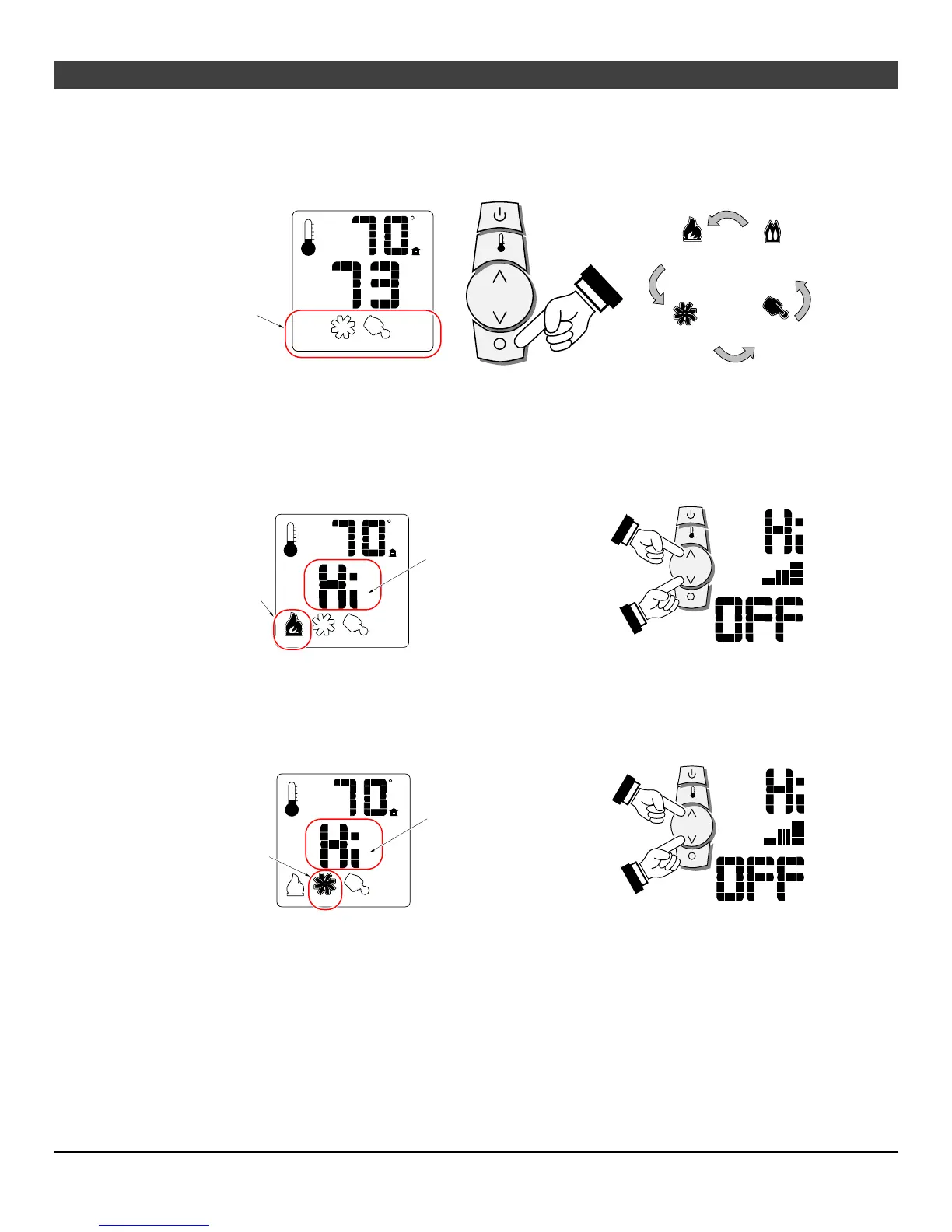
Use the mode button to cycle through the four mode controls (see Figure 9 below).
Flame
Height
OFF
F
AUXMAX
Look here for
mode controls.
Press the mode button to cycle through the mode settings.
AUX
Optional
Blower
Accent
Light
Comfort
Control
Figure 9
Flame Height
Flame height may be controlled using the up and down buttons when in Flame Height Mode (see Figure
10 below). The center display will display the 7 settings, from “OFF” to “HI” for full on.
NOTE: Flame height may not be adjusted if operating in Smart Thermostat setting.
OFF
F
AUXMAX
When in flame height
mode, this icon will
appear darkened.
MAX
This is the flame height read-
out. Use the up or down
buttons to adjust the flame
height (7 settings).
High
Medium
Off
Figure 10
Blower Speed
The blower may be controlled using the up and down buttons when in Blower Speed Mode (see Figure
11). The center display will display the 7 settings, from “OFF” to “HI” for full on.
OFF
F
AUX
MAX
When in blower
mode, this icon will
appear darkened.
This is the blower speed read-
out. Use the up or down
buttons to adjust the blower
speed (7 settings).
High
Medium
Off
Figure 11



 To Next Page