18
EN
minipool Phantom PR1
Use
SPECIAL FUNCTIONS
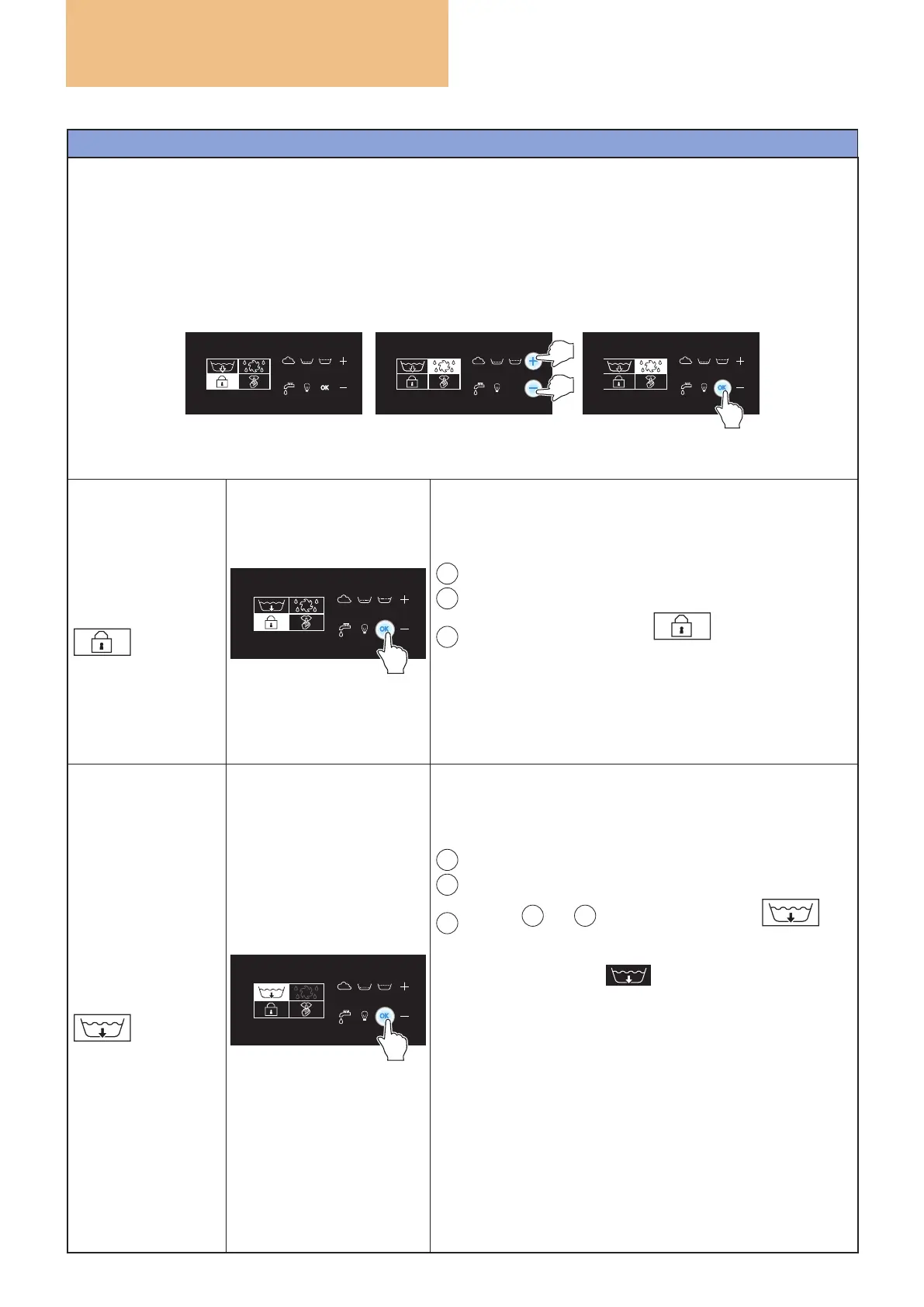
HOW TO SELECT THE SPECIAL FUNCTIONS
Pressing the "OK" key for more than three seconds accesses a submenu page on the display, where four more
special functions are available.
When accessing special functions, the "KEYPAD LOCK" icon is always lit by default.
To scroll through the various functions, press the "+" and "-" keys. When the icon of the desired function lights
up, press the "OK" key to activate it.
OK
After six seconds of inactivity the display exits the submenu and returns to showing the water temperature.
KEYPAD LOCK
Activation of this function will not allow the temperature set
point to be changed, while the whirlpool, blower and chro-
matherapy functions will remain active.
To activate it:
A
Press the "OK" key for at least three seconds.
B
This provides access to a submenu page.
C
The icon “KEYPAD LOCK”
is illuminated, press
the “OK” key to activate it.
When the function is activated, the display will show the word
"LOCK" for six seconds and then return to showing the water
temperature.
To disable the function, press the "OK" key again for three
seconds and then press the "KEYPAD LOCK" key again.
DRAIN
The emptying of the minipool can be activated at any time.
To activate it:
A
Press the "OK" key for at least three seconds.
B
this provides access to a submenu page.
C
use the
+
and
-
keys until the “DRAIN”
icon
is illuminated and press the “OK” key to activate it.
The display shows the
icon throughout the entire
emptying operation.
Emptying lasts 120 minutes and for the entire duration the
bathtub needs to be powered to allow it to completely drain
all residual water from the tank pipes and lter. During empty-
ing, the blower is automatically activated to drain the airpool
system pipes.
During
emptying of the minipool, the only enabled function is
chromatherapy.
To stop the emptying test, disconnect the power supply to
the bathtub for about 30 seconds.



 To Next Page