Access Point Setup
Wireless Screens
There are two (2) configuration screens available:
• Basic Settings
• Advanced
Basic Settings Screen
The settings on this screen must match the settings used by Wireless Stations.
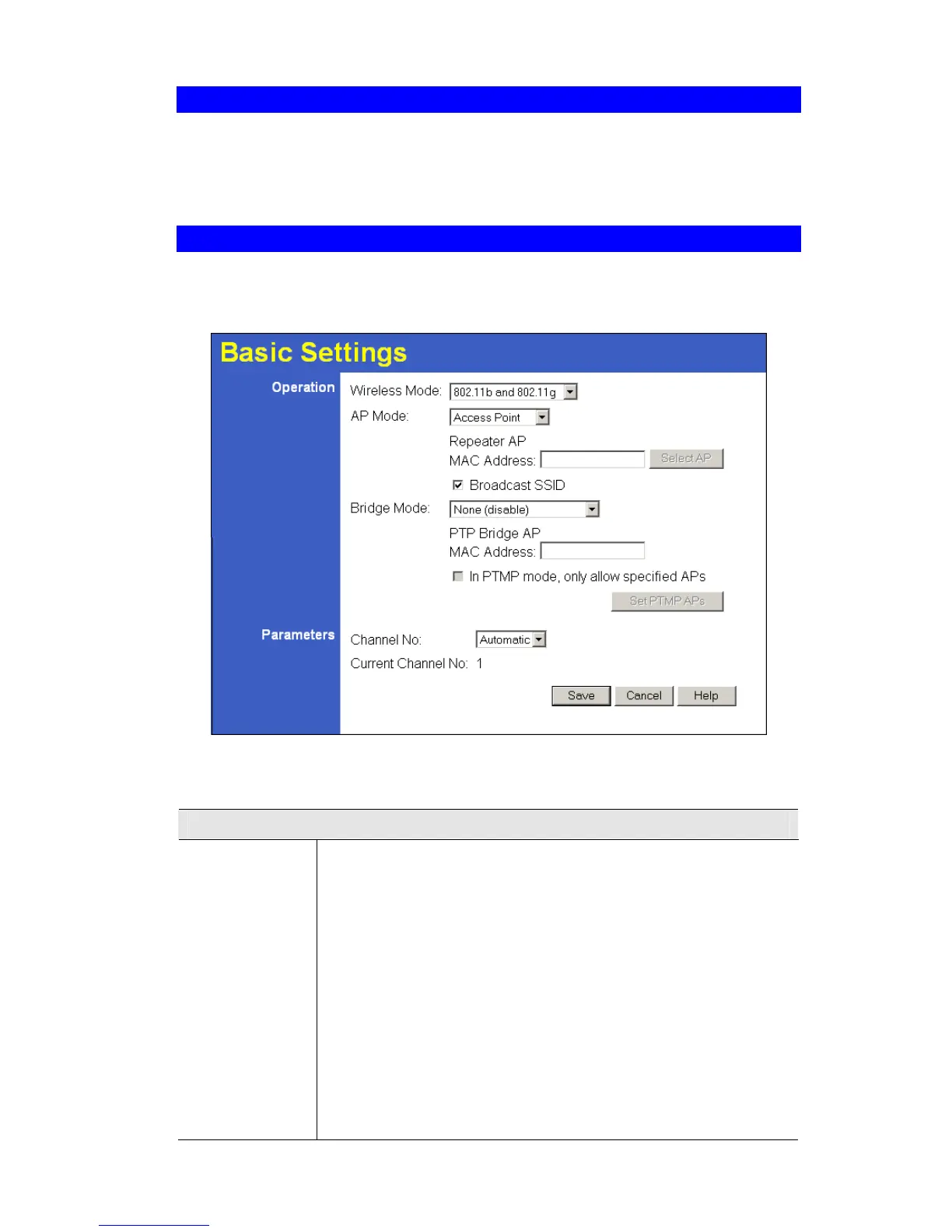
Click Basic on the menu to view a screen like the following.
Figure 21: Basic Settings Screen
Data - Basic Settings Screen
Operation
Wireless Mode
Select the desired option:
• Disable - select this if for some reason you do not this AP to
transmit or receive at all.
• 802.11b and 802.11g - this is the default, and will allow connec-
tions by both 802.11b and 802.1g wireless stations.
• 802.11b - if selected, only 802.11b connections are allowed.
802.11g wireless stations will only be able to connect if they are
fully backward-compatible with the 802.11b standard.
• 802.11g - only 802.11g connections are allowed. If you only have
802.11g, selecting this option may provide a performance im-
provement over using the default setting.
• Dynamic Super 802.11g (108Mbps) - This uses Packet Bursting,
FastFrame, Compression, and Channel Bonding (using 2 chan-
nels) to increase throughput. Only clients supporting the "Atheros
37











 To Next Page