EasyManua.ls Logo

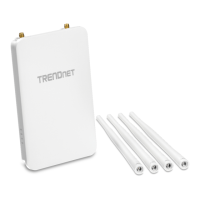
TRENDnet TEW-755AP - User Manual

TRENDnet TEW-755AP
44 pages
Print Icon
To Next Page IconTo Next Page
Loading...
TRENDnet User’s Guide
Cover Page

Other manuals for TRENDnet TEW-755AP

Question and Answer IconNeed help?

Do you have a question about the TRENDnet TEW-755AP and is the answer not in the manual?

Summary

Product Overview

Getting Started

Connect Wireless Devices

Guides users on connecting wireless devices to the network.

Improve Wireless Connectivity

Initial Configuration

Access Management Page

Guides on accessing the web-based management interface.

Set Computer IP Address

Specifies computer IP/subnet for accessing the access point.

Setup Wizard and Software Utility

Setup Wizard

Guides through initial setup and password changes.

Wireless Networking and Security

Choosing Wireless Security

Discusses different wireless security types and their benefits.

Device Settings Configuration

Details configuration options for device settings like IP, SSID, and security.

Wireless Encryption Types

Secure Wireless Network

WEP Setup

Guides on setting up WEP wireless security.

WPA Security Options

WPA;WPA2 Personal Modes

Details configuration for WPA/WPA2 personal modes.

WPS Connection

Advanced Configuration

Accessing Management Page

Reiterates how to access the management interface.

Operating Modes

Access Point Mode Settings

Basic Wireless Settings

Covers basic wireless network settings for 2.4GHz.

2.4 GHz Wireless Modes

Explains 802.11 modes like B/G/N mixed, N only.

Wireless MAC Filtering

Client Bridge Mode Settings

Basic Settings

Basic wireless network settings for Client Bridge mode.

WDS Setup

WDS Link Details

Wireless Profile Management

Repeater Mode Settings

Basic Repeater Settings

Basic settings and scanning for repeater mode.

Advanced Wireless Settings

Client Limit Configuration

Band Steering Configuration

IP Address Configuration

Spanning Tree Configuration

Maintenance and Monitoring

Reset to Factory Defaults

Resets the access point to its original factory settings.

Backup and Restore Configuration

Backs up and restores device configuration settings.

Restart Access Point

Restarts the access point for troubleshooting.

Firmware Upgrade

Logging and Diagnostics

Connectivity Testing

Performs ping and traceroute tests for diagnostics.

Software Controller Utility

Controller Device Management

Controller Firmware Upgrade

Initiates firmware upgrades using the controller.

Troubleshooting Common Issues

Management Page Access Problems

Resolves issues with accessing the router's management interface.

Summary

Product Overview

Getting Started

Connect Wireless Devices

Guides users on connecting wireless devices to the network.

Improve Wireless Connectivity

Initial Configuration

Access Management Page

Guides on accessing the web-based management interface.

Set Computer IP Address

Specifies computer IP/subnet for accessing the access point.

Setup Wizard and Software Utility

Setup Wizard

Guides through initial setup and password changes.

Wireless Networking and Security

Choosing Wireless Security

Discusses different wireless security types and their benefits.

Device Settings Configuration

Details configuration options for device settings like IP, SSID, and security.

Wireless Encryption Types

Secure Wireless Network

WEP Setup

Guides on setting up WEP wireless security.

WPA Security Options

WPA;WPA2 Personal Modes

Details configuration for WPA/WPA2 personal modes.

WPS Connection

Advanced Configuration

Accessing Management Page

Reiterates how to access the management interface.

Operating Modes

Access Point Mode Settings

Basic Wireless Settings

Covers basic wireless network settings for 2.4GHz.

2.4 GHz Wireless Modes

Explains 802.11 modes like B/G/N mixed, N only.

Wireless MAC Filtering

Client Bridge Mode Settings

Basic Settings

Basic wireless network settings for Client Bridge mode.

WDS Setup

WDS Link Details

Wireless Profile Management

Repeater Mode Settings

Basic Repeater Settings

Basic settings and scanning for repeater mode.

Advanced Wireless Settings

Client Limit Configuration

Band Steering Configuration

IP Address Configuration

Spanning Tree Configuration

Maintenance and Monitoring

Reset to Factory Defaults

Resets the access point to its original factory settings.

Backup and Restore Configuration

Backs up and restores device configuration settings.

Restart Access Point

Restarts the access point for troubleshooting.

Firmware Upgrade

Logging and Diagnostics

Connectivity Testing

Performs ping and traceroute tests for diagnostics.

Software Controller Utility

Controller Device Management

Controller Firmware Upgrade

Initiates firmware upgrades using the controller.

Troubleshooting Common Issues

Management Page Access Problems

Resolves issues with accessing the router's management interface.

TRENDnet TEW-755AP Specifications

General IconGeneral
BrandTRENDnet
ModelTEW-755AP
CategoryWireless Access Point
LanguageEnglish

Related product manuals