Page 27
NETWORKLANSETTING
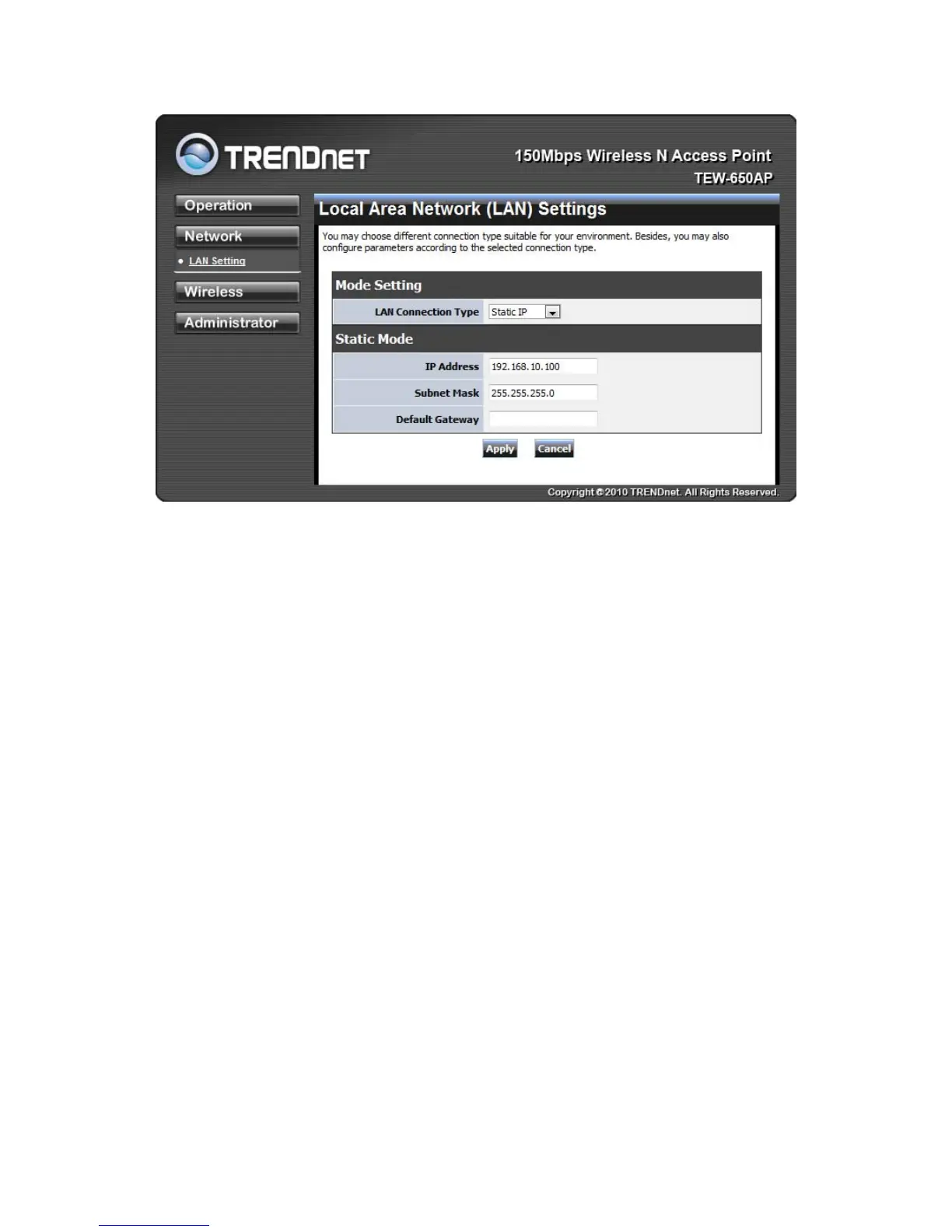
These are the settings of the LAN (Local Area Network) interface for the Access Point. The Access Point's
local network (LAN) settings are configured based on the IP Address and Subnet Mask assigned in this
section. The IP address is also used to access this Web-based management interface.
LANConnectionType
Choose "Static IP (fixed IP)" if your router does not support DHCP or if for any other reason you need
to assign a fixed address to the AP. In this case, you must also configure the following fields.
IP Address
The IP address of the AP on the local area network. Assign any unused IP address in the range of
IP addresses available for the LAN. For example, 192.168.10.100.
Subnet Mask
The subnet mask of the local area network.
Default Gateway
The IP address of the router on the local area network.
Choose “DHCP (Auto Config)” if your router supports DHCP and you want the router to assign an IP
address to the AP.
WIRELESS
The wireless section is used to configure the wireless settings for your Access Point. Note that changes
made in this section may also need to be duplicated on wireless clients that you want to connect to your
wireless network.
To protect your privacy, use the wireless security mode to configure the wireless security features.













 To Next Page