43
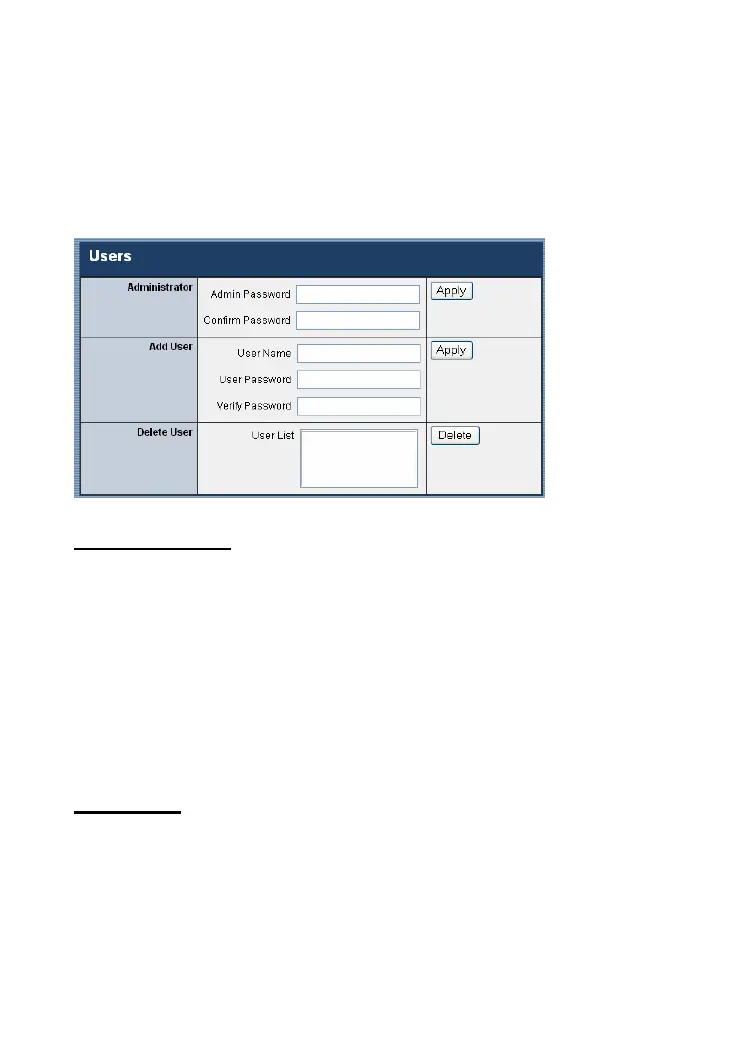
Users
The Users window contains commands that allow the system
administrator to assign legal users who are permitted to monitor
the camera from the remote site.
Administrator
Enter the password in the Admin Password box, enter the same
password in the Confirm Password box to confirm the password,
and then click Apply.
The default setting for Admin is blank space. For security
purposes, you are strongly recommended to set the Admin
Password (a maximum of 16 characters) as soon as possible to
enable security function for the camera.
Add User
- User Name: Enter the user name in this field (a maximum of
32 characters, printable ASCII code).
A maximum of 32 users names are allowed; however, each
users name must be different. Each user name can be used as










 To Next Page