51
Tools
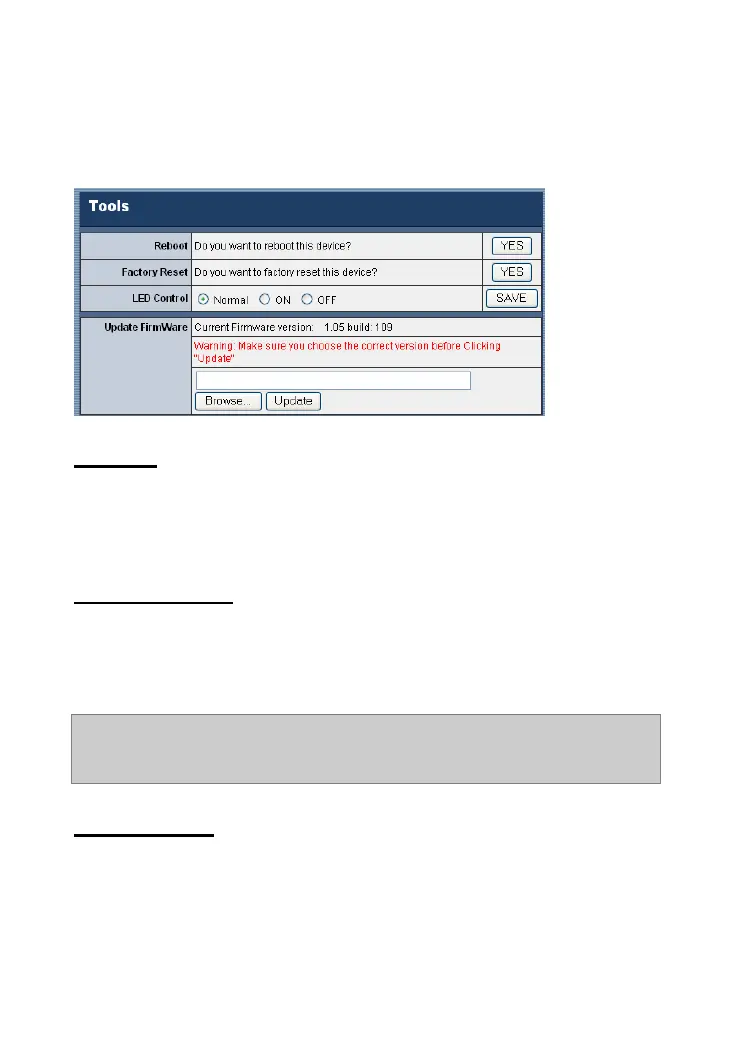
The Tools window contains commands for restarting the camera
and upgrading firmware.
Reboot
Do you really want to reboot this device? Click YES from this
option, and you can restart the camera just like turning the device
off and on and saved settings are retained.
Factory Reset
Do you really want to factory reset this device? Click YES from
this option, and you can resume all factory default settings for the
camera.
NOTE: You have to configure the network settings again after a Factory
Reset.
LED Control
The LED control allows user to setup the LED illumination as
desired. This feature provides the flexibility when surveillance
activity is ON. There are three options: Normal, ON, and OFF.










 To Next Page