EN
22
4.1.4 Motor setting
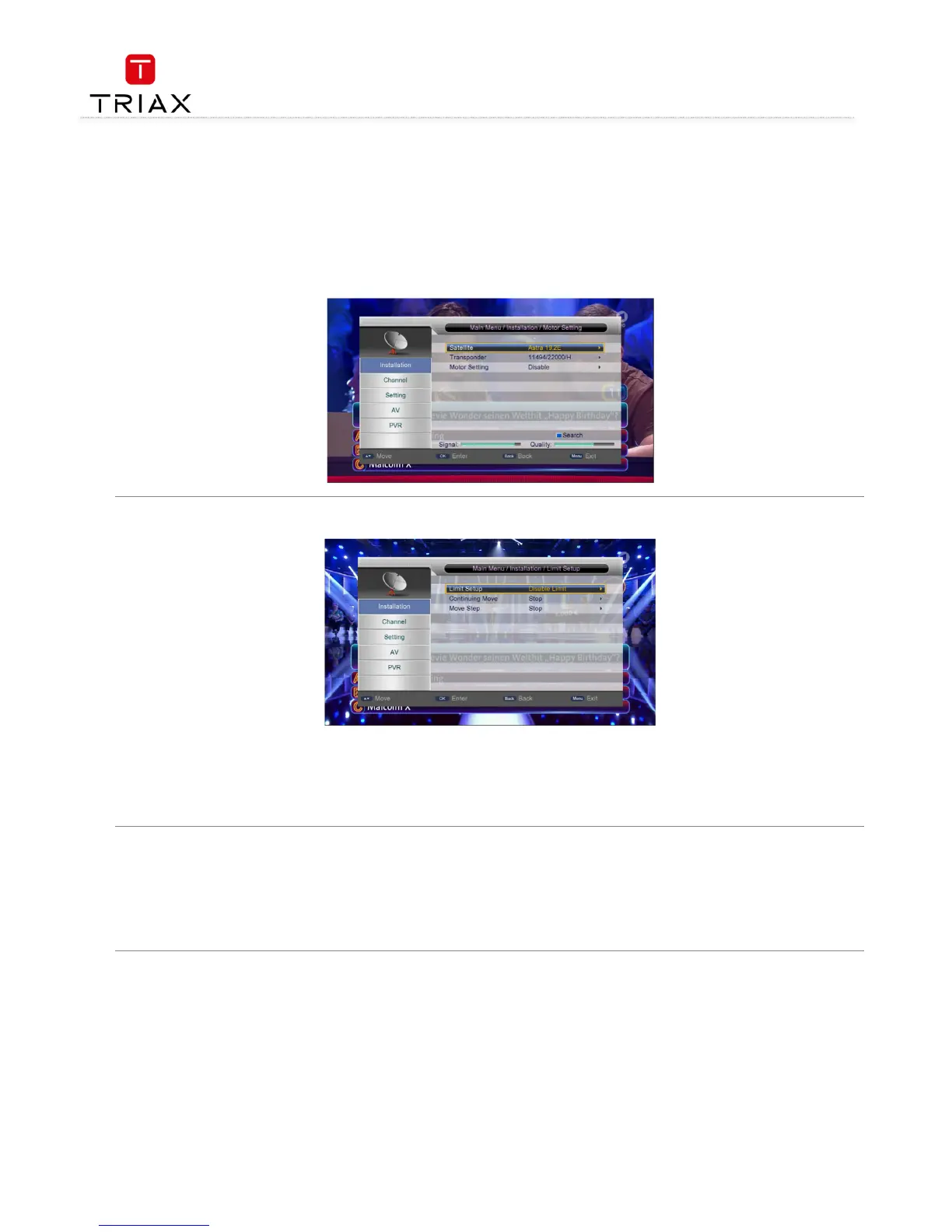
Through the Motor Setting page you can control the polar axis motor to adjust the direction of antenna so as to make the antenna accurately
point to the satellite. There are these setting items in this page (see Fejl! Henvisningskilde ikke fundet.
Fejl! Henvisningskilde ikke fundet.Fejl! Henvisningskilde ikke fundet.
Fejl! Henvisningskilde ikke fundet.):
• Satellite:
Satellite:Satellite:
Satellite: Select a satellite.
• Transponder:
Transponder:Transponder:
Transponder: Select a transponder.
• Motor setting:
Motor setting:Motor setting:
Motor setting: Set the polar axis motor.
If you have already selected a satellite and a transponder, when moving the polar axis you will find the signal strength and quality indicators at
the bottom of the page..
4.1.5 Limit setup
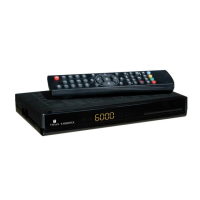
There are three sub items:
• Limit Setup:
Limit Setup:Limit Setup:
Limit Setup: Polar axis move limit setting.
• Continuing Move:
Continuing Move:Continuing Move:
Continuing Move: Enable polar axis continuous move.
• Move Step:
Move Step:Move Step:
Move Step: Enable polar axis step move. After setting, you can press V+/
V+/V+/
V+/-
--
- keys to move the polar axis east or west step by step.
• Press MENU
MENUMENU
MENU key to enter the Main Menu and then directly press OK
OKOK
OK key. Key in a correct four-digit password (default password: 0000)
in the pop-up dialog to enter the Installation menu.
• Enter the Satellite List item. If there are satellites, press CH+/
CH+/CH+/
CH+/-
--
- keys and OK
OKOK
OK key to select a satellite. Before the selected satellite name,
a green check mark appears. Press the blue function key to pop out the Search menu and then press OK
OKOK
OK key with default settings. The
system will then start to auto scan.


 To Next Page