EN
30
4.4.2 Parental lock
The Parental Lock item is to set a program lock in order to protect children from watching some improper programs to their ages.
After highlighting the Parental Lock item in the Setting menu press OK
OKOK
OK key, and a password input dialog will appear. Input a correct password
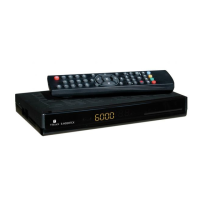
(default: 0000) to enter the Parental Lock menu. See the figure below:
There are three menu items:
•
System Lock:
System Lock:System Lock:
System Lock: Turn on or off the parental lock function.
•
Parental Rating:
Parental Rating:Parental Rating:
Parental Rating: Set rating from 4 ages to 18 ages. If set as 0, no limit.
•
Change Pin Code:
Change Pin Code:Change Pin Code:
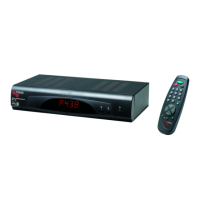
Change Pin Code: Change the password of the parental lock. When this item gets the highlight, press OK
OKOK
OK key to call out the
Change Pin Code dialog.
See the figure below:
In this dialog, enter the correct old password first and then give a new password twice. Thus the
password is changed completely.
Through the Local Time Setting item you can set the system time and time zone. To enter the Local Time Setting menu, highlight the Date Time
item in the Setting menu and then press OK
OKOK
OK key.


 To Next Page