15
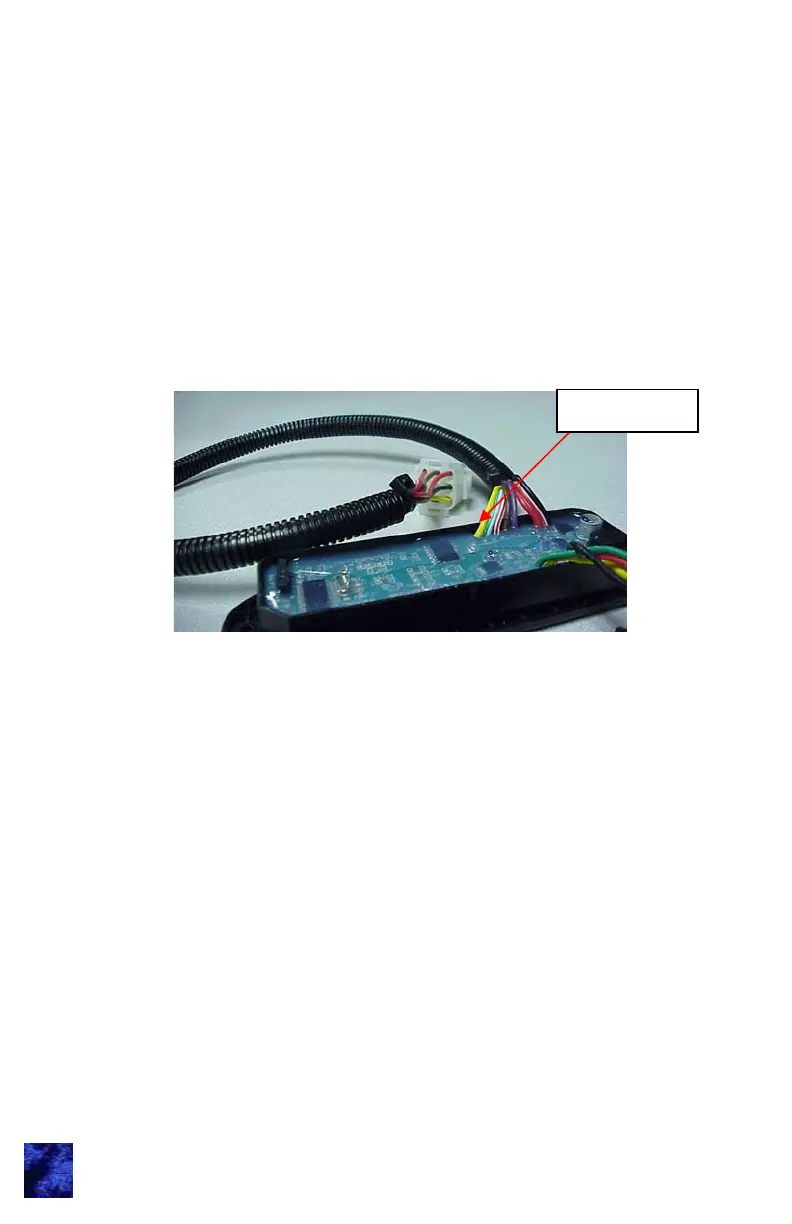
Setting CAN Keypad Function Instance (location):
The following procedure sets the keypad’s CAN address and
identifies the keypad’s location within the vehicle. Each keypad
installed in a vehicle must have a unique location. The default
function instance is 0. The procedure for assigning keypad function
instance follows:
1. Ground the learn mode input (yellow wire). AMP connector
housing location 9 or loose. The buzzer will sound for 3
seconds and the keypad backlights will flash continuously ½
second on, ½ second off (note: backlighting can only be seen
when dark). Double beeps are provided upon any button press
while in learn mode.
2. Press and hold the (1 / 2) (1) button for 5 seconds. The
keypad will sound a beep.
3. Next press button to indicate which function instance this
keypad should be assigned:
4. Single beep sounds to confirm function instance change. Then
number of beeps are played indicating which function instance
is stored. E.g. 1 beep for function instance 0, 2 beeps for
function instance 1...5 beeps for function instance 4.
5. The keypad then resets out of learn mode. The CAN address
will be claimed with the new function instance.
Learn Input
(1 / 2) (1) = function instance 0 = Driver’s side
(3 / 4) (2) = function instance 1 = Passenger’s side
(5 / 6) (3) = function instance 2 = 3rd keypad
(7 / 8) (4) = function instance 3 = 4th keypad
(9 / 0) (DB) = function instance 4 = 5th keypad
Note: This step must be completed within 10 seconds.



 To Next Page