2
Battery Wire Connection
When connecting the battery, pay attention to polarity. Incorrect connection will
damage the ESC and battery.
Connect the positive (+) wire to the positive (+) battery port. Connect the
negative (-) wire to the negative (-) battery port.
Motor Wire Connection
1. Sensored Mode
With a sensored brushless motor, connect the three A/B/C ESC wires to the
corresponding A/B/C motor wires. Do not change the wire sequence. Motor
rotation reversal can only be accomplished via programming. Connect the
sensor wire to the “Sensor” port on the ESC.
2. Sensorless Mode
With a sensorlesss brushless motor, connect the A/B/C wires to the motor
wires interchangeably. If the motor runs opposite the desired direction, swap
any two wire connections to reverse the rotation.
Receiver Wire Connection
The signal wire supplies 6.0V from the ESC to the receiver, servo, etc. There is no
need to connect an additional battery.
NOTICE: Connecting additional external battery power to the receiver may
damage the ESC.
ESC Negative (-) wire RX-
ESC Positive (+) wire RX+6.0V
ESC Signal ( ) wire RX Signal
Connect
Power On/Off ESC
1. Press the power button to power ON the ESC. The LEDs will light.
2. Press and hold the power button to power OFF the ESC. The LEDs will turn off.
NOTICE: Put the throttle trigger in neutral, within 10%, otherwise the ESC will
not power OFF.
Power On and Calibrate
LED Indicator Status
During normal operation:
Throttle Position Blue LED Red LED
Neutral Blinking OFF
Full Throttle ON ON
Full Brake OFF ON
The red LED glows solid when the power button is pressed.
IMPORTANT: When the throttle is increased from the neutral position to full
throttle, the blue LED will flash. The frequency of the flash increases as the
throttle increases.
Error Indications:
• When the red LED flashes once every second, the voltage is abnormal.
• When the red LED flashes twice every second, the ESC is in thermal (over-
heat) protection mode.
• When the RED LED alternates between a single and double flash every
second, both the voltage and temperature are abnormal.
IMPORTANT: The red LED will not give any voltage or temperature indications
if no throttle signal is detected.
• When the blue LED flashes twice every two seconds, the ESC is in throttle
protection mode; either there is no throttle signal from the receiver or the
throttle is not in the neutral position.
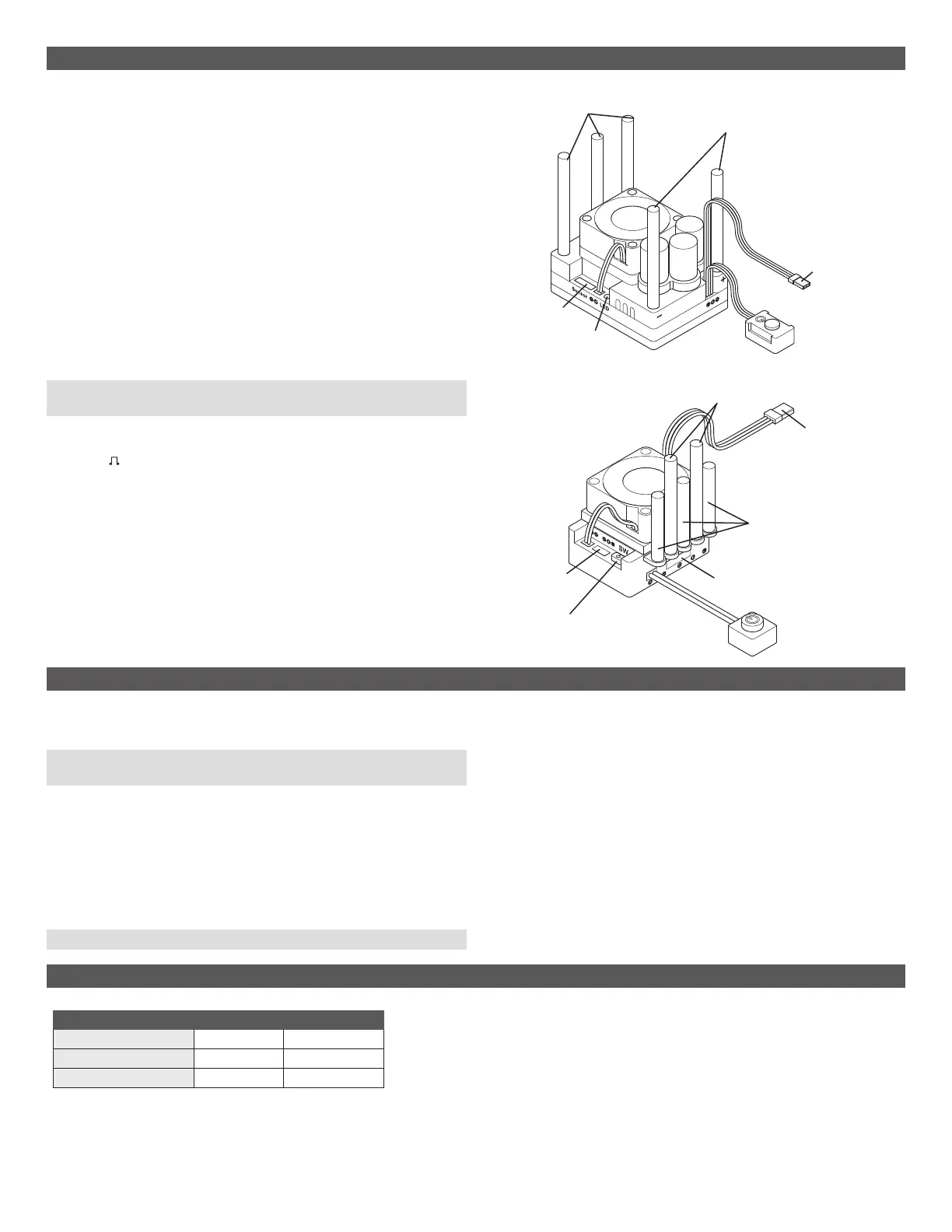
Motor Wires
Receiver Wire
Battery Wires
Power Switch
Sensor Port
LED
Throttle Calibration
1. Connect the ESC with the battery and receiver.
2. Power ON the transmitter.
3. Press and hold the power button until the blue LED turns solid. The motor
emits a long beep. Release the power button. The red LED turns solid, and
the ESC enters calibration mode.
4. Pull the throttle trigger to full throttle. The blue LED blinks three times, and
the motor beeps once indicating the full throttle position is saved.
NOTICE: Do not move the throttle when the blue LED is blinking.
5. Push the throttle trigger to the full brake position. The blue LED blinks three
times, and the motor beeps twice indicating the full brake position is saved.
6. Release the throttle trigger to neutral. The blue LED blinks three times, and
the motor beeps three times indicating throttle calibration is complete.
The ESC supports reverse throttle calibration.
You do not need to restart the ESC after throttle calibration is complete.
MX8 Wire Connection
Power Switch
Receiver Wire
Power Switch / LED
Battery Wires
Motor Wires
Wireless
Port
Sensor Port
MX10 Wire Connection



 To Next Page