3
ESC Modes
High Voltage Protection
High voltage protection guards against too high a voltage at the ESC startup.
When high voltage is detected at startup and the voltage protection is not set
to OFF, maximum throttle output is limited to less than 50%. If high voltage
protection is triggered, restart the ESC with a fresh battery to reset.
Low Voltage Protection
If the supplied voltage to the ESC drops and stays below the value set in the
programming, low voltage protection is triggered. The red LED flashes once
every second, and the throttle is limited to less than 50%. Once triggered, restart
the ESC with a fresh battery to reset.
Thermal Protection Mode
Thermal protection mode is triggered when the temperature of the ESC exceeds
the temperature value entered in the programming. The red LED flashes twice
every second, and the throttle output is limited to less than 50%. Thermal
protection is dismissed when the ESC temperature drops to 65°C.
Throttle Protection Mode
Throttle protection mode, indicated by the blue LED flashing twice every two
seconds, is activated by the following situations:
• The throttle is not in the neutral position when the ESC is powered on.
• No throttle signal is present. If the throttle signal is lost during operation,
the ESC will not power the motor until the throttle signal is restored.
Sensored and Sensorless Modes
Sensored mode is automatically activated when a sensor cable is connected and
a hall sensor signal is detected from the motor.
Sensorless mode is activated when no sensor cable is present and/or no hall
sensor signal is detected. Timing, Boost, and Turbo functions are not available
when sensorless mode is active.
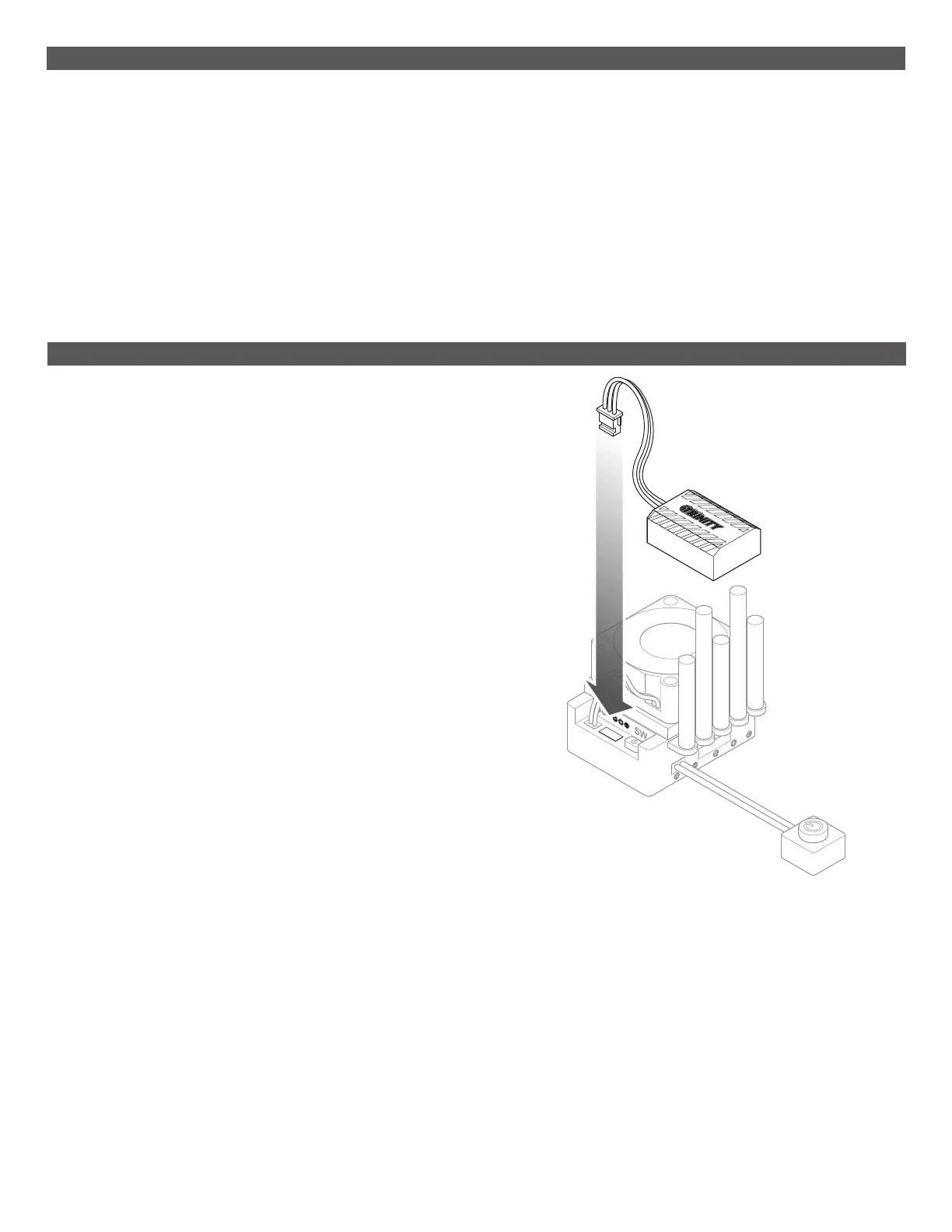
MX10 Pro Gen2 ESC Wireless Module Connection
For programming, the MX10 Pro Gen2 ESC requires connection to the MX10 Pro
Wireless module (TEP0015), sold separately.
To connect the wireless module:
1. Plug the wireless module into the port between the fan connection and the
power switch.
IMPORTANT: Verify correct polarity, taking care with the pins when plugging
the module into the port.
2. If you’d like, use foam tape to secure the wireless module to the vehicle.



 To Next Page