User’s Manual – Conventional Mode
114
Repetition Shots
A repetition "shot" consists of one or more sets. A set consists of four
individual shots; direct and reverse shots to a backsight and a
foresight. The result of a repetition shot is to store the foresight point
using average coordinate values that are computed from all the shots
taken.
Repetition shots can be performed with a variety of options. This
section explains how to perform a repetition shot and the different
options available.
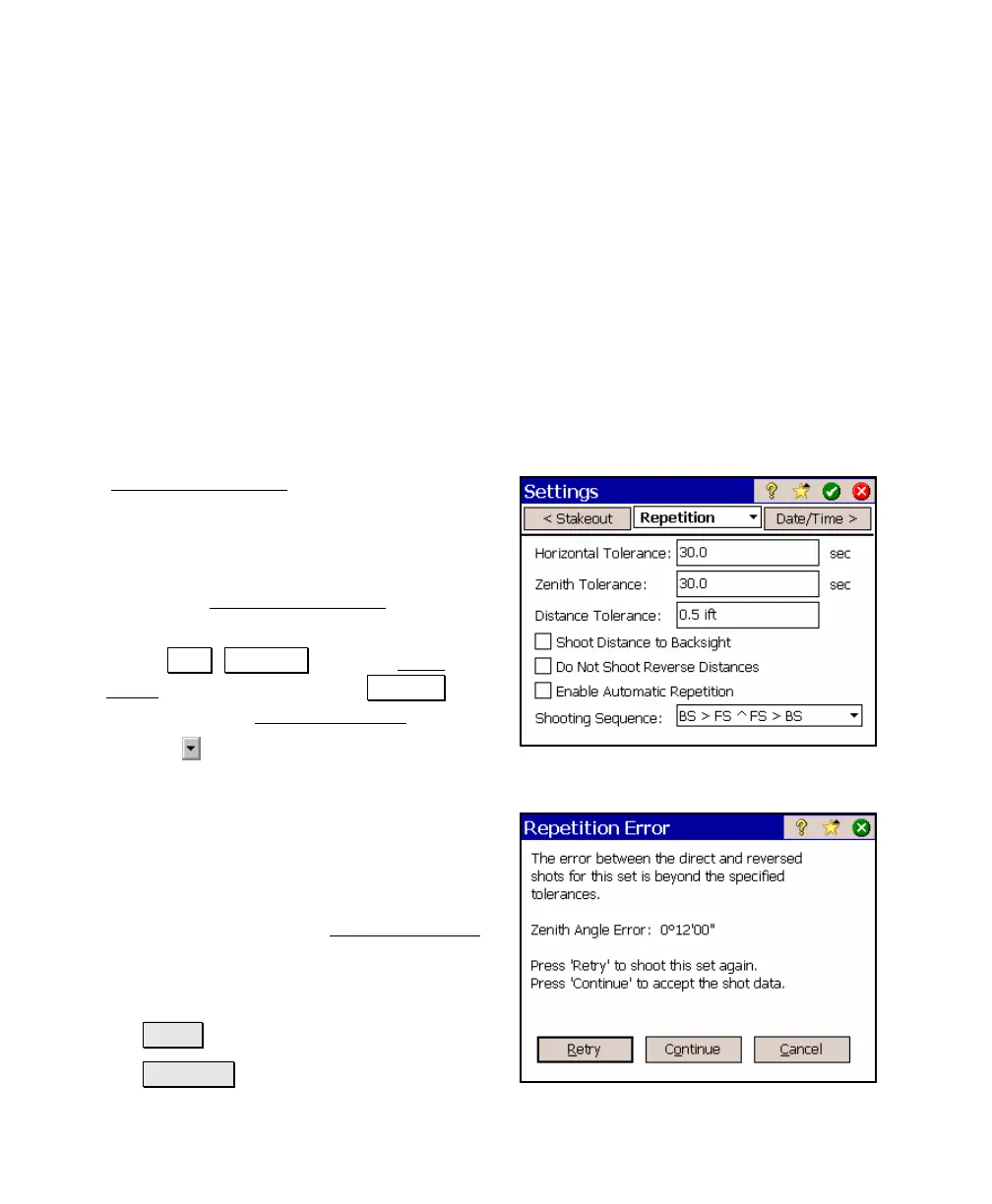
Repetition Settings Screen
The Repetition Settings screen is used to define
the method that you will use when performing
repetition shots. It includes acceptable
tolerance values between the direct and
reverse shots for each set and the desired shot
sequence. The Repetition Settings must be set
before you start taking shots.
1. Select .Job , Settings from the Main
Menu. (You can also tap the Settings
button from the Repetition Shots screen.)
2. Tap the
button to drop down the list of
available screens and then tap Repetition.
3. Set the Horizontal, Zenith, and Distance
Tolerances in the appropriate fields. The
direct shots for each set are compared to
the corresponding reverse shots. If any of
the angles or distances exceeds the
specified tolerances, the Repetition Error
dialog box, shown here, will open that asks
what you want to do. You have the
following choices:
• Retry : Re-shoot only the last set.
• Continue : Continue and use the shot



 To Next Page