User’s Manual – Conventional Mode
80
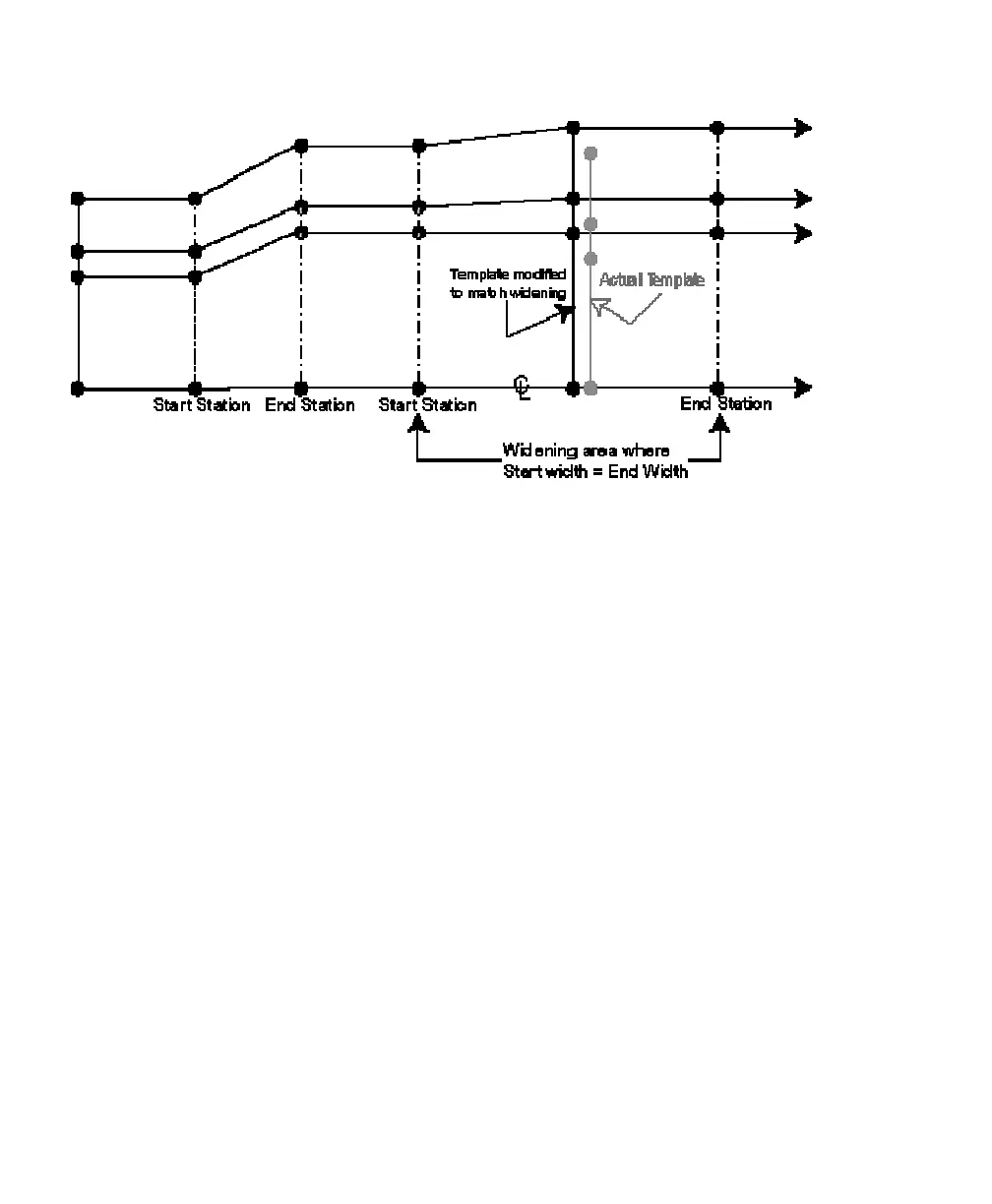
Figure 5 Template Inserted Into A Widening Area
Figure Descriptions
Figure 1 shows an overhead view of a simple transition from one
template to another. Notice the linear transition of one template
segment end node to the next.
Figure 2 shows an overhead view of a basic template to widening
transition. The widening’s first segment width for the start station
must match the first segment width of the previous template.
Figure 3 shows a transition from a widening to a template. This
example shows that a widening basically defines a new template that
has a modified first segment. The modified template (widening) will
transition to the next template down the road.
Figure 4 shows the same concept as Figure 3 except another widening
is used instead of a template.
Figure 5 depicts how a template can be inserted inside a widening
definition. The widening will take precedence over the first segment
so the first segment will maintain the length as defined in the
widening definition. However, the segments outside of the first
segment now take on the shape of the inserted template. The figure
shows a widening where the start width is the same as the end width
but having the widening use the same start and end width is not
required. The first segment of the template will be adjusted to match



 To Next Page