31
2. Web Configuration Interface
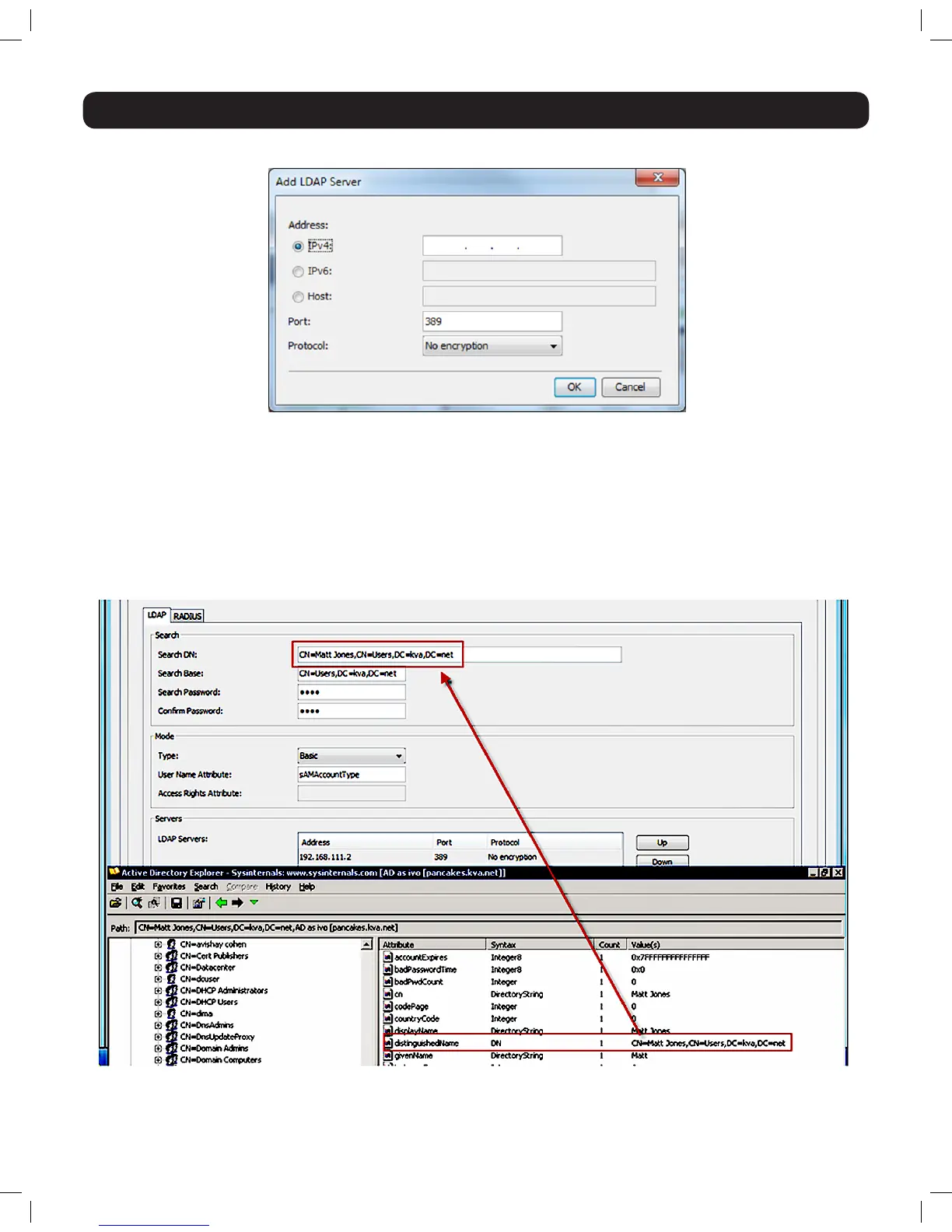
• To add an LDAP/S server to the list, click on the Add button to bring up the Add LDAP Server screen.
• Enter the IPv4, IPv6, or Host address for your LDAP/S server in the corresponding field.
• Select the Port number that is used by the server. The default port number is 389 for LDAP/TLS servers and 636 for LDAPS servers.
• Selectfromoneofthreeencryptionmethodstouse:No encryption, SSL, or TLS extension.
• Click the OK button to add the server to the list.
• Servers can be edited or deleted by highlighting them in the list and clicking on Edit or Delete. They can be re-ordered according to their
priority by highlighting them and clicking on Up or Down to move them in the list.
Search – The SearchsectioniswhereyousettheaccountDNthatisusedtoquerytheLDAP/Sserver,andwhereinthedirectorytosearch
during authentication. Reference the following screenshots and descriptions of the Search fields when adding this information.
• Search DN – The Search DNeldshouldbepopulatedwiththevalueoftheDistinguishedNameattributefortheuseraccountthatis
beingusedtoquerytheActiveDirectory.
14-03-051 93-32D5.indd 31 3/14/2014 9:52:32 AM


 To Next Page
 Loading...