51
5. Serial Port Pinout
Note: When connecting a Cisco device, use Cisco rolled cable.
SerialPort1:
Pin1:RTS
Pin2:DTR
Pin3:TX
Pin4:GND
Pin5:GND
Pin6:RX
Pin7:DSR(pins7andpin2areshortedinsidetheunit)
Pin8:CTS
SerialPort2:
Pin1:RTS
Pin2:DTR
Pin3:TX
Pin4:GND
Pin5:GND
Pin6:RX
Pin7:DSR
Pin8:CTS
6. Security Certificate Installation
WhenremotelyloggingintotheKVM,youmaygetsecuritywarningsfromyourWebbrowserand/orJavapop-upstatingthattheconnection
tothewebsitecannotbetrusted.ThisoccursbecausetheKVM’ssecuritycerticateisnotamongthebrowserand/orJavacontrolpanel’s
list of trusted certificates. To add the certificate to the list of trusted certificates, follow the steps in this section. Once installed, the security
warning will no longer appear. Note: If the IP address of the KVM switch is changed, you will need to reinstall the security certificate.
Browser Security
ThefollowingstepsapplytoInternetExplorer9,butmayalsobeusedwithotherWebbrowsers.Note: You may need to run Internet Explorer
as an Administrator to install the security certificate.
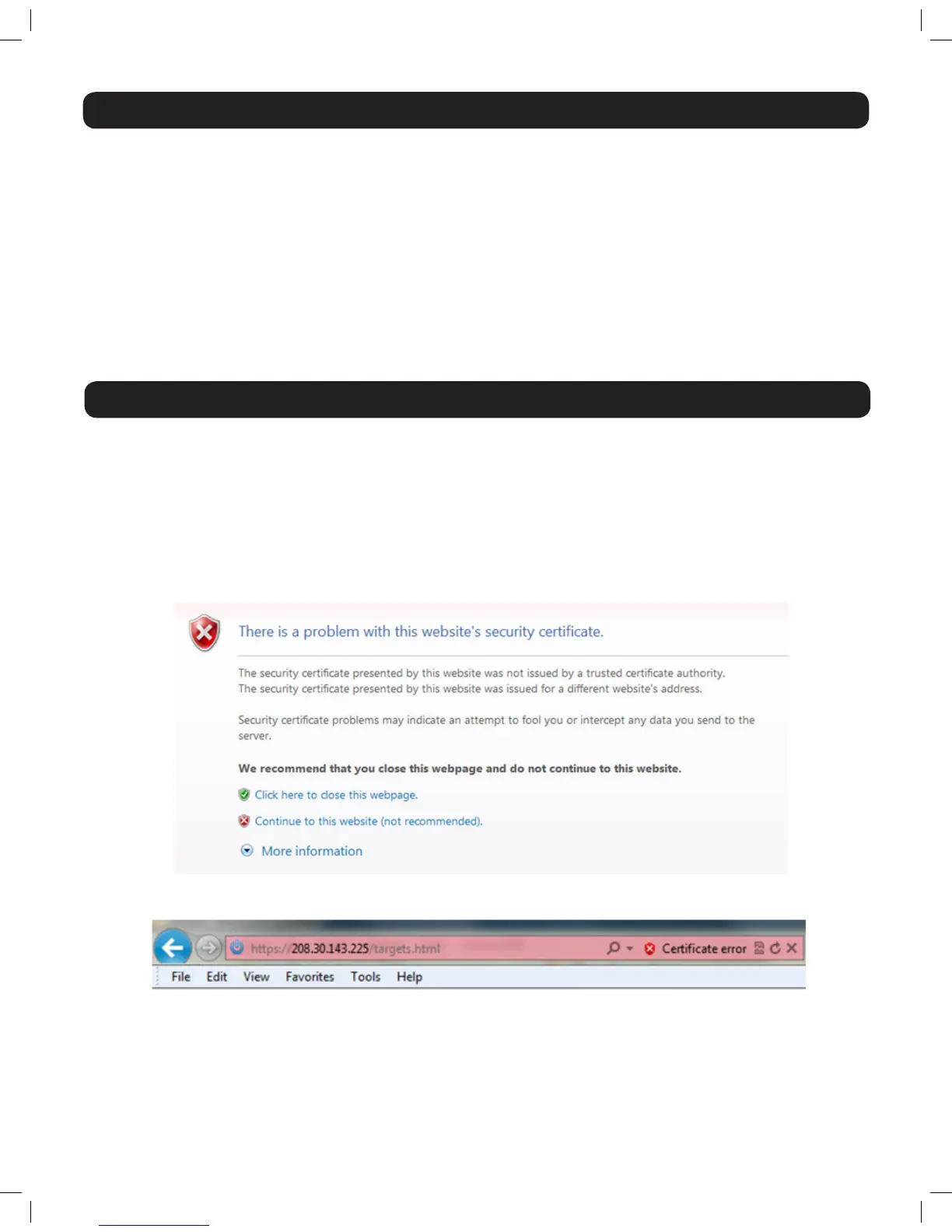
1. UponloggingintotheKVM,ascreenwillappearstatingthatthereisaproblemwiththewebsite’ssecuritycerticate.ClickonContinue
to this website (not recommended).
2. A URL bar will appear with a Certificate error message.
14-03-051 93-32D5.indd 51 3/14/2014 9:52:43 AM


 To Next Page
 Loading...