11
Basic Operation continued
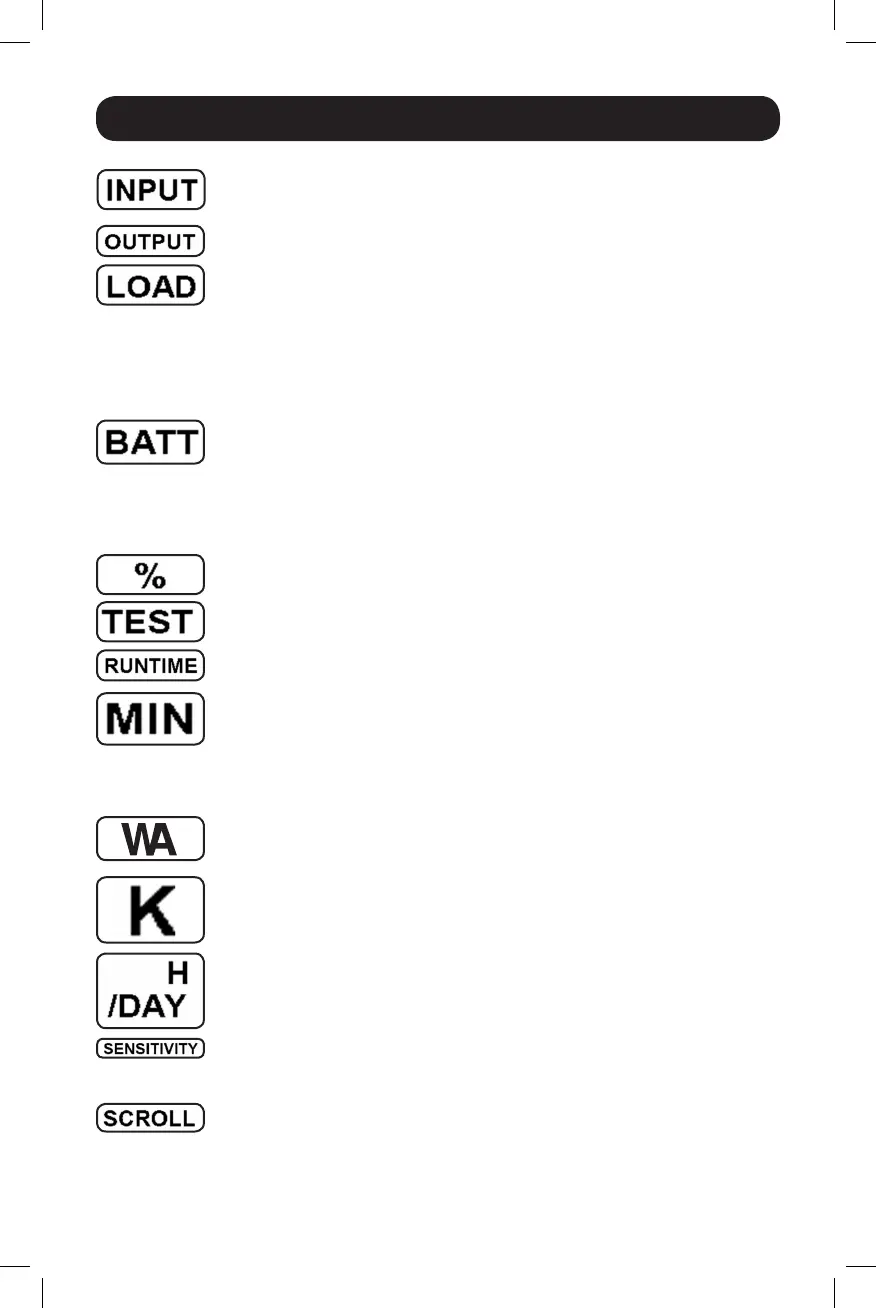
INPUT Icon: Indicatesthatthe3-digitvaluedisplayedistheInputVoltage.
OUTPUT Icon: Indicatesthatthe3-digitvaluedisplayedistheOutputVoltage.
LOAD Icon:Displayedintwomodes:
1.Displayedinconjunctionwiththe%iconand3-digitvaluetoindicatethe
load percentage.
2.DisplayedinconjunctionwithKWH/Dayand3-digitvaluetoindicatedaily
power consumption.
3.BoththeLOADiconandWarningiconwillflashtoindicateanoverload.
BATT Icon: Displayedintwomodes:
1.BATTicon(displayedinconjunctionwith%iconand3-digitvalue)indicates
theBatteryCapacity%.
2.BATTiconisshownwithTESTicontoindicateselftestmodeorcontrol
mode.
% Icon:Indicatesunitsof%.
TEST Icon:DisplayedinconjunctionwithBATTicontoindicatethattheUPSis
performingaself-test.
RUNTIME Icon:DisplayedinconjunctionwiththeMINiconand3-digitvalueto
indicate Runtime in minutes.
MIN Icon:Indicatesunitsofminutes.
1.DisplayedinconjunctionwithRUNTIMEiconand3-digitvaluetoindicate
battery runtime in minutes.
2.Displayedinconjunctionwiththe3-digitvalue(reporting“LCD”)toindicate
the minimum brightness.
VWA Icon: ThisisamultipurposeiconwhichindicatesunitsofVolts,VA,Watts,
orAmps(V,VA,W,orAwillbeshown).
K Icon: DisplayedinconjunctionwiththeWtoindicateKilowatts.Itisalso
usedinconjunctionwiththeWHand/DAYiconstoindicateKilowattHoursper
Day.
H and /DAY Icons:Displayedinconjunctionwith“K”and“W”iconstoindicate
KilowattHoursperday(KWH/DAY).
Sensitivity Icon: DisplayedtosettheACinputlinesensitivitysetting.
Sensitivitysettingsavailableare100%(highsensitivity),50%(medium
sensitivity),and25%(lowsensitivity).
SCROLL Icon:Whenenabled,thedisplaywillautomaticallycyclethrougheach
DISPLAYmodeoftheLCDoncepertwo-secondinterval.Ifabuttonispressed
while Scroll Mode is enabled, the scroll function will pause for 10 seconds to
allow the user to manually make menu selections before resuming scroll.
14-03-028-93-3088.indb 11 3/20/2014 4:08:45 PM




 To Next Page