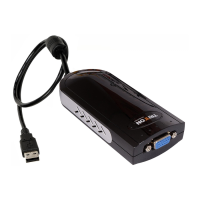
Need help?
Do you have a question about the Tritton TRI-UV150 and is the answer not in the manual?
Guides the user through installing the device driver software for Windows 2000/XP.
Guides the user through installing the device driver software for Windows Vista.
Configures the connected monitor as the primary display, switching the main adapter to secondary.
Sets the adapter to extend the primary desktop, allowing for a larger display area.
Replicates the primary display's content onto the secondary monitor, requiring matching resolutions.
Disables the SEE2 UV150 adapter on the system, turning off its functionality.
Allows changing the orientation (0, 90, 180, 270 degrees) of the secondary display.
Allows setting up hotkey shortcuts for moving windows between displays and managing screen configurations.
Displays numbers on monitors to help identify each one in the system for correct configuration.
 General
| Interface | USB |
|---|---|
| Frequency | 50/60 Hz |
| Cable Length | 1.5m |
| Input Voltage | 5V |
| Output Voltage | 5V |

 To Next Page