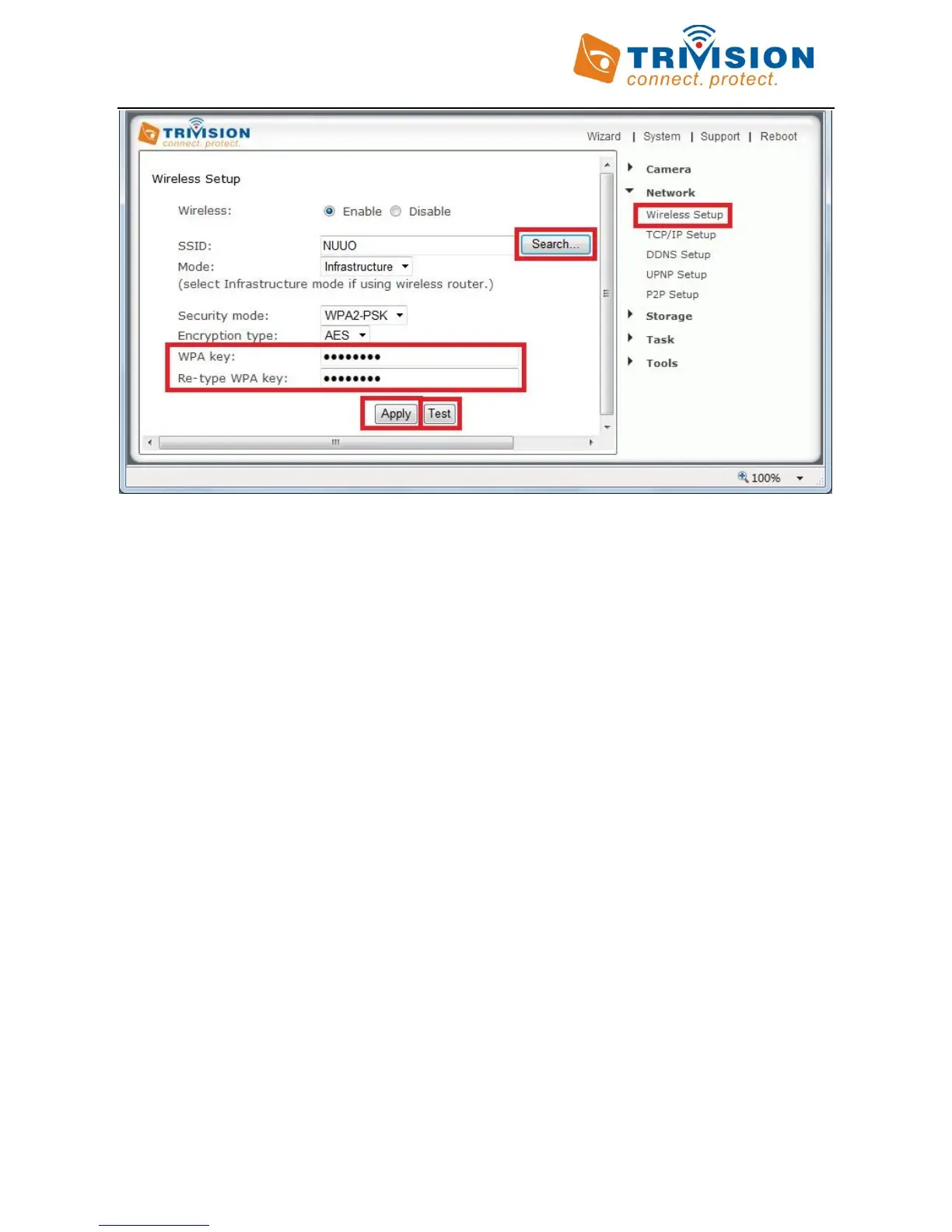
Please remember that both WPA and WPA2 keys are case sensitive and need to be between 8 and 63 characters.
When you have entered the key, click on “Apply”, you’ll get a message about “Wireless setup accepted
successfully”, but that only means that the information was stored in the camera. Now you should use the “Test”
feature to check if you typed it correctly.
If the test reports “Success!” you can remove the network cable and it should work wireless after a short delay. If
the test reports “no wireless connection”, please double check your WPA key (password” and refer both to the
Wi-Fi troubleshooting and “Known issues” section of this User Guide.
Congratulations! At this point you should be able to use your camera wired or wireless on your local network using
the same local IP address.
If it doesn’t connect, we recommend that you temporarily remove wireless security from your router for a quick
experiment to see if the setup succeeds with no passwords. Then put the password back in and try again. Many
times this will refresh your memory about the exact spelling of your password.
Also, it could be either that the camera is too closer to or too far from your router, or that your router was set up
with the tightest possible security which allows only known devices to connect to your network. In this case, do
not forget to add the MAC address of this camera to your allowed list. In this context, MAC refers to a hardware
network address and is unrelated to Macintosh computers. The Mac address is printed on the back of the camera.
During setup it is best to have the camera at least a couple of feet away from the antenna of the wireless router.
The maximum distance is dependent on the kinds of walls and objects that are between your wireless router
antenna and your camera.



 To Next Page