11
ASSEMBLY STEPS
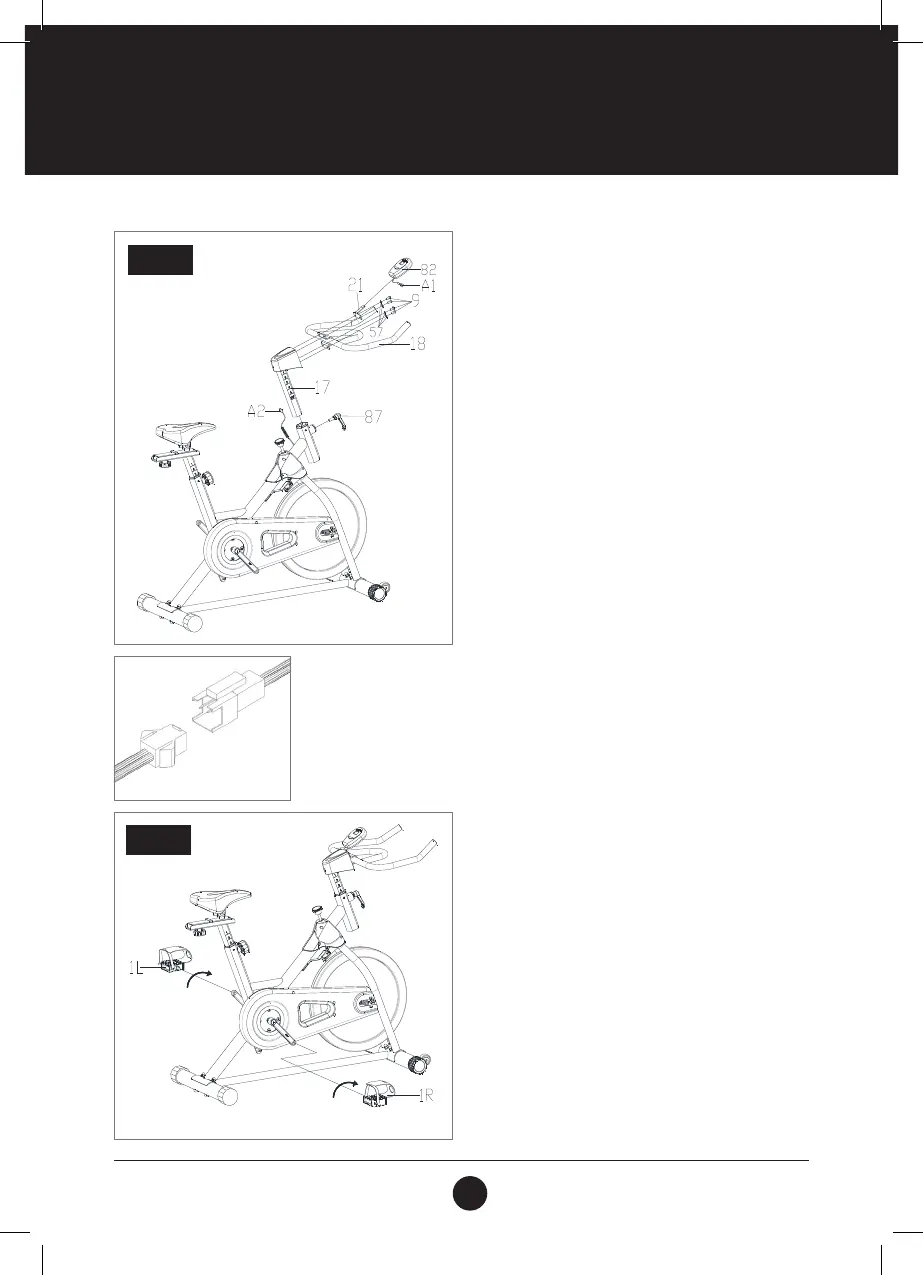
STEP 3: HANDLEBAR AND
HANDLEBAR POST
Insert the Handlebar Post (17) into the handlebar post
tube of the main frame. You will have to slacken the
Knob (87) and pull the Knob back. Then select the
desired height. Release the Knob and retighten it.
The Handlebar (18) and the Computer Holder (21) are
xed on the Handlebar Post (17) with four sets of the
Bolt (9) and the Elastic Washer (57).
The Computer (82) is xed on the Computer Holder (21).
ATTENTION: CONNECT THE COMPUTER LINE,
TO GAP (A1) CORRESPONDING
TO THE CONVEX POINT (A2)
TO INSERT LINK
STEP 4: PEDAL ASSEMBLY
The Pedals (1L & R) are marked “L” and “R” - Left and
Right. Connect them to their appropriate crank arms.
The right crank arm is on the right- hand side of the
cycle as you sit on it.
Note: The Right pedal should be threaded on
clockwise and the Left pedal anticlockwise.
STEP 3
STEP 4


 To Next Page