TR-36RBF INSTALL GUIDE
07/28/2021 Page 27 of 48TEC_TM_151 | REV. A | EN
CABINET SETUP
ICE TROUBLESHOOTING
Please see the table below to troubleshoot some common problems with ice production. If your issue is not
resolved, please contact True Residential Service at 844-746-9423 or TrueResidentialService@TrueMfg.com.
Icemaker Troubleshooting
No ice
• Verify the water filter is installed
• Verify water is being supplied to the unit
• Verify the icemaker is on and has been running for at least 24 hours
• Verify the ice bin is positioned correctly
• Verify the freezer temperature is near 0°
• Verify the water filter has been replaced within the last 12 months and
has been installed correctly
Black flecks in the
ice cubes
Stop use and contact True Residential Technical Service
Bad taste
• Defrost the freezer and clean with soap and water
• Place coee grounds or charcoal briquettes in the freezer to absorb
odor
Hollow cubes
Clean the condenser coil. Contact True Residential Customer Service if
the issue is unresolved.
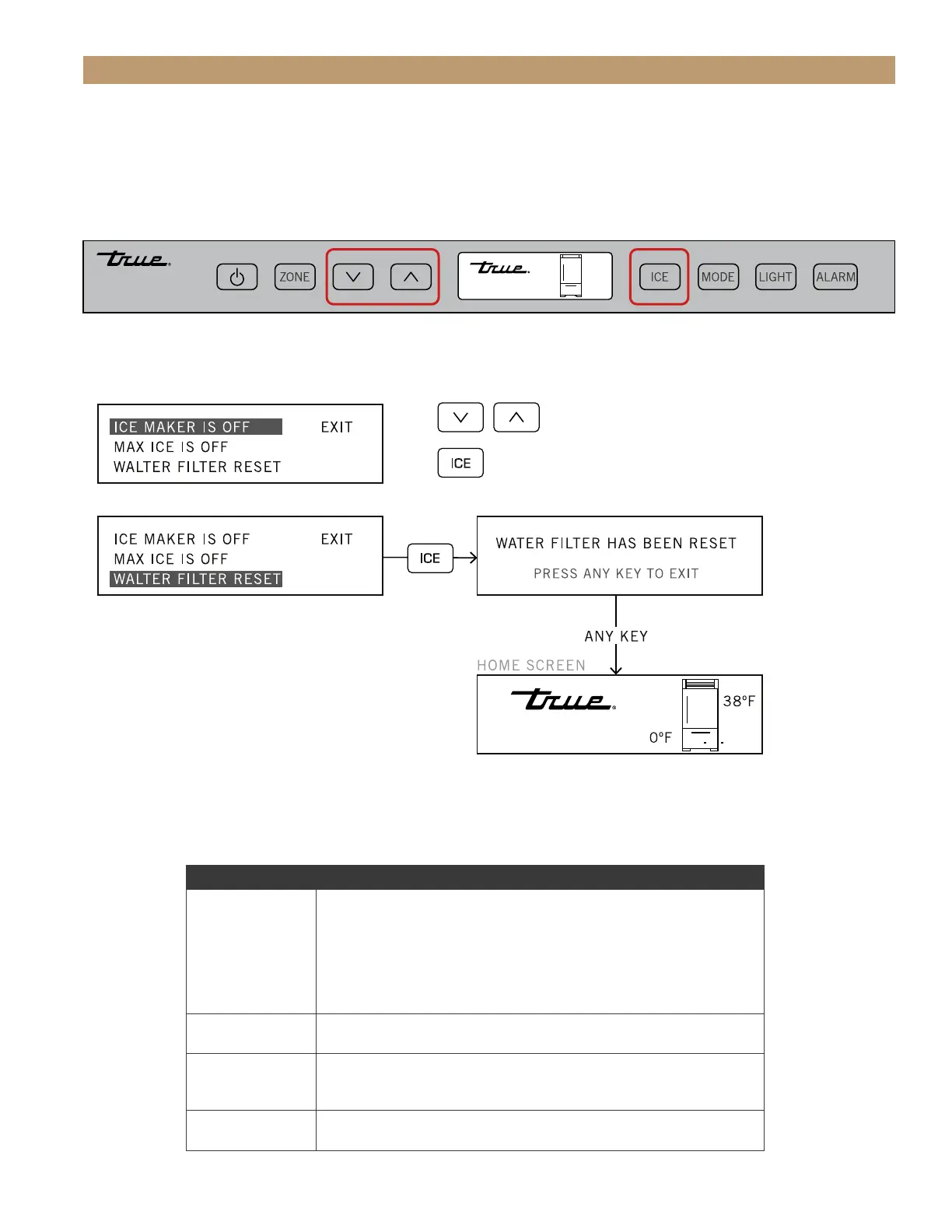
ICE MENU NAVIGATION
To enter the Ice Menu, press ICE button on the user interface. Use the UP and DOWN arrows to navigate
between the menu options and use ICE button to make a selection. See the diagram below. For more detail,
please see “Ice Menu Navigation” (page 27 or 31).
• Unless otherwise stated, the shown button commands are “press and release”.
• Shutting the door exits the menu to the Home screen.
To change selection (dark highlight/white text)
To toggle ICE MAKER and MAX ICE between ON and OFF
Return to home if EXIT is highlighted
38º F
0º F




 To Next Page