TRUE RESIDENTIAL
®
TEC_TM_151 | REV. A | EN07/28/2021Page 30 of 48
38º F
0º F
ELECTRONIC CONTROL OPERATION
SET POINT MENU
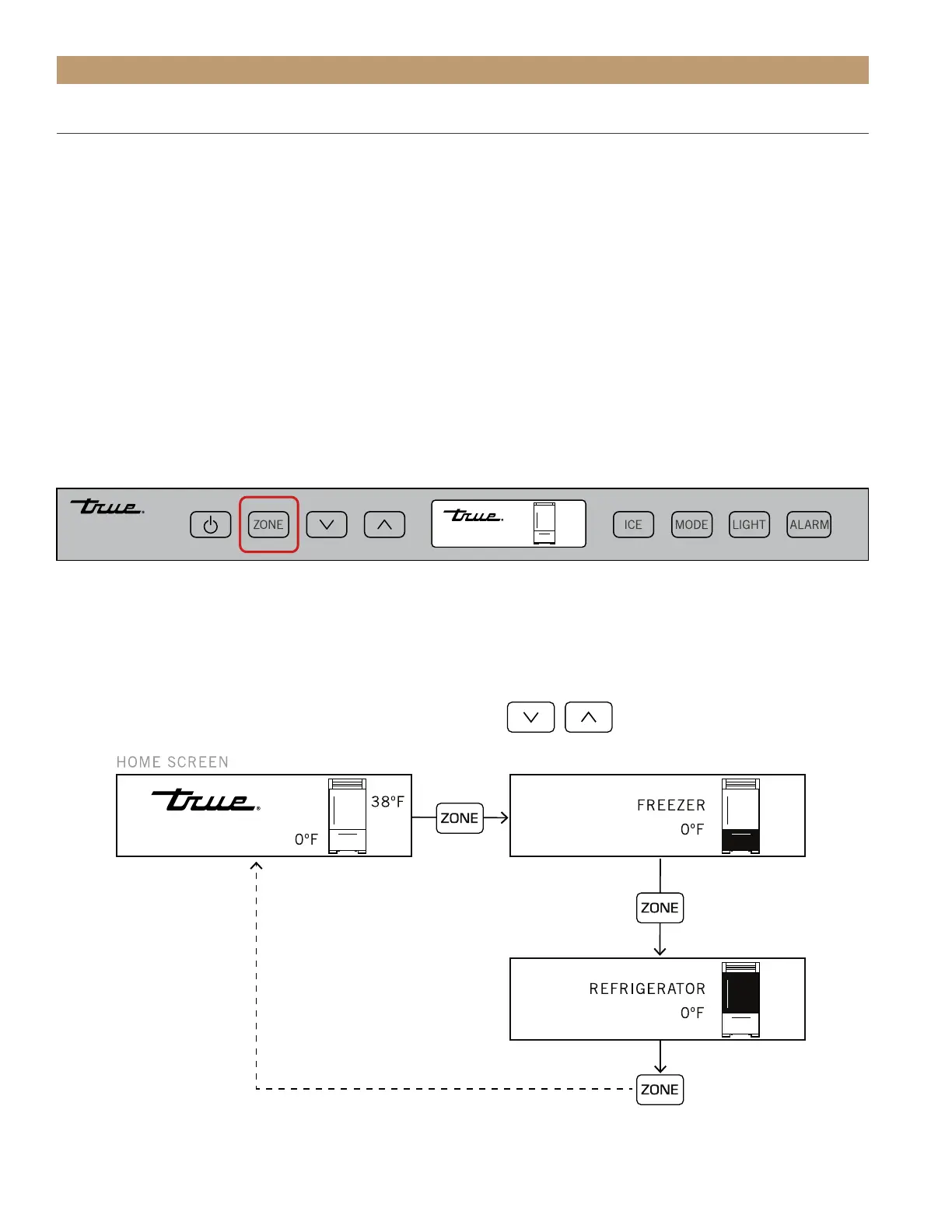
To adjust set points, please see the information and diagram below.
• Press the ZONE button until the display shows the appropriate compartment.
• With the DOWN or UP arrows, select the desired set point. NOTE: Each button press adjusts the set point by
one (1) degree and is accompanied by an audible beep.
• When the desired set-point is reached, press the ZONE button until the display shows the home screen.
PLEASE NOTE:
• The temperature range in a freezer zone is -4°F(-20°C) to 4°F (-16°C).
• The temperature range in a refrigerator zone is 32°F (0°C) to 42°F (6°C).
• Initial factory set-points are 0°F (-18°C) in a freezer zone and 38°F (3°C) in a refrigerator zone.
• The initial stroke of the up or down key will change the previous set-point by one degree.
• Unless otherwise stated, the shown button commands are “press and release”.
• Shutting the door exits the menu to the Home screen.
To change the set point




 To Next Page