4
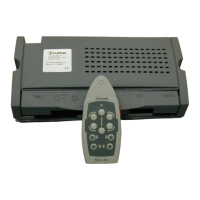
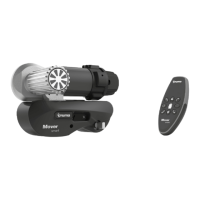
Remote Control
a = On / Off slide switch
❙ On (green LED illuminates)
Off (green LED goes off)
b = Caravan forwards
(both wheels rotate in forwards
direction)
c = Caravan reverse
(both wheels rotate in reverse
direction)
d = Caravan right forwards
(left wheel rotates in forwards
direction)
e = Caravan left forwards
(right wheel rotates in forwards
direction)
f = Caravan right reverse
(left wheel rotates in reverse direction)
g = Caravan left reverse
(right wheel rotates in reverse
direction)
Fig. 1
The caravan can be turned in a circle on the spot without
moving forward:
d + g = Turn caravan to the right
(left wheel rotates forwards + right wheel rotates
backwards)
e + f = Turn caravan to the left
(left wheel rotates backwards + right wheel rotates
forwards)
The remote control automatically switches itself off after ap-
prox. 2 minutes if no button is pressed, or after 7 minutes if
one of the movement buttons is held down. The green LED
goes off.
To reactivate the remote control, move slide switch to “Off”
and then back to “On”
❙ after approximately 1 second.
There is no “On / Off” switch on the caravan to be operated.
Remote control LED flash codes and acoustic
signal
LED “On” and no acoustic signal
System is ready for operation
LED “Off” and no acoustic signal
System off (check remote control batteries if necessary)
LED “flashes” in combination with acoustic signal:
– for approx. 5 seconds after switching the remote control on,
until the system is ready for operation.
– for approx. 10 seconds after switching the remote control
on, then it is switched off again – unable to establish radio
link to controller.
– every 3 seconds if the caravan battery has a low charge
(finish manoeuvring as quickly as possible and charge
battery).
– 5 times a second (5 Hz) if the caravan battery voltage is low.
No manoeuvring is possible until the battery voltage is above
11 V again (e.g. by means of recovery / battery charging).
– approx. 2 times per second with overcurrent / overtempera-
ture (2 Hz). Switch remote control off and on again (wait for
cooling down if necessary in the event of overtemperature).
Changing the batteries in the remote control
Please be sure to use leak-proof micro -
batteries only, type LR 03, AAA, AM 4,
MN 2400 (1.5 V).
When fitting new batteries it must be
ensured that the polarity is correct!
Dead and used batteries may leak
and damage the remote control!
Remove the batteries if the remote control
is not going to be used for an extended period.
Fig. 2
No claims under guarantee will be considered for
damage caused by leaking batteries.
Before throwing away a defective remote control, it is essen-
tial that the batteries are removed and disposed of in a proper
manner.
Manoeuvring the caravan
Please read the “Safety instructions” before using
the Caravan Mover®!
With the caravan uncoupled (apply handbrake), engage the
drive rollers to the tyres using the provided lever. Swivel the
lever as far as it will go without using excessive force. The
drive unit securely engages in the end position.
Before operating the Caravan Mover®, release the
handbrake.
Move slide switch (a) on remote control to the “On” ❙ position
– green LED flashes for 5 seconds in combination with the
acoustic alarm until the control unit is ready for operation.
The six direction buttons provide movement in six directions
–forward, reverse, left forward, left reverse, right forward,
right reverse.
The “left forward” (e) and “right reverse” (f) or “right forward”(d)
and “left reverse” (g) buttons can also be pressed simultaneously
in order to turn the caravan in a circle on the spot without mov-
ing it forwards.
The soft start / stop facility means that the caravan starts
without jerking and is gently braked when stopping.
If the buttons are released or the radio signal is interfered
with or becomes too weak, the caravan stops. Your
Caravan Mover® cannot be activated by radio devices or other
Mover® remote controls.
After starting up, the Caravan Mover® moves at a uniform
speed. The speed will increase slightly when going downhill
and decrease slightly when going uphill.
Move slide switch on remote control to the “Off”
position
to switch the remote control and the Caravan Mover® off.
The slide switch also acts as an “Emergency stop”
switch.
After manoeuvring, first apply the handbrake and then dis-
engage the drive rollers away from the tyres.
Operating instructions


 To Next Page