5
Coupling to a towing vehicle
It is possible to position the caravan’s coupling to a stationary
car tow ball using the Caravan Mover®, but take some care.
Use the instructions above as your guide. Use the button con-
trols to move the caravan to the car (car handbrake “ON”, and
car in gear). Use a button stabbing technique to position the
coupling exactly above the ball. Lower the coupling onto the
ball and engage in the normal way using the jockey wheel.
Prepare the caravan for towing as usual. The caravan must
not be towed with the drive rollers engaged.
Maintenance
Please do not allow the drive units to become soiled with
coarse road material. When you are cleaning the caravan,
spray the Caravan Mover® with a water hose to dissolve mud
etc. Please ensure that no stones, twigs or the like become
trapped in the equipment. The control unit does not require
maintenance. Please keep the remote control in a dry place.
Every year (and / or before putting away for the winter), clean
Caravan Mover® as described, dry and lightly spray the drive
unit guides with oil spray or a similar water-repelling lubricant.
Do not put lubricant on the rollers or the tyres! Engage
and disengage the drive units several times to allow the lubri-
cant to penetrate all the guides. Do not park the caravan with
the drive rollers engaged.
To prevent the battery from becoming totally discharged dur-
ing long periods of inactivity it must be disconnected and
recharged before using again. Charge the caravan battery
before starting up.
It is extremely easy for you or your caravan dealer to perform
the checking and maintenance of your Caravan Mover® dur-
ing the annual inspection of your caravan. If in doubt, please
contact the Truma Services (see Truma Service Booklet or
www.truma.com).
Checks
– Check the installation, wiring and connections for damage
at regular intervals. The drive units must be able to move
freely and be returned automatically to the safe idle posi-
tion by the return spring when they are disengaged. If this
is not the case, examine drive units for soiling or corrosion
at the guides and clean if necessary. Undo all moving parts
as required and oil or spray with a lubricant such as WD40
to ensure that the equipment moves correctly and provides
the full range of movement.
– After the annual inspection, check whether all motors react
properly to the buttons on the remote control.
– At least every 2 years, an expert must check the
Caravan Mover® for rust, check that detachable parts
are firmly attached and check that all safety-related
parts are in good working order.
Troubleshooting
Before calling customer service, please check the following:
Are the batteries in the remote control in good condition?
Is the caravan battery in good condition and fully charged?
Please note that battery performance can deteriorate rapidly
at cold ambient temperatures.
Perform a reset by briefly disconnecting the battery (for
approx. 10 seconds).
If the fault cannot be remedied, please contact your dealer or
the Truma Service department (see www.truma.com).
Synchronising the electronic control unit with
the radioremote control
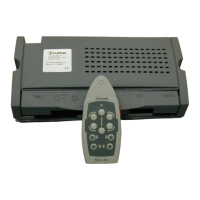
The remote control and the control unit are synchronised
with each other in the factory.
If the control unit or the remote control is replaced, they must
be re-synchronised as described below.
Check the installation in accordance with the installation in-
structions and ensure that the drive rollers are not applied.
Check that the battery is properly connected, check the condi-
tion of the battery and that a voltage of 12 V is present at the
control unit.
Press the reset button (k) on the control unit and hold down
(red LED (j) flashes slowly), and after approx. 5 seconds the
LED (j) starts to flash rapidly. Then release the reset button
and press and hold down the caravan reverse button on the
remote control (c) within 10 seconds, simultaneously switch-
ing on the remote control using the slide switch (a).
a
c
j
k
Fig. 3
The remote control and the control unit are synchronised with
each other. After successful synchronisation, the red LED
flashes rapidly.


 To Next Page