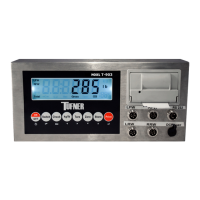
The T903 Portable Static Weighing Indicator is designed for static axle scales, capable of connecting to 1, 2, 3, 4, 5, or 6 weighing pads to weigh trucks. It supports both manual and automatic weighing modes, offering normal and accumulative weighing to meet diverse requirements.
Function Description
The device features an LCD display (136mm x 36.5mm) that shows real-time weight data from the weighing pads. It can display the unit in KG or LB, which is adjustable via a key on the instrument. Additionally, it shows the percentage of each pad's weight relative to the total weight. Other functions include tare, zero, print, save, check, and delete.
The indicator is powered by a 7.4V/4400mAh battery, rechargeable with an 8.4V/1A adapter. It includes a built-in thermal printer with multiple printing formats and an RS232 interface for computer connection. The integrated calendar allows for easy checking of date and time. The device is designed for easy operation, high precision, and good application.
Important Technical Specifications
- Sensitivity: 0.5µV/d
- Input voltage: -30mV to 30mV
- Accuracy class: III
- Initial zero range: ±10% Max
- Manually zero range: ±2δ Max
- Zero Range: 100% Max
- Zero Tracking: 0.5 l/s
- Excitation circuit: VDC, 6-wire connection, maximum connect 24 load cells of 350Ω
- AC power: 100-240VAC, 50/60HZ
- Operation temperature humidity: -10°C to +40°C, ≤90%RH
- Storage temperature: -10°C to +40°C
- Records: 560 records in indicator, Max. recording is 2000 cps.
- PCB version: HE-1.0A
- Software version: SE-1.00
- RS232 parameters: 9600Bit/S Baud rate, 8 digits, no check point, 1 stop.
Usage Features
Keypad Functions:
- ON/OFF: Press for 2 seconds to power on or off.
- Switch: Toggles display between pad weight and total weight. In calibration, it's used to enter the F1-F5 menu.
- Check: Displays saved weight data for printing. In calibration, it's used to navigate.
- Print: Prints weighing data when stable. In calibration, it's used to navigate.
- Store: In accumulative weighing mode, accumulates axle weight and prints data. In calibration, it's used to navigate.
- Zero: Clears weight on all weighing pads within tolerance.
- kg/lb: Converts between kg and lb units.
- Tare: In normal weighing mode, sets current load as tare weight. In accumulative weighing mode, presets tare weight. In Tare mode, deducts tare weight from total weight.
Power On & Off:
Pressing the "on/off" key for 2 seconds will power the indicator on or off. Upon powering on, the device checks for abnormal strokes or LCD status indications before entering the weighing state.
Zero Operation:
The "Zero" key clears the weight on all weighing pads, provided the pads are stable and within the zero range. If pads are unstable, overloaded, or in tare mode, an "ERROR" will be displayed.
Tare Operation:
In normal weighing mode, the "Tare" button sets the current load as the tare weight. In accumulative weighing mode, it presets the tare weight, which is confirmed by pressing the "Print" button. In Tare mode, pressing "Tare" deducts the tare weight from the total weight, displaying the net weight. Tare mode is only shown on the total weight display.
Unit Switch:
The "Unit" button switches the weighing unit between "KG" and "LB."
Checking Records:
Pressing "Check" in weighing mode displays "C 0030" (indicating 30 existing records). Users can input "C 0020" and press "Print" to check the 20th record. The display shows "REAd-0," allowing users to choose "1" to view date, time, axle, tare weight, and total weight sequentially. "Print 0" allows printing the record, and "1" prints it. Pressing "Check" again exits the checking mode.
Switching Display:
The "Switch" button changes the display between axle weight and total weight.
Printing:
- Manual weighing: Press "Print" when the pad is stable to print.
- Automatic accumulative weighing mode: Press "Print" to print the total weight, even if the set number of axles is not reached.
- Pressing "Store" and then "Print" adds the current weight data to the printout.
Calibration and Parameter Setting:
Pressing the "Switch" button for 3-5 seconds enters the F1-F5 setting menu.
- F1 menu: Configures working mode, unit, decimal, graduation, and span.
- Weighing pad working mode: 1/2/3/4.
- Zero Calibration: 0=not performed, 1=performed.
- Point number: 0/1/2/3/4.
- Graduation setting: 1,2,5,10,20,50.
- Max capacity: 0=no change, 1=change.
- Max span: Default division 10000, display 500.00, max span 1000.00.
- F2 menu: Manages zero and loading calibration, and saves parameters.
- Pad choose: Calibration for 1st to 6th pads.
- Zero Calibration: 0=no need, 1=need.
- Loading calibration: 0=no need, 1=need.
- Setting loading: For example, 100.00kg on the 2nd pad. Loading choice: load weight as possible, at least 10% of max capacity.
- Save loading parameter: 0=non-save, 1=save.
- F2 allows setting the mode (channel) to 0 for simultaneous zeroing of all channels, or calibrating each channel separately.
- F3 menu: Application function parameters.
- Number of axle settings: In accumulative weighing mode, the number of axles must be pre-set.
- Cargo number setting.
- Printing format setting: 0=no printing, 1=normal printing, 2=accumulative printing.
- Printing method: 0=manual, 1=automatic.
- Printing coupon numbers setting: 1/2/3.
- Baud rating setting: 0:600 to 8:115200.
- Communication format setting: 0=off, 1=format 1 (connected to PC).
- Automatic power off setting: 00=no power-off, 10=power-off after ten minutes.
- Backlit setting: 00=on, 10=off after ten seconds. Backlight off in zero condition and no operation.
- Date format: 0:year,month,day; 1:month,day,year; 2:day,month,year.
- Date setting.
- Time setting.
- F4 menu: Not detailed in the provided text.
- F5 menu:
- Deleting weighing record: 0=no deleting, 1=deleting.
- Deleting all records: 0=no deleting, 1=deleting.
- F6: Adds the function of restoring factory settings and equipment self-test.
Serial Interface Reception Command (RS232COM):
The device can receive simple ASCII commands. The command format includes S0 (weight status), S1 (weight status), S2 (weight mode), S3 (positive/negative sign), Data (weight value), and S4 (unit "kg" or "lb").
- S1: ST=standstill, US=not standstill, OL=overload.
- S2: GS=gross mode, NT=net mode.
- S3: "+" or "-".
- S4: "kg" or "lb".
- Data: Weight value, including decimal point.
- Command 2: Workable with a second display from Yaohua, Baud rate 600.
- Normal Printing Format: Available for single, double, three, and four pads. Includes NO., Date, Time, Vehicle, Cargo, individual pad weights (LFW, RFW, LRW, RRW, FW, LCW, RCW), Axle weights, Net weight, Tare, Gross weight, and Operator.
- Accumulative Printing Format: Available for double and four pads (axles). Includes NO. and Date.
Maintenance Features
Regular Error and Solution:
- UUUUUU (Overload, wrong load cell connection, load cell quality problem): Reduce weight, check load cell connection, inspect load cell (input and output).
- Nnnnnnn (Calibration no good, wrong connection, load cell quality problem): Check scale resistance/level, check load cell connection, check load cell.
- ERR10 (Zeroing, not on stable weighing condition): Zero on stable weighing condition.
- ERR11 (Zero and tare at same time): Back to Gross Weight, then Zero.
- ERR12 (Out of zero range): Move extra load.
- ERR15 (Tare, not on stable): Tare after stable weighing.
- ERR16 (Tare when no load): Load some weight, then tare.
- ERR17 (Out of tare range): Decrease tare weight.
- ERR25 (S/N number wrong when checking weighing record): Assure S/N number within the number of records.
- ERR30 (Printing format wrong at accumulative weighing mode): Set printing format to "2".
- ERR31 (Working mode wrong at accumulative weighing mode): Set working mode to "2/4".
- ERR32 (Weighing over span, display range unstable, or failure of zero at accumulative weighing mode): Load properly at zeroing, then print after data is stable.
- ERR33 (Display Error, Printing with indicator at accumulative weighing mode): Print total weight after accumulating axle weights.
- ERR34 (Printing error at normal weighing mode): Stable then printing.
- ERR35 (Printing format wrong at normal weighing mode): Set printing format to "1".
Daily Maintenance:
- Protect the indicator from strong sunlight to prolong its lifespan.
- Ensure good connection between the load cell and indicator, keeping them away from strong electric and magnetic fields.
- Power off the indicator during lightning.
- Always power off the indicator before plugging or unplugging cables.
Packing List:
The device comes with:
- Weighing indicator (1 PCS)
- Plastic bag (1 PCS)
- Accessories bag (1 PCS)
- Adapter (1 PCS, available in China/US/UK/EU/AU/OTHERS specifications)
- User Manual (1 PCS)
- RS232 3-core aviation plug (1 PCS)
- Serial port plug DB9-9 core (1 PCS)
- Certificate (1 PCS)
- Packing list (1 PCS)


 To Next Page
 General