16
Attaching the crossbars
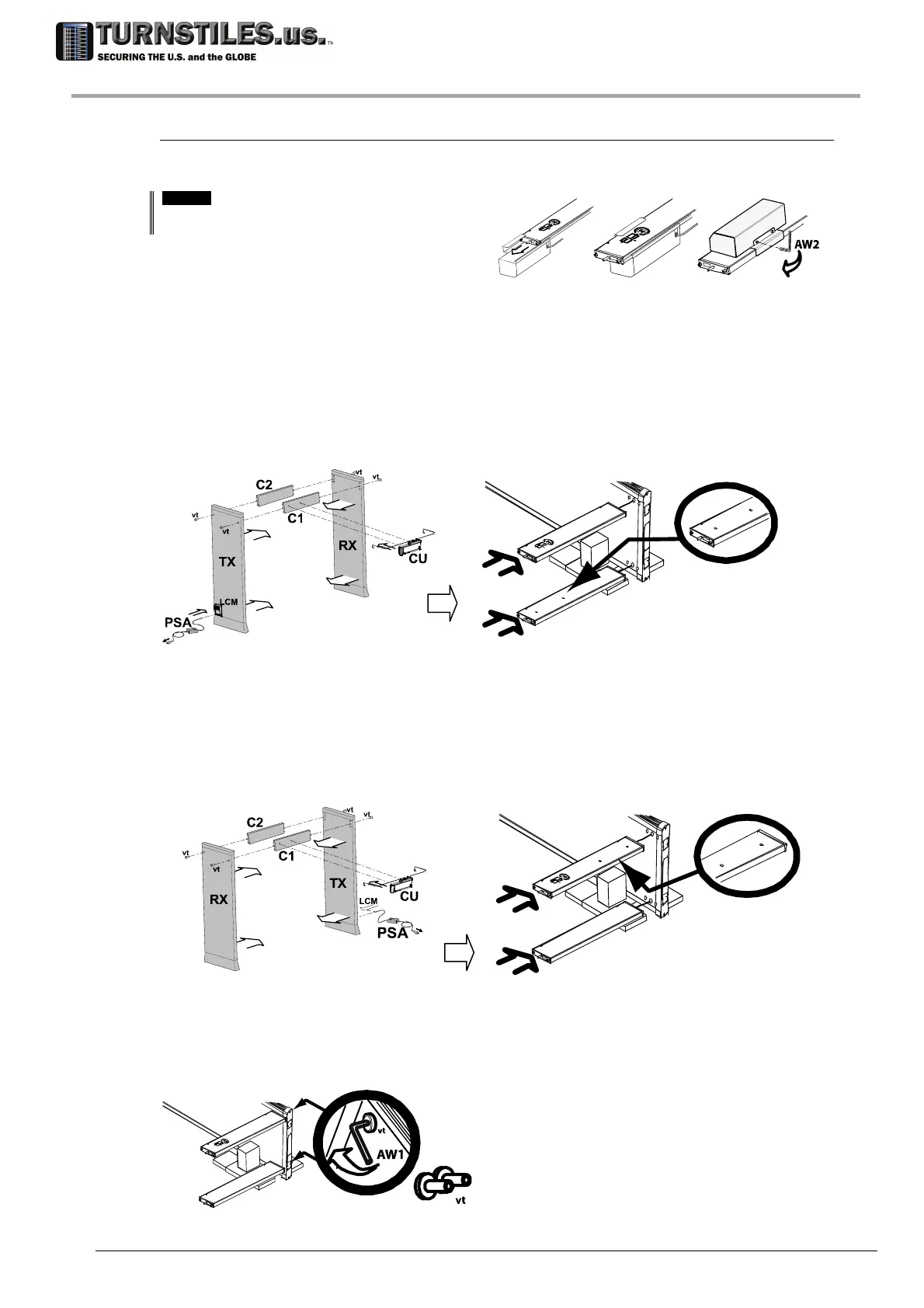
ATTENTION! The crossbars must be attached to the panels, according to the suitable
configuration.
[OPTION]
Version with Long Life Crossbar Battery
Back-Up: attach the Battery Compartment to the C2
crossbar, before assembling it with the panel.
Extract the crossbars from the packaging.
Configuration A (with TX panel on the left when facing the exit side)
Attach the C1 crossbar with holes to the lower part of the panel, taking care that the logo is
facing the floor.
Attach the C2 crossbar with no holes to the
upper part of the panel, making sure that the logo
is facing up.
RX
C1
C2
Configuration B (with TX panel on the right when facing the exit side)
Attach the C2 crossbar with no holes to the
lower part of the panel, taking care that the logo
is facing the floor.
Attach the C1 crossbar with holes to the upper part of the panel, making sure that the logo is
facing up.
RX
C2
C1
Secure the crossbars to one of the panels, using vt screws and AW1 Allen key (included in the
installation kit). Tightening torque: 10 Nm.
RX
303-670-1099



 To Next Page