EasyManua.ls Logo

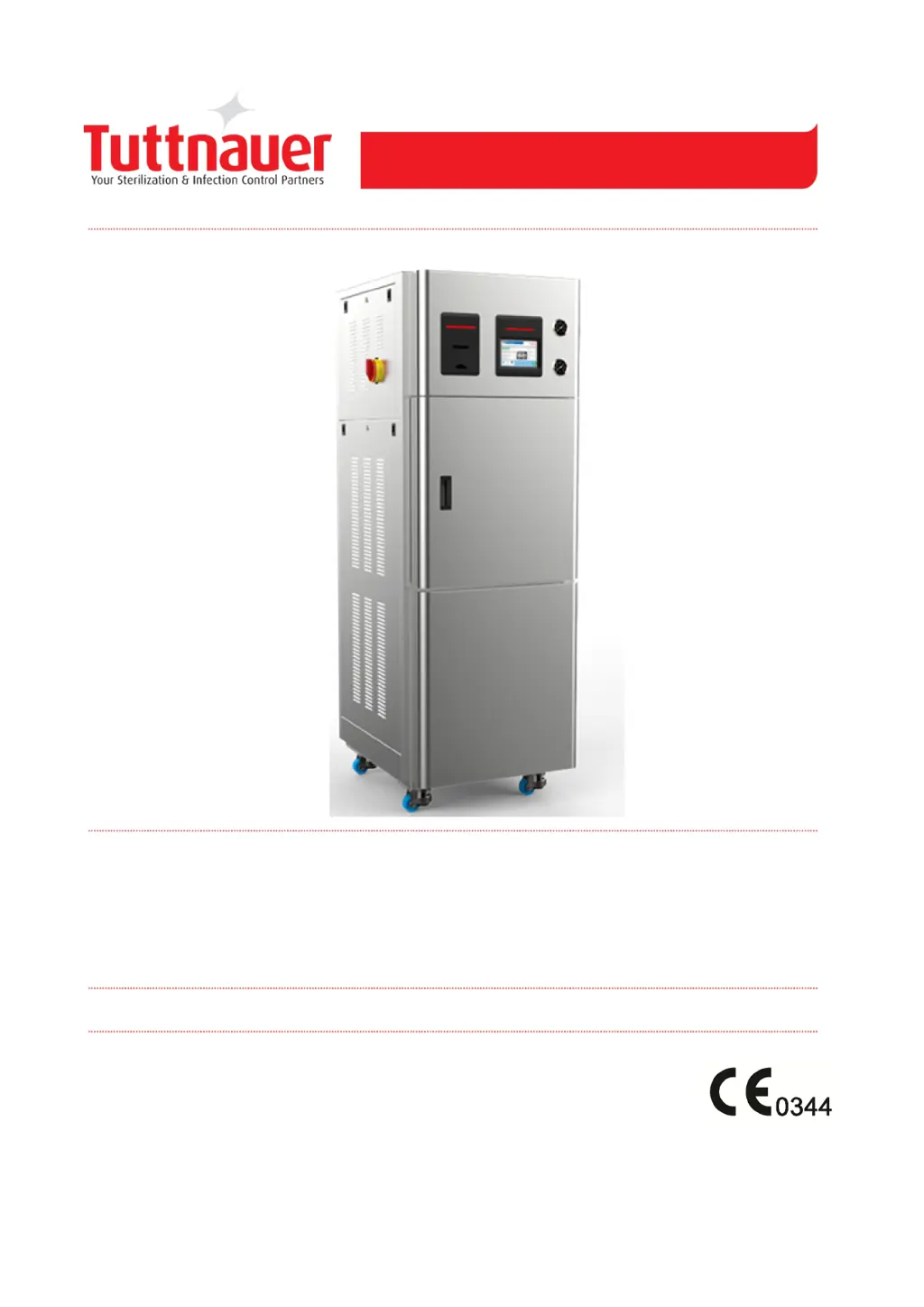
Tuttnauer 5075 GS-2A - User Manual

Tuttnauer 5075 GS-2A
50 pages
Print Icon
To Next Page IconTo Next Page
Loading...
Operation and Maintenance Manual
Cat. No. MAN205-1000000EN Rev B
Tuttnauer Europe B.V.,
Hoeksteen 11 4815 PR P.O. Box 7191 4800 GD Breda,
The Netherlands Tel: 31 (0) 765423510, Fax: 31 (0) 765423540
Pre-vacuum Steam Sterilizer with Generator
Model 5075 GS-2A, 50125 GS-2A

Table of Contents

Questions and Answers

  • H
    Haley FrancoAug 15, 2025
    What to do if Tuttnauer Laboratory Equipment shows an Air Error?
    • U
      uquinnAug 15, 2025
      If you receive an 'Air Error' message on your Tuttnauer Laboratory Equipment at the end of a cycle, this indicates that the autoclave did not reach atmospheric pressure within 10 minutes. The suggested solution is to wait until the autoclave reaches atmospheric pressure, and then perform a new cycle.
  • R
    ryan28Aug 18, 2025
    What to do if Tuttnauer 5075 GS-2A Laboratory Equipment shows Power Down message?
    • T
      ttoddAug 18, 2025
      If your Tuttnauer Laboratory Equipment displays a 'Power Down' message, it means that a power outage occurred during the cycle. To resolve this, turn the autoclave back on and wait until it is ready and in a safe condition. After this, you can start a new cycle.
  • S
    smithlaurenAug 21, 2025
    What does RTC Error mean on Tuttnauer Laboratory Equipment?
    • S
      Shannon KimAug 21, 2025
      If your Tuttnauer Laboratory Equipment displays an 'RTC Error - Please Set Current Date and Time' message, you need to set the current date and time on the device. If the problem continues after setting the date and time, call a technician.
  • J
    Jade MartinezAug 25, 2025
    How to fix a Tuttnauer 5075 GS-2A Laboratory Equipment with a display that is not activated?
    • M
      Michelle SmithAug 26, 2025
      If the display of your Tuttnauer Laboratory Equipment is not activated, first, ensure that the main switch is in the 'on' position. Next, verify that the power cord is correctly connected to both the machine and the power source. Finally, check the main power source to ensure it is providing electricity.
  • K
    Kelly DaviesAug 28, 2025
    Why is my Tuttnauer 5075 GS-2A Laboratory Equipment printer not printing correctly?
    • L
      Larry OlsonAug 28, 2025
      If the printer on your Tuttnauer Laboratory Equipment isn't printing, or prints blank pages, first check that the paper is correctly inserted into the printer. If the issue persists, switch the machine off and then back on. If the printer then prints the date and time, the printer is working correctly.
  • C
    Carlos KiddAug 31, 2025
    What to do if Tuttnauer Laboratory Equipment chamber temperature is not in range?
    • D
      darren78Sep 1, 2025
      If your Tuttnauer Laboratory Equipment displays a message indicating that the chamber temperature is not in range, it means the temperature is either too high or too low. Wait until the chamber reaches the normal temperature range.
  • J
    Jason EstradaSep 4, 2025
    What to do if Tuttnauer 5075 GS-2A chamber pressure is not in range?
    • D
      Destiny HarmonSep 4, 2025
      If your Tuttnauer Laboratory Equipment shows that the chamber pressure is not in range, this means the pressure is either too high or too low. The solution is to wait until the chamber reaches the normal pressure range.
  • D
    Donna SmithSep 7, 2025
    What does Canceled By User mean on Tuttnauer 5075 GS-2A Laboratory Equipment?
    • B
      Brittany MasonSep 7, 2025
      If your Tuttnauer Laboratory Equipment displays 'Canceled By User', it means the START/STOP key was pressed, aborting the cycle. Wait until either 'cycle failed – canceled by user' or 'cycle end – canceled by user' is displayed, and then perform a new cycle.
  • B
    Brandon WadeSep 12, 2025
    What to do if Tuttnauer 5075 GS-2A Laboratory Equipment says the door is open during the cycle?
    • J
      Jacqueline AllenSep 12, 2025
      If your Tuttnauer Laboratory Equipment shows 'Door is open (During the cycle)', it means the door was opened during operation. Close the door to start a new cycle.

Summary

General Information

Incoming Inspection

Inspects the autoclave for any damage upon arrival and during unpacking.

Warranty Description

Details the manufacturer's warranty coverage for components and workmanship.

Warranty Statement

Outlines warranty registration, service contacts, and terms for voiding coverage.

Safety and Operating Conditions

Safety Features

Describes the autoclave's built-in safety mechanisms and protective features.

Safety Instructions

Provides essential safety guidelines for users to follow during operation.

Operating Conditions

Specifies environmental and operational requirements for safe autoclave use.

Autoclave Specifications and Design

Introduction

Overview of the GS-2A autoclave's design, purpose, and application.

Front and Rear Panel Views

Illustrates and labels the front and rear panel layouts and controls.

Technical Specifications

Details technical specifications for the 5075 and 50125 models.

Generator Data

Provides steam and electrical data for the autoclave's generator.

Autoclave Electrical Data

Lists electrical data for the autoclave, excluding the generator.

Utilities Requirements

Specifies power supply, water, and drain connection requirements.

Environmental Emission Information

Details on sound and heat emissions generated by the autoclave.

Construction Materials

Lists the primary materials used in the autoclave's construction.

Sticker Descriptions

Explains the meaning of various symbols and labels found on the autoclave.

Water Quality Standards

Specifies acceptable water quality and contaminant levels for operation.

Directives and Standards

Lists the directives and standards the autoclave complies with.

Overall Dimensions (5075 GS-2 A)

Provides detailed physical dimensions for the 5075GS-2A model.

Overall Dimensions (50125 GS-2 A)

Provides detailed physical dimensions for the 50125GS-2A model.

Rear Panel View (5075 GS-2 A)

Illustrates and labels components on the rear panel of the 5075GS-2A.

Front Panel View (5075 GS-2 A)

Illustrates and labels components on the front panel of the 5075GS-2A.

Control Panel and Operation

Control Panel Overview

Explains the touch screen interface, its display fields, and button functions.

Printer Functions

Explains the printer's role in recording cycle history and data.

Printer Handling

Instructions for maintaining and loading paper into the printer.

Error Messages and Symbols

Lists and explains error messages and their corrective actions.

Operational Messages and Symbols

Lists and explains operational messages and required user actions.

Sterilization Programs and Procedures

Program Parameters

Details the parameters for various sterilization programs.

Cycle Process Description

Explains the stages of a typical sterilization cycle.

Vacuum Test Procedure

Describes the procedure and interpretation of the vacuum test.

Bowie & Dick Test Procedure

Details the Bowie & Dick test procedure and its expected outcome.

Installation and Setup

Placing the Autoclave

Guidance on positioning the autoclave for installation and ventilation.

Initial Setup

Steps for setting up the autoclave after placement, including connections.

Utilities Connection

Instructions for connecting power, water, and drain utilities.

Lifting and Carrying Safety

Safety precautions for moving and transporting the autoclave.

Generator Preparation

Preparatory steps and checks for the generator before operation.

Preparation for Sterilization and Loading

General Preparation Rules

General guidelines for preparing items, cleaning, and disinfection.

Packing Instruments

Specific instructions for packing instruments and materials for sterilization.

Tubing Preparation

Guidance on preparing tubing for sterilization, including rinsing.

Wrapped Instruments Packing

Instructions for packing wrapped instruments using appropriate materials.

Loading the Autoclave

Procedures for loading the autoclave chamber with sterilized items.

Operating Instructions

Water Supply Check

Instructions for ensuring proper water supply to the autoclave.

Turning On the Autoclave

Steps for powering on the autoclave unit.

Starting a Sterilization Cycle

Step-by-step guide to selecting and starting a sterilization cycle.

Handling Malfunctions

Actions to take when malfunctions occur during a sterilization cycle.

Cycle Completion and Unloading

Procedures for ending a successful sterilization cycle and unloading.

Aborting a Cycle

How to stop or abort a sterilization cycle and its implications.

Ending Cycle and Unloading

Detailed steps for unloading the autoclave after cycle completion.

Parameter Management

Quick Options Screen

Overview of quick options available on the touch screen interface.

Adjusting Extra Dry Time

Instructions on how to add extra drying time to a program.

Exporting Data to USB

Procedures for exporting machine data, logs, and history to a USB device.

Printing Cycle History

How to print past sterilization cycle reports from the printer.

Viewing Version Information

Accessing details about the autoclave's software and hardware versions.

Setting Date and Time

Guide to setting the autoclave's internal date and time.

Scheduling Cycle Starts

How to set the autoclave to start a cycle automatically at a specific time.

User Login Procedure

Process for logging into the autoclave control system with credentials.

System Parameter Access

Overview of system parameter subdirectories like print rates and screen saver.

Configuring Screen Saver

How to adjust the screen saver timeout settings.

Maintenance Menu Access

Accessing the maintenance menu for system resets and tests.

Maintenance Instructions

Preventive and Scheduled Maintenance

Daily, weekly, and periodic maintenance tasks for the operator.

Cleaning Water Outlet Strainer

Step-by-step instructions for cleaning the water outlet strainer.

Replacing HEPA Air Filter

Procedure for replacing the HEPA air filter on the autoclave.

Troubleshooting Guide

Troubleshooting Error Messages

Lists common error messages and their corresponding corrective actions.

Tuttnauer 5075 GS-2A Specifications

General IconGeneral
Number of Trays2
Operating Temperature Range105°C to 138°C
Sterilization Temperature Range121°C to 134°C
MaterialStainless Steel
TypeAutomatic Autoclave
Power Supply400V, 50/60Hz, 3-phase
Sterilization Pressure Range1.1 Bar - 2.1 Bar
Heating ElementElectric
Weight290 kg
External Dimensions (WxDxH)1110 x 860 x 1570 mm
Safety FeaturesPressure safety valve, door locking mechanism
Chamber Dimensionsø 500 x 990 mm (ø 19.7" x 39")

Related product manuals