EasyManua.ls Logo

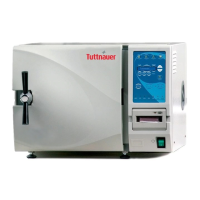
Tuttnauer 50125 GS-2A - User Manual

Tuttnauer 50125 GS-2A
50 pages
Print Icon
To Next Page IconTo Next Page
Loading...
Operation and Maintenance Manual
Cat. No. MAN205-1000000EN Rev B
Tuttnauer Europe B.V.,
Hoeksteen 11 4815 PR P.O. Box 7191 4800 GD Breda,
The Netherlands Tel: 31 (0) 765423510, Fax: 31 (0) 765423540
Pre-vacuum Steam Sterilizer with Generator
Model 5075 GS-2A, 50125 GS-2A

Table of Contents

Questions and Answers

  • C
    Cindy WarrenAug 14, 2025
    What to do if Tuttnauer 50125 GS-2A Laboratory Equipment shows an Air Error?
    • K
      Katrina RamseyAug 14, 2025
      If you receive an 'Air Error' message on your Tuttnauer Laboratory Equipment at the end of a cycle, this indicates that the autoclave did not reach atmospheric pressure within 10 minutes. The suggested solution is to wait until the autoclave reaches atmospheric pressure, and then perform a new cycle.
  • E
    Elizabeth GrayAug 18, 2025
    What to do if Tuttnauer 50125 GS-2A shows Power Down message?
    • L
      lburnettAug 18, 2025
      If your Tuttnauer Laboratory Equipment displays a 'Power Down' message, it means that a power outage occurred during the cycle. To resolve this, turn the autoclave back on and wait until it is ready and in a safe condition. After this, you can start a new cycle.
  • D
    Douglas GreeneAug 21, 2025
    What does RTC Error mean on Tuttnauer 50125 GS-2A Laboratory Equipment?
    • M
      Mitchell CraigAug 21, 2025
      If your Tuttnauer Laboratory Equipment displays an 'RTC Error - Please Set Current Date and Time' message, you need to set the current date and time on the device. If the problem continues after setting the date and time, call a technician.
  • H
    Hannah WarrenAug 25, 2025
    How to fix a Tuttnauer Laboratory Equipment with a display that is not activated?
    • L
      Lorraine MckinneyAug 25, 2025
      If the display of your Tuttnauer Laboratory Equipment is not activated, first, ensure that the main switch is in the 'on' position. Next, verify that the power cord is correctly connected to both the machine and the power source. Finally, check the main power source to ensure it is providing electricity.
  • R
    rojasvalerieAug 28, 2025
    Why is my Tuttnauer 50125 GS-2A Laboratory Equipment printer not printing correctly?
    • S
      smithjoshuaAug 28, 2025
      If the printer on your Tuttnauer Laboratory Equipment isn't printing, or prints blank pages, first check that the paper is correctly inserted into the printer. If the issue persists, switch the machine off and then back on. If the printer then prints the date and time, the printer is working correctly.
  • K
    kristine32Aug 31, 2025
    What to do if Tuttnauer Laboratory Equipment chamber temperature is not in range?
    • C
      crosstinaAug 31, 2025
      If your Tuttnauer Laboratory Equipment displays a message indicating that the chamber temperature is not in range, it means the temperature is either too high or too low. Wait until the chamber reaches the normal temperature range.
  • C
    cynthiawheelerSep 3, 2025
    What to do if Tuttnauer 50125 GS-2A Laboratory Equipment chamber pressure is not in range?
    • W
      William BradleySep 3, 2025
      If your Tuttnauer Laboratory Equipment shows that the chamber pressure is not in range, this means the pressure is either too high or too low. The solution is to wait until the chamber reaches the normal pressure range.
  • R
    Rebecca RamosSep 7, 2025
    What does Canceled By User mean on Tuttnauer 50125 GS-2A?
    • M
      Mark RussoSep 7, 2025
      If your Tuttnauer Laboratory Equipment displays 'Canceled By User', it means the START/STOP key was pressed, aborting the cycle. Wait until either 'cycle failed – canceled by user' or 'cycle end – canceled by user' is displayed, and then perform a new cycle.
  • T
    Theresa RichardsSep 10, 2025
    What to do if Tuttnauer 50125 GS-2A Laboratory Equipment says the door is open during the cycle?
    • G
      George DuranSep 10, 2025
      If your Tuttnauer Laboratory Equipment shows 'Door is open (During the cycle)', it means the door was opened during operation. Close the door to start a new cycle.

Summary

Safety Instructions

Safety Features

Key safety mechanisms and protective features integrated into the autoclave design.

Control Panel

Control Panel Functions

Overview of the touch screen interface, including functions, status indicators, and controls.

Sterilization Programs

Program Parameters

Details on available sterilization programs, including temperature, time, and cycles.

Preparation and Loading

Operating Instructions

Startup and Operation

Procedures for powering on, starting, and running sterilization cycles on the autoclave.

Cycle Management

Instructions for ending cycles, aborting processes, and unloading materials safely.

Malfunctions and Failures

Guidance on handling malfunctions, cycle failures, and error conditions during operation.

Parameter Management

Maintenance Instructions

Preventive Maintenance

Routine maintenance tasks to keep the autoclave in good working condition.

Troubleshooting

Tuttnauer 50125 GS-2A Specifications

General IconGeneral
BrandTuttnauer
Model50125 GS-2A
CategoryLaboratory Equipment
LanguageEnglish

Related product manuals