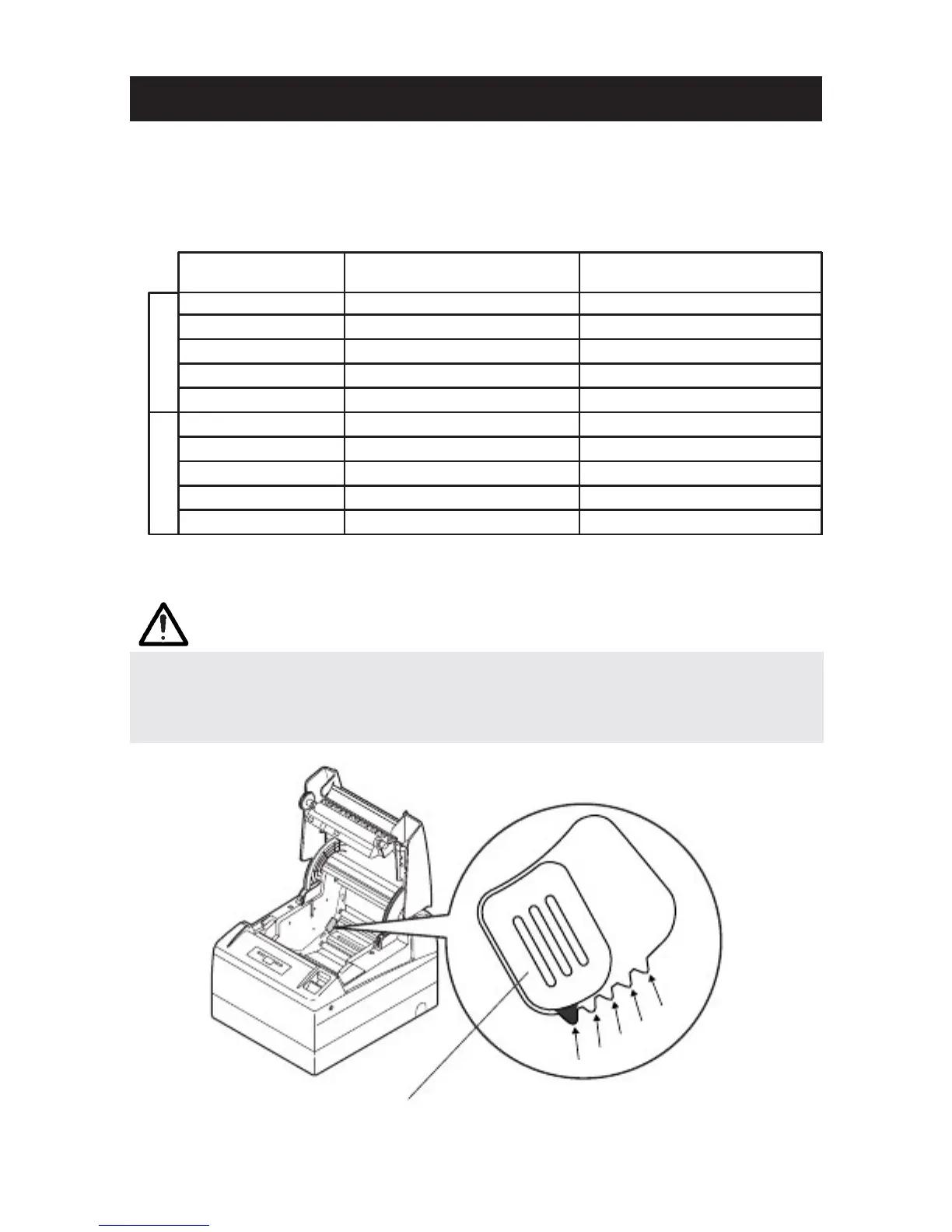
3.7 Adjusting the Paper Near
3.7 Adjusting the Paper Near3.7 Adjusting the Paper Near
3.7 Adjusting the Paper Near-
--
-end Sensor
end Sensorend Sensor
end Sensor
1. Lightly push in the paper near
1. Lightly push in the paper near1. Lightly push in the paper near
1. Lightly push in the paper near-
--
-end sensor unit.
end sensor unit.end sensor unit.
end sensor unit.
2. Move the paper near
2. Move the paper near2. Move the paper near
2. Move the paper near-
--
-end sensor unit to the right and left while keeping to
end sensor unit to the right and left while keeping toend sensor unit to the right and left while keeping to
end sensor unit to the right and left while keeping to
press it. The position to be set varies in accordance with the setting of the
press it. The position to be set varies in accordance with the setting of thepress it. The position to be set varies in accordance with the setting of the
press it. The position to be set varies in accordance with the setting of the
printer
printerprinter
printer, horizontal or vertical, or diameter of the paper roll as shown in the
, horizontal or vertical, or diameter of the paper roll as shown in the, horizontal or vertical, or diameter of the paper roll as shown in the
, horizontal or vertical, or diameter of the paper roll as shown in the
following figure.
following figure.following figure.
following figure.
Sensor Position
Sensor PositionSensor Position
Sensor Position
**1
*2
3
4
5
5
4
3
2
1
Roll paper diameter at the
Roll paper diameter at theRoll paper diameter at the
Roll paper diameter at the
detection of near
detection of neardetection of near
detection of near-
--
-end
endend
end
21.0
24.5
28.0
31.5
35.0
21.0
24.5
28.0
31.5
35.0
Outer core diameter of
Outer core diameter ofOuter core diameter of
Outer core diameter of
roll paper used
roll paper usedroll paper used
roll paper used
18.0
21.5
25.5
28.0
32.0
18.0
21.5
25.5
28.0
32.0
* Factory setting for USA version
** Factory setting for other country version
CAUTION!
CAUTION!CAUTION!
CAUTION!
■ Paper remaining differs by the type of paper roll used.
■ The external diameter of the paper roll is only for reference.
■ When a paper end error is detected incorrectly during using a paper roll with a honey-
comb type core, move the sensor position to the larger number.
5
4
Paper-near-end
sensor unit
— 20 —
1
2
3



 To Next Page