To lock the steering, turn the handle bar all the way to the
left or right. Push the key in and turn it to the ‘LOCK’ position
and then take out the key. All the electrical circuits are
turned ‘OFF’ in this position.
Safety shutter can be closed in the reverse order of opening.
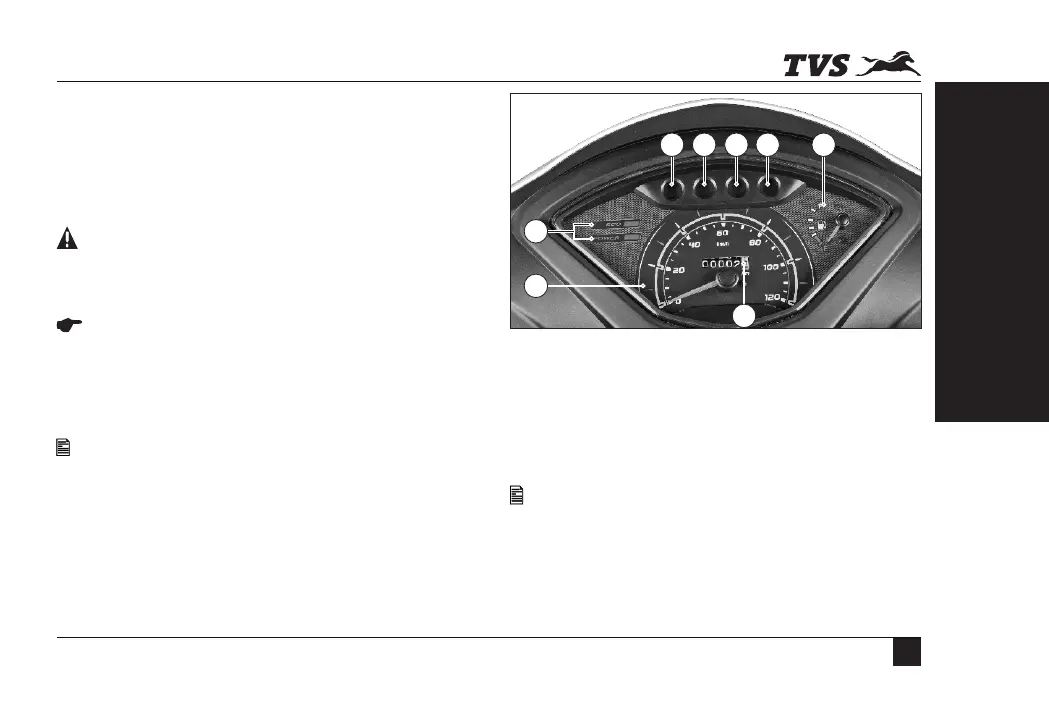
SPEEDOMETER ASSEMBLY
1. Speedometer
Indicates vehicle speed in kilometers per hour.
Never attempt to move the vehicle when the steering is locked, you
may lose balance.
Leaving the ignition cum steering lock in ‘ON’ position will drain the
battery when the vehicle is not in use. “Switch Off” and take the key
out when the vehicle is not in use. For safety, always lock the
steering and close the safety shutter while parking.
Anti corrosion spray can be sprayed on the shutter release knob in
regular intervals to avoid stuck-up of shutter due to corrosion.
2. Economy and power indicators
Eco indicator (green lamp) indicates that the vehicle is
running in economy mode which gives better fuel economy.
Power indicator (amber lamp) indicates that the vehicle is
running in power mode which results in reduced fuel
economy.
1
2
3
4
5
6 7
8
KNOW YOUR TVS JUPITER
WARNING
CAUTION
NOTE
NOTE
Always ride the vehicle in economy mode for better fuel economy.
Whenever the vehicle is switched ‘OFF’ and started again, if the
engine is kept running in idle mode for more than 110 seconds
approx, the power mode indicator blinks and informs you that the
fuel is getting wasted and the engine needs to be switched ‘OFF’ to
save the fuel.
KNOW YOUR TVS JUPITER
17


 To Next Page