15
Always use the appropriate turn signal lamps when you
intend to change lanes or take turns. Be sure to switch
‘OFF’ it after negotiating the lanes or turns.
Use appropriate head lamp beam ‘high / low’ as per the
traffic and road conditions for your safety and to avoid
inconvenience to other riders.
7
1
7
77
7
2
3
54
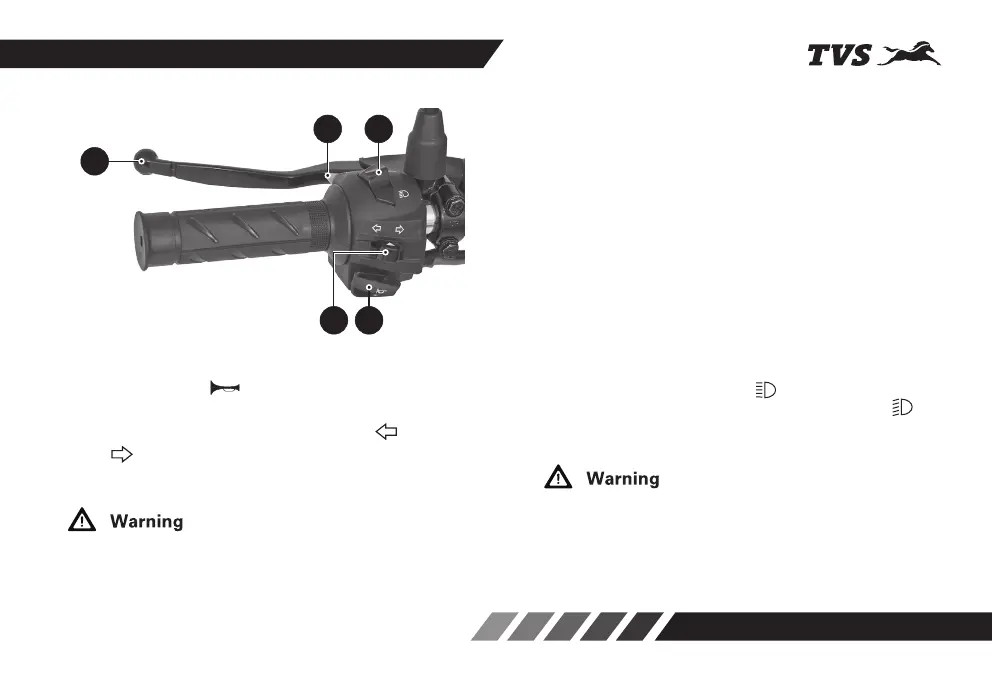
HANDLE BAR LEFT SIDE
1. Horn switch
Press the switch ‘ ’ to operate the horn.
2. Turn signal lamp switch
Slide the turn signal lamp switch to left ‘ ’ or right
side ‘ ’ to operate the respective turn signal lamps
(LH/RH). Press the switch to turn ‘OFF’.
3. Clutch lever
Use the clutch lever to disengage the drive to the rear
wheel while shifting the gears. Squeezing the lever
towards grip disengages the drive.
4. Pass by switch
Press the switch to flash the head lamp high beam.
It is used to give signal to the vehicles coming from
opposite direction while overtaking other vehicles
during day. If the switch is pressed while the head
lamp is switched ON and glowing in high beam, there
will be no change in beam of head lamp.
5. Beam control switch
The head lamp beam (high/low) can be controlled by
pressing the beam control switch.
Press the switch towards ‘ ’ to turn-on the head
lamp high beam or press the switch towards ‘ ’ to
turn-on the head lamp low beam.














 To Next Page