21
While re-fixing the cover frame, ensure the availability of
rubber cushion in the fuel tank hole.
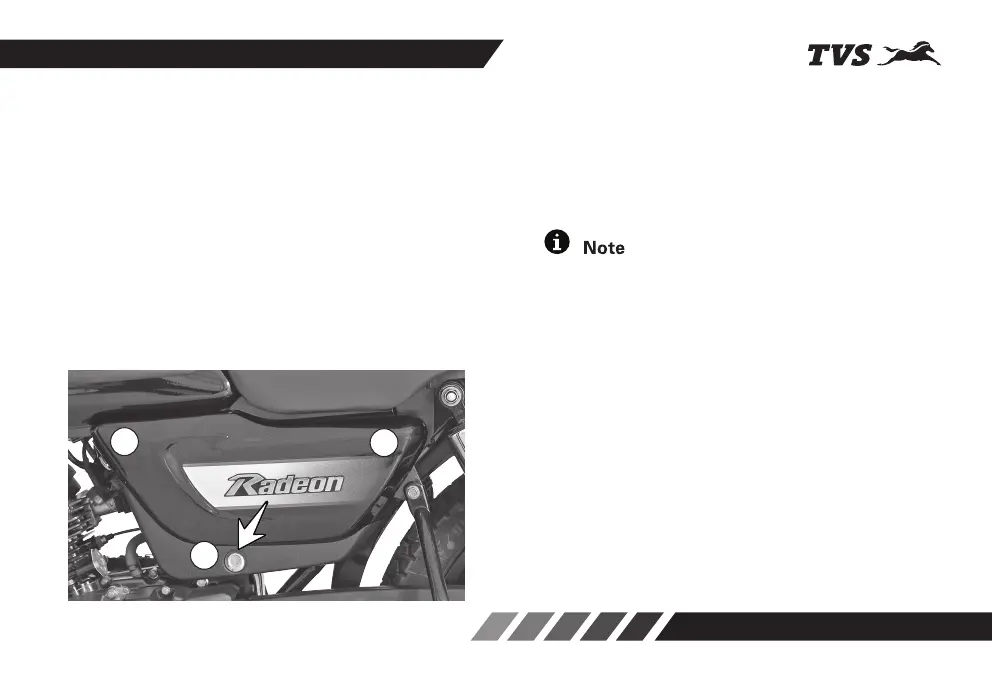
COVER FRAME L
TVS Radeon is provided with lockable cover frame on
left side for accessing the battery, tool kit and first aid
kit. This cover can be opened in the following manner:
1. Insert the control key into the cover frame lock
(A) and rotate it in clock wise direction.
2. Take out the cover frame by gently pulling out at
front (B) and bottom (A) and sliding it forward.
To assemble the cover frame back
1. Locate the cover frame rear portion (C) carefully
to the hook provided on the frame. while ensuring
the availability of cushion in the hook.
2. Locate the cover frame lug (B) on the hole
provided in the fuel tank. While ensuring the
availability of cushion in the hole and gently press
cover frame.
3. Now lock the cover frame by turning the key in
anti-clockwise direction.
B
A
C














 To Next Page