47
6. Incase of disc brake model, carefully dislocate
the disc from the caliper assembly and slide the
wheel out.
7. Reverse the procedure for reassembling.
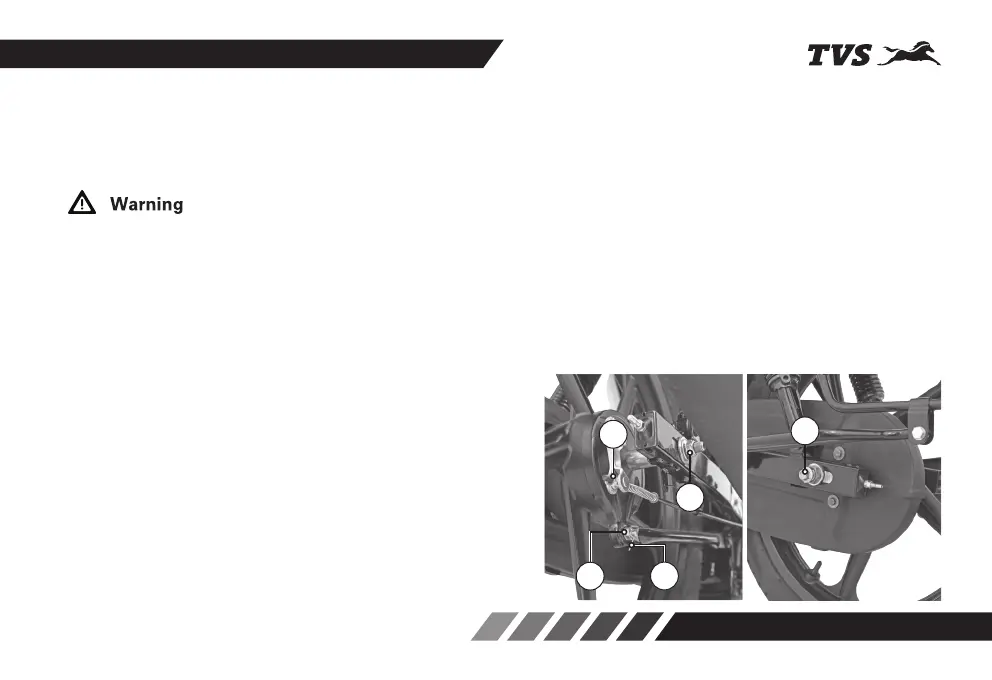
REAR WHEEL REMOVAL AND REASSEMBLY
1. Remove the rear brake adjuster nut (1) and
disconnect the brake rod.
2. Remove the split pin (2) and the nut (3) from
torque link mounting with the brake panel and
disconnect the torque link.
3. Remove the axle nut (4).
4. Pull out the axle (5) and take out the spacer bush
from the rear wheel assembly.
5. Tilt the vehicle to the left and take out the wheel
along with the brake panel. Separate the brake
panel from the wheel.
Always make sure that whenever the wheel is removed,
axle nut is properly re-tightened to the specified torque.
Ensure proper seating of disc in the caliper assembly
while reassembling the wheel.
4
5
1
3
2














 To Next Page