ZED-F9T-Integration Manual
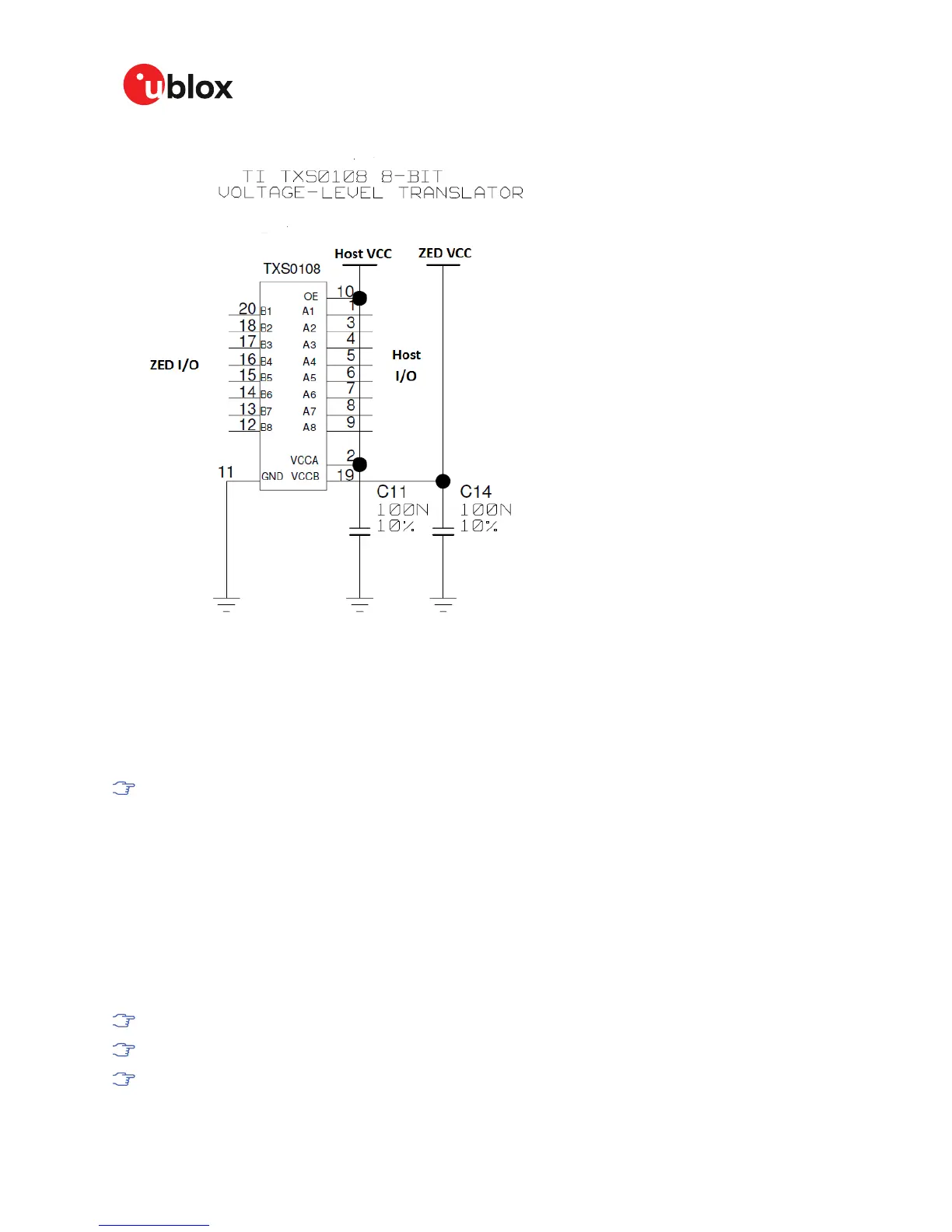
Figure 9: ZED-F9T interface level translation
3.3.1 UART interfaces
ZED-F9T includes 2 UART ports.
UART1 can be used for host interface. It supports a configurable baud rate and protocol selection.
UART2 is available as an optional stand-alone RTCM interface. It should not be used as a host
interface.
The default baud rate is 38400 baud. To prevent buffering problems it is recommended not
to run at a lower baud rate than the default.
3.3.2 SPI interface
The ZED-F9T high accuracy timing receiver has an SPI slave interface that can be selected by
setting D_SEL = 0. The SPI slave interface is shared with UART1. The SPI pins available are:
SPI_MISO (TXD), SPI_MOSI (RXD), SPI_CS_N, SPI_CLK. The SPI interface is designed to allow
communication to a host CPU. The interface can be operated in slave mode only. The maximum
transfer rate using SPI is 125 kB/s and the maximum SPI clock frequency is 5.5 MHz.
3.3.3 USB interface
The USB interface is compatible with a USB version 2.0 FS (full speed, 12 Mb/s) interface.
USB suspend mode is not supported.
USB bus powered mode is not supported.
It is important to connect V_USB to ground when the USB interface is not used in an
application.
UBX-19005590 - R01
3 Receiver functionality Page 23 of 80
Advance Information


 To Next Page
 Loading...