Ubee Interactive 3.7 Gateway
DDW3612 Subscriber User Guide • July, 2010 25
3.7.5 Gateway - DDNS
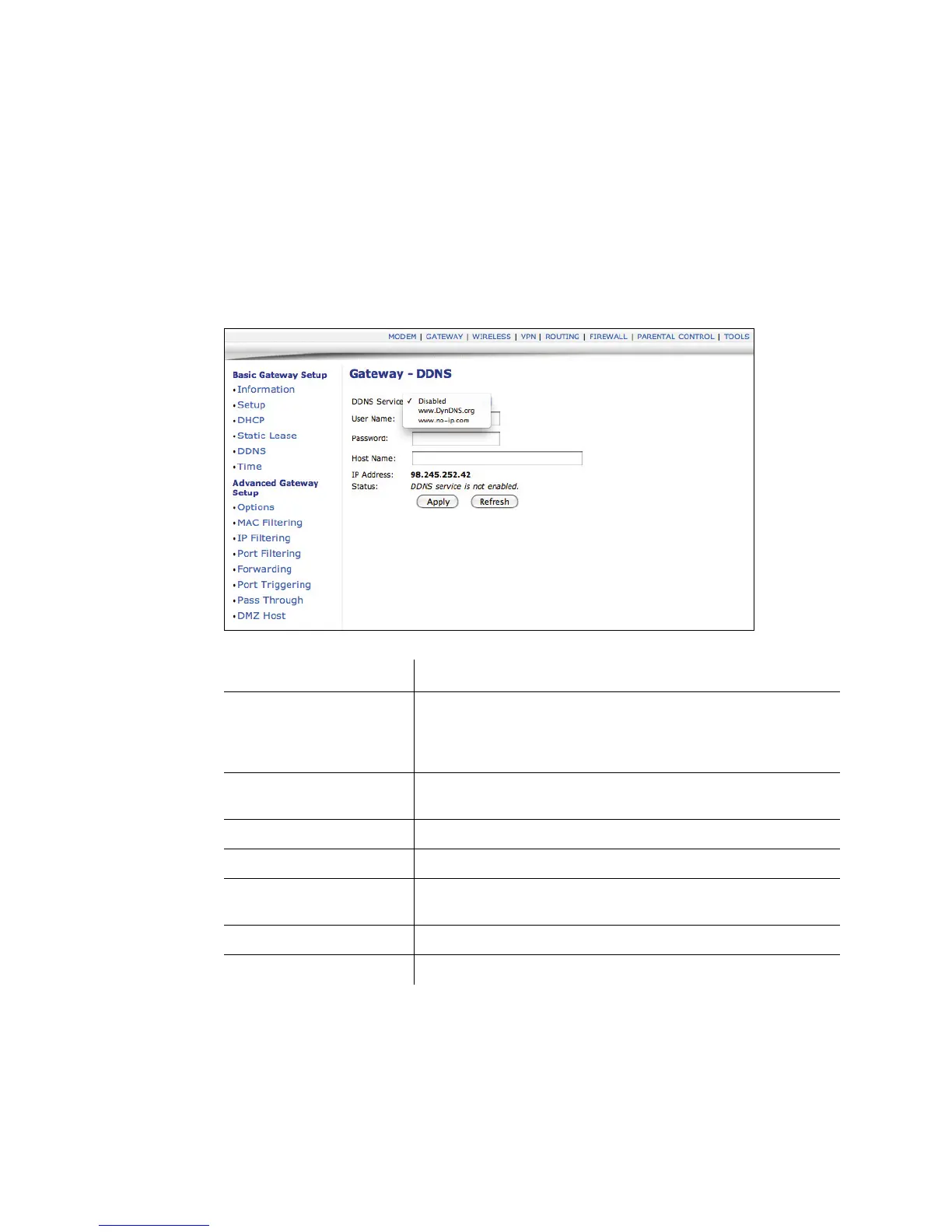
The Dynamic Domain Name Service (DDNS) option allows you to configure your
registered Domain Name with a dynamic IP address.
1. Access the web interface. Refer to page 7, if needed.
2. Click the Gateway link from the top of the screen.
3. Click DDNS from the left side of the screen. The DDNS fields are explained
following this screen example.
Label Description
DDNS Service Select the service provider used for your DDNS Service or
Disabled.
www. DyDNS.org
www.no-ip.com
User Name Input your DDNS account username as subscribed to the
service provider.
Password Enter your password for the above account.
Host Name Input the host name, as specified by the DDNS service provider.
IP address/Status These fields are automatically populated once the User Name
and Password are entered.
Apply Click Apply to save all screen changes.
Refresh Click to refresh the page.


 To Next Page