Ubee Interactive 3.8 Wireless
DDW3612 Subscriber User Guide • July, 2010 41
3.8.2 Wireless - Primary Network
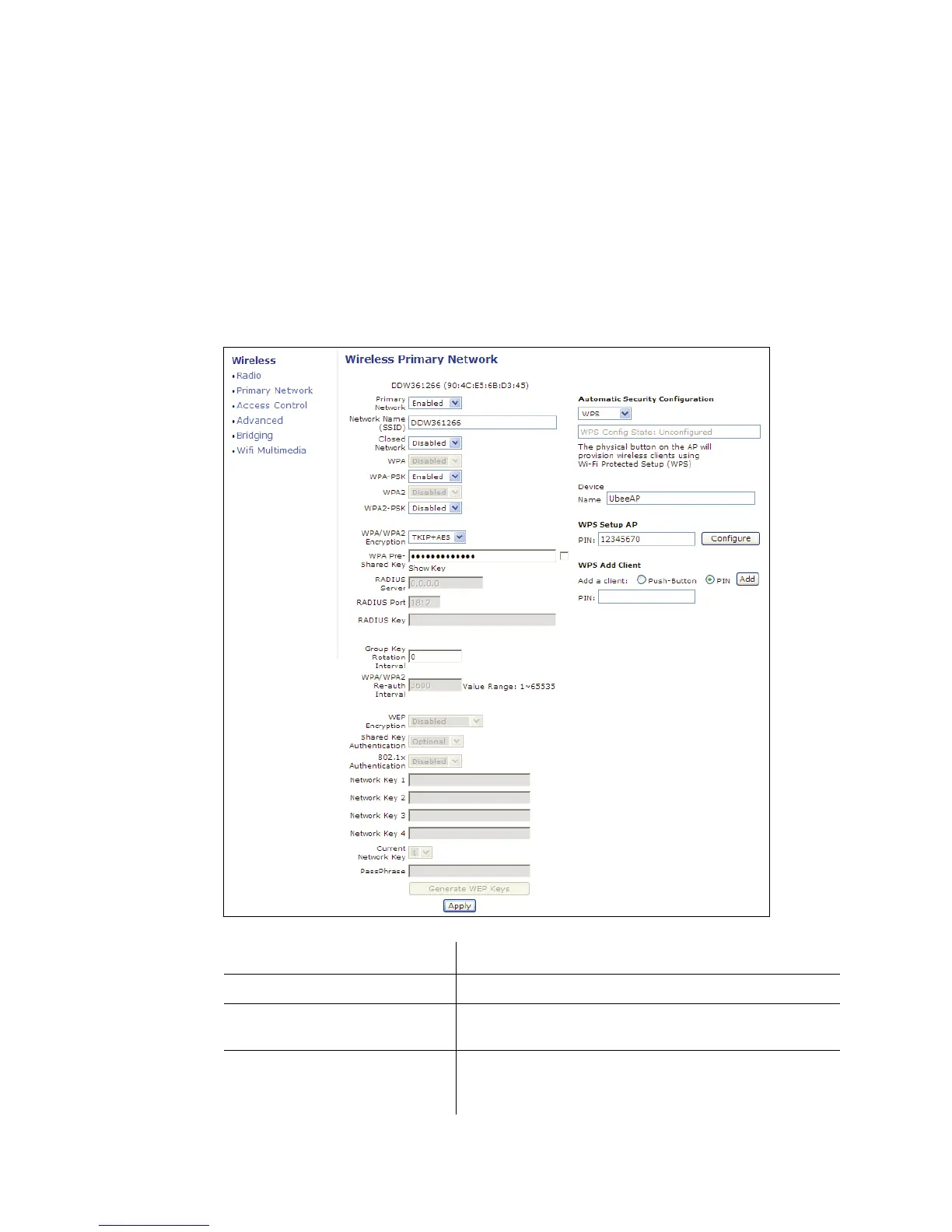
The Primary Network option allows you to configure a variety of wireless security
settings.
1. Access the web interface. Refer to page 7, if needed.
2. Click the Wireless link from the top of the screen.
3. Click Primary Network from the left side of the screen. The Primary Network
fields are explained following this screen example. Note: Wireless default values
are discussed in “Default Values” on page 4.
Label Description
Primary Network Select to Enable or Disable the primary network.
Network Name Enter the unique SSID of the cable modem, or accept the
default. Refer to page 4 for more information on the SSID.
Closed Network If Enable is selected, the selected SSID is hidden and is
undiscoverable by wireless clients unless manually setup
on the client. If Disabled, the SSID is discoverable.


 To Next Page