Ubee Interactive 3.8 Wireless
DDW3612 Subscriber User Guide • July, 2010 49
3.8.6 Wireless - Wifi Multimedia
The Wifi Multimedia option allows you to configure QoS (Quality of Service) to ensure
the quality of service in wireless networks. Wifi Multimedia controls WLAN
transmission priority on packets to be transmitted over the wireless network. WMM
QoS prioritizes wireless traffic according to the delivery requirements of the individual
user and applications. Refer to page 50 for more information on Wifi Multimedia.
Note: This feature is available when logged into the device using the MSO user
login. Refer to page 4 for more information.
1. Access the web interface. Refer to page 7, if needed.
2. Click the Wireless link from the top of the screen.
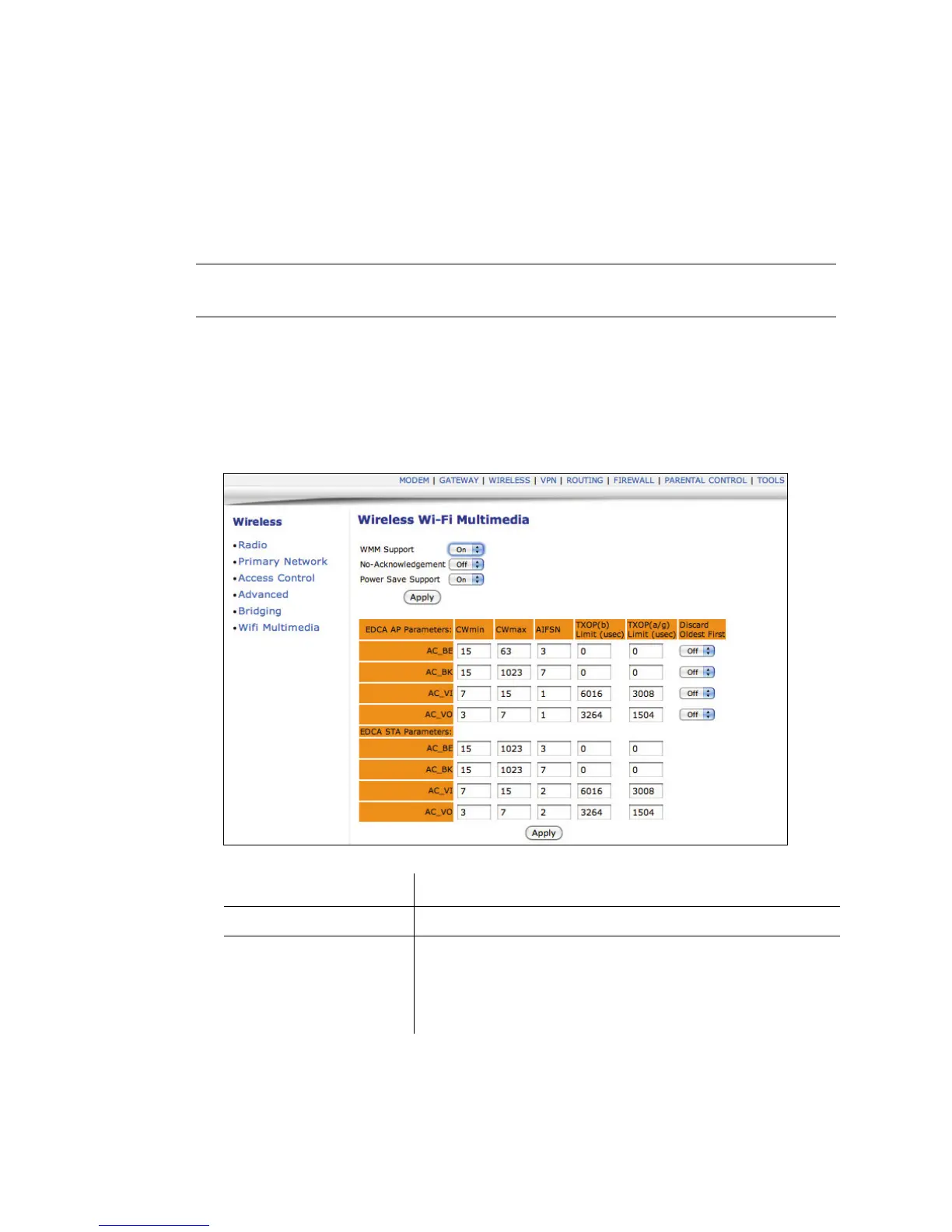
3. Click Wifi Multimedia from the left side of the screen. The Wifi Multimedia fields
are explained following this screen example.
Label Description
WMM Support Select On or Off to turn on or off WMM support.
No Acknowledgement Select On or Off to turn on or off the acknowledgement of data
frames. In QoS mode, frames to send can have two values:
QosAck and QosNoAck. Frames with QosNoAck are not
acknowledged, thus avoiding the retransmission of highly time-
critical data.


 To Next Page