(6) User program registration
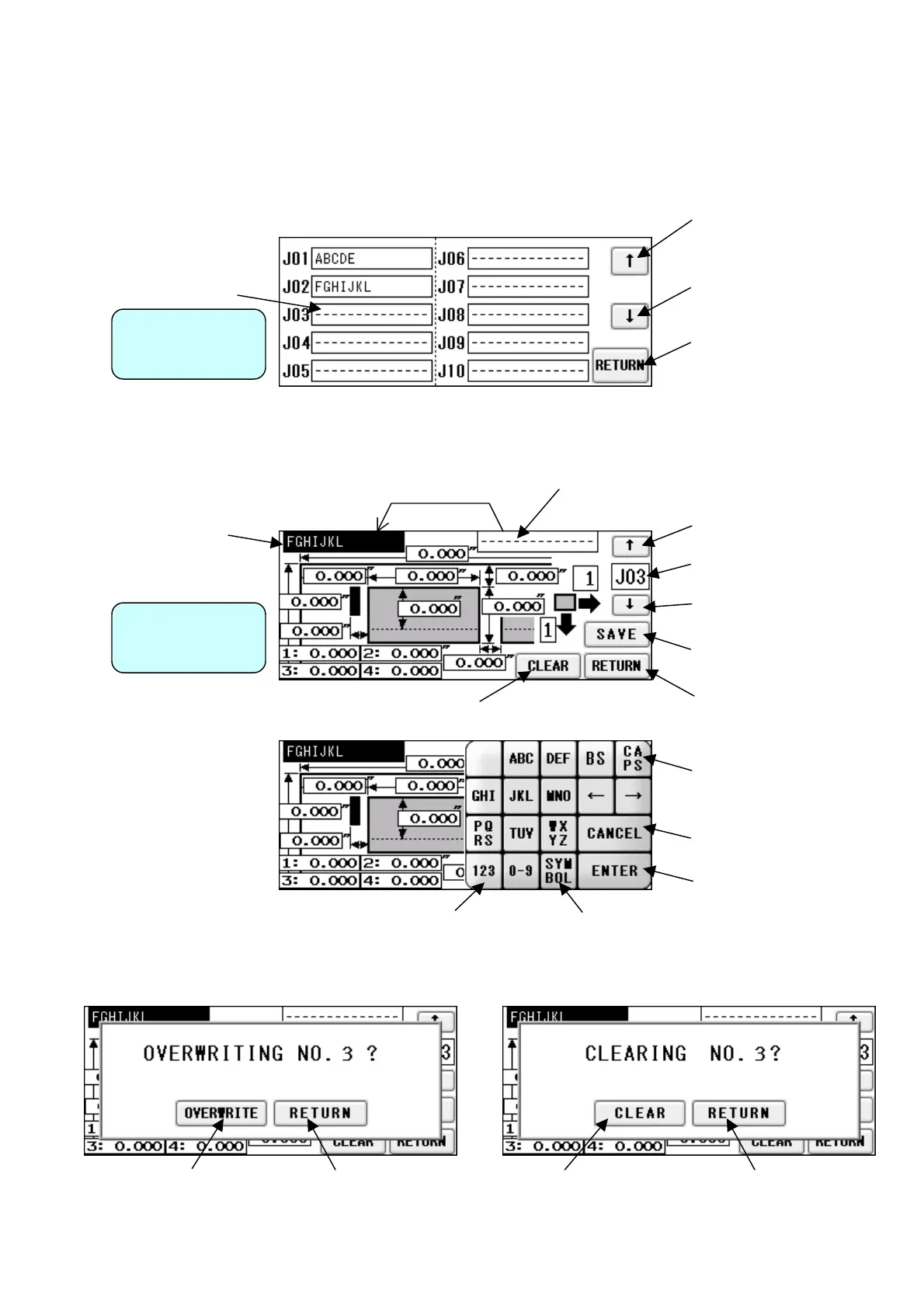
① 50 user program can be registered.
② Press the button in which you wish to make a registration.
③ Confirm the program stored in the selected place.
Move to the previous
10 program
Return to Cutting Pattern
Correction Screen
Move to the next 10
program
User Program
Selection Screen
Copy
Currently registered name
User Program
Detail Screen
Move to the next program
Return to User Program
Selection Screen
Overwrite confirmation
Enter the number to jump
to it
Delete confirmation
Double Click to make a copy of input
name.
Move to the previous
program
Enter the name fo
registration
Change to
number entry
Finalize the registration name
、。・!?:;^"'~|「」[]{}<>$%&¥#+-*/=()
Press here to select the following symbols
which will be displayed one by one:
Cancel the entry and
return
Uppercase/lowercase
switching
22
Return to User Program
Detail Screen
Delete and move to
User Program Detail
Screen
Return to User Program
Detail Screen
For overwriting and
move to Cutting Pattern
Correction Screen


 To Next Page