(10) Speed change
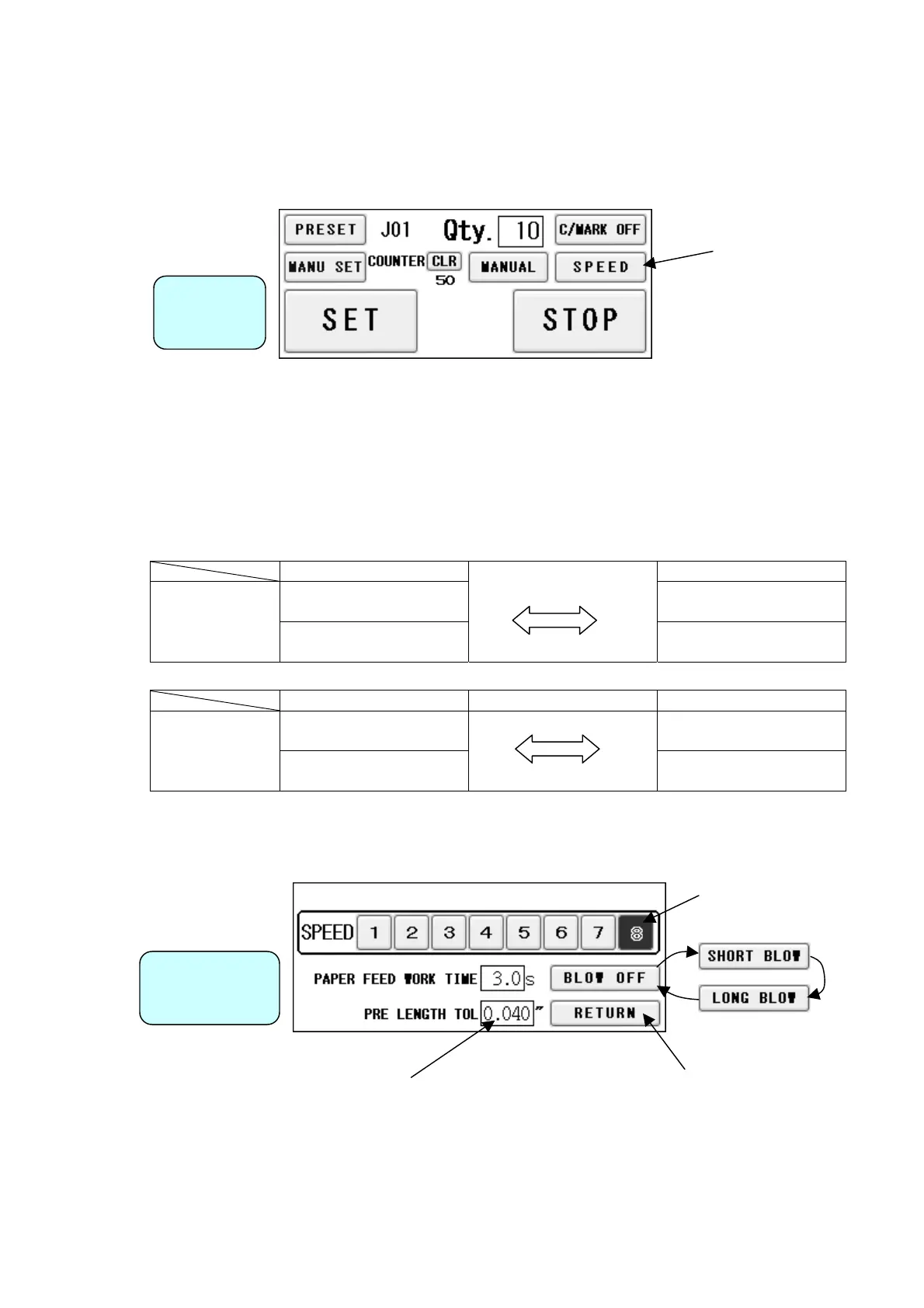
① Press SPEED from the Operation Screen.
Operation
Screen
② There are eight feeding speed levels. The currently selected speed level is inverted to
black. Thick paper should not be fed at higher speeds. Please slow the speed down if
sheet stops with noise associated.
③ To avoid double feed or skew feed, adjust PAPER FEED WORK TIME and volume of AIR
BLOW.
SHORT LONG
Double feed:
25
more likely to occur
Double feed:
less likely to occur
PAPER FEED
WORK TIME
Skew feed:
0.5s~5.0s
less likely to occur
Skew Feed:
more likely to occur
BLOW OFF SHORT BLOW LONG BLOW
Double feed:
more likely to occur
Double feed:
less likely to occur
AIR BLOW
Skew feed:
less likely to occur
Skew feed:
more likely to occur
As a recommended default setting, PAPER FEED WORK TIME should be 3.0 seconds
and AIR BLOW should be LONG BLOW.
Return to
Operation Screen
The value is for easy double feed detection.
The operation will become an error and stop
if a longer sheet of paper than the input value
of the first sheet is fed.
Enter 0 when you do not use the function.
Speed Change
Screen


 To Next Page