ULEAD VIDEOSTUDIO USER GUIDE
70
a number indicates how many scenes are merged into that particular clip. Click
Split to undo any Join actions that you have done.
8. Click OK to split the video.
Multi-trimming your video
The Multi-trim Video feature is another method for breaking down a clip into
multiple segments. While Split by Scene is automatically done by the program,
Multi-trim Video gives you complete control over the clips you wish to extract,
making it even easier for you to manage your project.
To trim a video file into multiple clips:
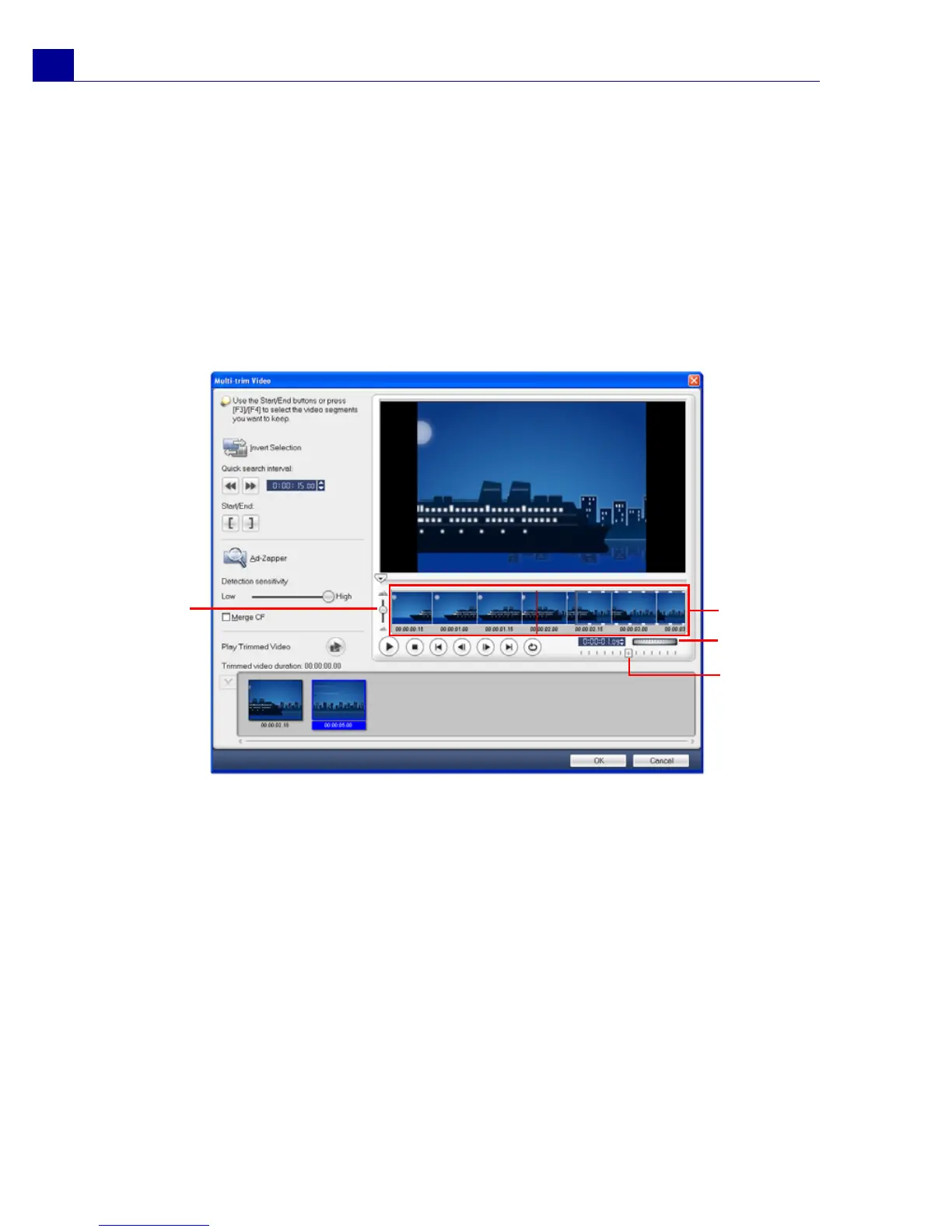
1. Go to the Edit Step and click Multi-trim Video in the Options Panel.
1Timeline zoom
Drag up and down to sub-divide a video
clip into frames per second.
2 AccuCut Timeline
Scan a video clip frame by frame for
accurate mark-in and mark-out positions.
3Jog Wheel
Use to scroll to different parts of the clip.
4 Shuttle Slider
Preview the clip at different playback
speeds.
1
2
3
4



 To Next Page