40
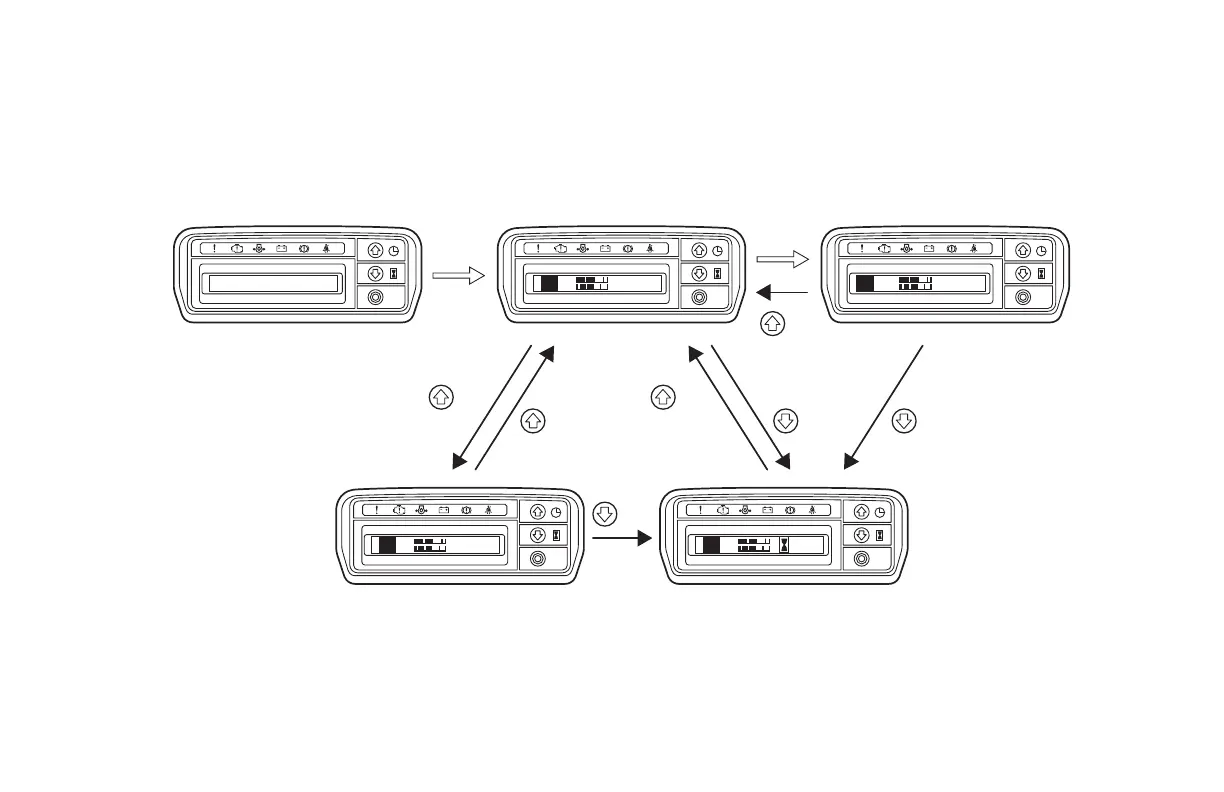
10. METER DISPLAY
Changing Meter Display
F R
C
E
H
F
N
F R
C
E
H
'05/02/31
F
N
14
:
25
F R
C
E
H
F
N
08235.6
NR
C
E
H
F
F
08
km/h
10
:
25
Start display (Appears immediately
after the ignition switch is turned on.)
Date display
For the changes marked with an (*), contact your Local Authorized Dealer.
NOTE:
The display time and date will be reset if the battery cable is disconnected or the battery is replaced.
If the display has been reset, set the time and date again.
Normal display (time display) Speedometer display
Changes
automatically.
Press Press
Press
Press
Press
PressPress
Changes automatically
by more than 4.0 km/h (2.5 MPH)
lift truck speed
* MPH display is also available.
* Display of total engine operating time is also available.
Hour meter display





 To Next Page