42
Date
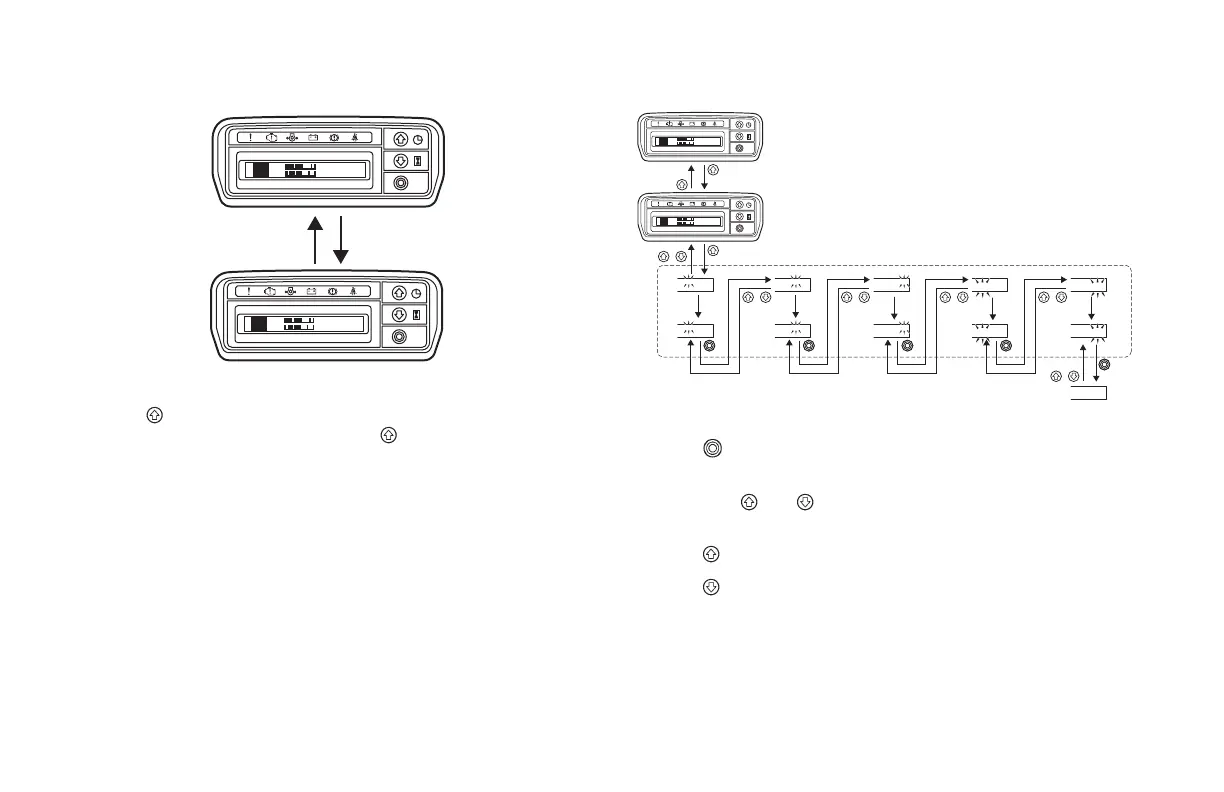
Press the
button on the normal display (clock) to change from the
time display to the date display. Press the button again to return to
the normal display.
Setting the Date
Press the
button to change the setting item from yearmonth
dayhourminuteconrmed.
Press both the
and buttons at the same time to return to the
previous setting item.
Press the
button to change the number up.
Press the button to change the number down.
FR
C
E
H
F
N
FR
C
E
H
'05/02/31
F
N
14
:
25
10
:
25
FR
C
E
H
F
N
FR
C
E
H
'05/02/31
F
N
14
:
25
’05/02/31
14
:
25
10
:
25
+
+
Press and hold
’06/02/31
14
:
25
’06/02/31
14
:
25
’06/06/31
14
:
25
+
’06/06/31
14
:
25
’06/06/26
14
:
25
+
’06/06/26
14
:
25
’06/06/26
07
:
25
+
+
’06/06/26
07
:
25
’06/06/26
07
:
45
’06/06/26
07
:
45
Setting completed






 To Next Page