BATTERY CAREBATTERY CARE
3-143-14
REMOVING AND REINSTALLING THEREMOVING AND REINSTALLING THE
BATTERYBATTERY
WARNINGWARNING
••
Never place yourself between thNever place yourself between the battery ande battery and
the mast or the the mast or the truck body.truck body.
••
Make sure to remove and Make sure to remove and reinstall the batteryreinstall the battery
with the truck parked on a level surface and inwith the truck parked on a level surface and in
an area with no obstacles in front.an area with no obstacles in front.
•• Keep the forks at a hKeep the forks at a height of 10 to 30 cm eight of 10 to 30 cm and beand be
sure the truck is unloaded.sure the truck is unloaded.
•• Make sure the key switch is Make sure the key switch is “OFF”, the forks“OFF”, the forks
are lowered to the ground or floor surfaceare lowered to the ground or floor surface
and the battery connectors are disconnectedand the battery connectors are disconnected
before inspecting the battery, adding batterybefore inspecting the battery, adding battery
electrolyte or water, or replacing the electrolyte or water, or replacing the batterybattery..
•• When returning the battery, make sure the When returning the battery, make sure the
battery is securely housed in the case and thebattery is securely housed in the case and the
battery cable is not twisted, kinked, or battery cable is not twisted, kinked, or caught incaught in
the battery case the battery case or the truck body.or the truck body.
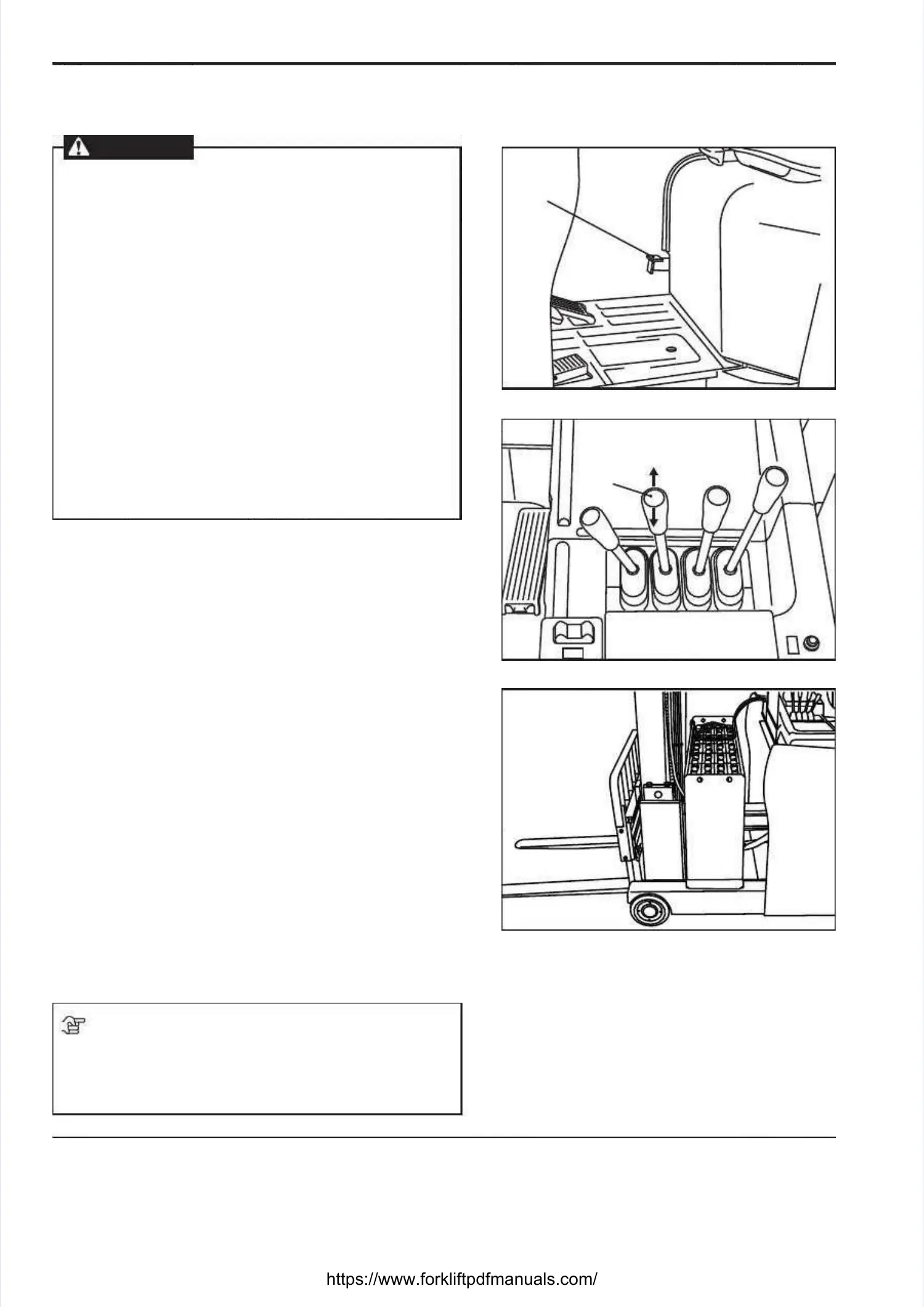
REMOVING THE BATTERYREMOVING THE BATTERY
1) 1) Pull back the reach lever [1] to retract the mast fullyPull back the reach lever [1] to retract the mast fully..
2) Step on the battery lock release pedal [2] fully, with2) Step on the battery lock release pedal [2] fully, with
the mast the mast retracted fully.retracted fully.
3) Keeping the battery lock release pedal pressed fully,3) Keeping the battery lock release pedal pressed fully,
push the reach lever forward. The battery will comepush the reach lever forward. The battery will come
out as the mast advances.out as the mast advances.
REINSTALLING THE BATTERYREINSTALLING THE BATTERY
1) Keeping the battery lock release pedal [2] fully1) Keeping the battery lock release pedal [2] fully
pressed, pull the reach lever [1] to retract the mast.pressed, pull the reach lever [1] to retract the mast.
The battery case will be returned to its originalThe battery case will be returned to its original
position by the mast movement.position by the mast movement.
2) When the battery case is returned back, the battery2) When the battery case is returned back, the battery
cable may come off the cable guide or be raised fromcable may come off the cable guide or be raised from
the cable guide. In that case, rst correct the positionthe cable guide. In that case, rst correct the position
of the cable and push in the battery.of the cable and push in the battery.
3)3)
AfAfteter r mamakiking ng susu re re ththe e mama st st hahas s bebe en en cocompmp lele tetelyly
retracted, release the battery lock release pedal.retracted, release the battery lock release pedal.
NOTENOTE
If the battery lock release pedal does not return fullyIf the battery lock release pedal does not return fully
when you release the pedal, step on the pedal againwhen you release the pedal, step on the pedal again
and pull the reach lever to retract the mast again.and pull the reach lever to retract the mast again.
22
(Battery pulled out into view)(Battery pulled out into view)
11





 To Next Page