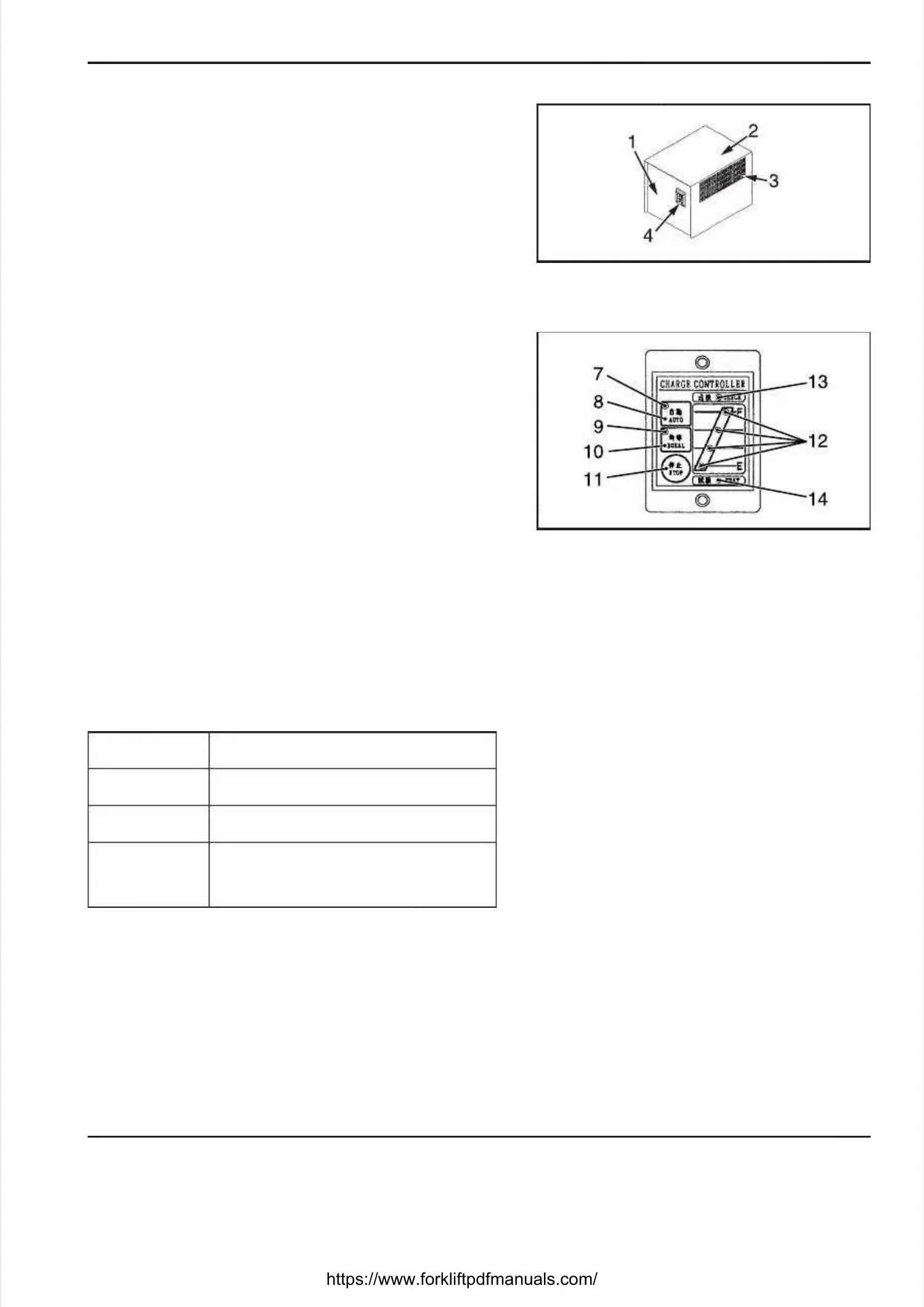
STASTATIONARY TIONARY BATTERY CHARGERBATTERY CHARGER
3-153-15
1. Charger1. Charger
2. Cover2. Cover
3. 3. Air Air ventvent
4. 4. Charger Charger control control panelpanel
7. 7. Automatic Automatic charge charge indicating indicating lightlight
8. 8. Automatic Automatic charge charge switchswitch
9. 9. Equalizing Equalizing charge charge indicating indicating lightlight
10. Equalizing charge switch10. Equalizing charge switch
11. Stop switch11. Stop switch
12. Charge status indicating lights12. Charge status indicating lights
13. Error light13. Error light
14. T14. Timer test limer test lightight
STATIONARY BATTERY CHARGERSTATIONARY BATTERY CHARGER
(OPTION)(OPTION)
The battery can be recharged using a stationary batteryThe battery can be recharged using a stationary battery
charger. This section covers the operating instructionscharger. This section covers the operating instructions
of the stationary battery charger. For the procedure forof the stationary battery charger. For the procedure for
handling the battery, see the pages 3-10 ahandling the battery, see the pages 3-10 and after.nd after.
PICTORIAL NOMENCLATUREPICTORIAL NOMENCLATURE
CHARGER CONTROL PANELCHARGER CONTROL PANEL
Automatic charge switch [8] and indicating light [7]Automatic charge switch [8] and indicating light [7]
When the automatic charge switch [8] is pressed, aWhen the automatic charge switch [8] is pressed, a
normal charge is started.normal charge is started.
During the normal charge process, the indicating light [7]During the normal charge process, the indicating light [7]
stays on.stays on.
Equalizing charge switch [10] and indicating light [9]Equalizing charge switch [10] and indicating light [9]
When the equalizing charge switch [10] is pressed, anWhen the equalizing charge switch [10] is pressed, an
equalizing charge is started.equalizing charge is started.
During the equalizing charge process, the indicating lightDuring the equalizing charge process, the indicating light
[9] stays on.[9] stays on.
Stop switch [11]Stop switch [11]
When the stop switch [11] is pressed, the chargingWhen the stop switch [11] is pressed, the charging
process is stopped.process is stopped.
Charge status indicating lights [12]Charge status indicating lights [12]
The indicating lights come on in sequence according toThe indicating lights come on in sequence according to
the charge level.the charge level.
1st light (bottom)1st light (bottom)
Comes on when the charge level is 53.0 V orComes on when the charge level is 53.0 V or
more.more.
2nd2nd
Comes on when the charge level is 55.0 V orComes on when the charge level is 55.0 V or
more.more.
3rd3rd
Comes on when the pole changing point isComes on when the pole changing point is
reached.reached.
4th (top)4th (top)
Comes on at the end of a timer interval ofComes on at the end of a timer interval of
the timer. Light does not come on when thethe timer. Light does not come on when the
battery becomes fully charged by the totalbattery becomes fully charged by the total
timer.timer.
* * The charge status The charge status indicating lights [12] sindicating lights [12] stay on aftertay on after
the end of a the end of a timed interval of the timer.timed interval of the timer.
Error light [13]Error light [13]
Light comes on when an error occurs.Light comes on when an error occurs.
Timer test light [14]Timer test light [14]
Light comes on when a Light comes on when a timer test is performed.timer test is performed.





 To Next Page