18
HX120
Item Sub-item Option Description
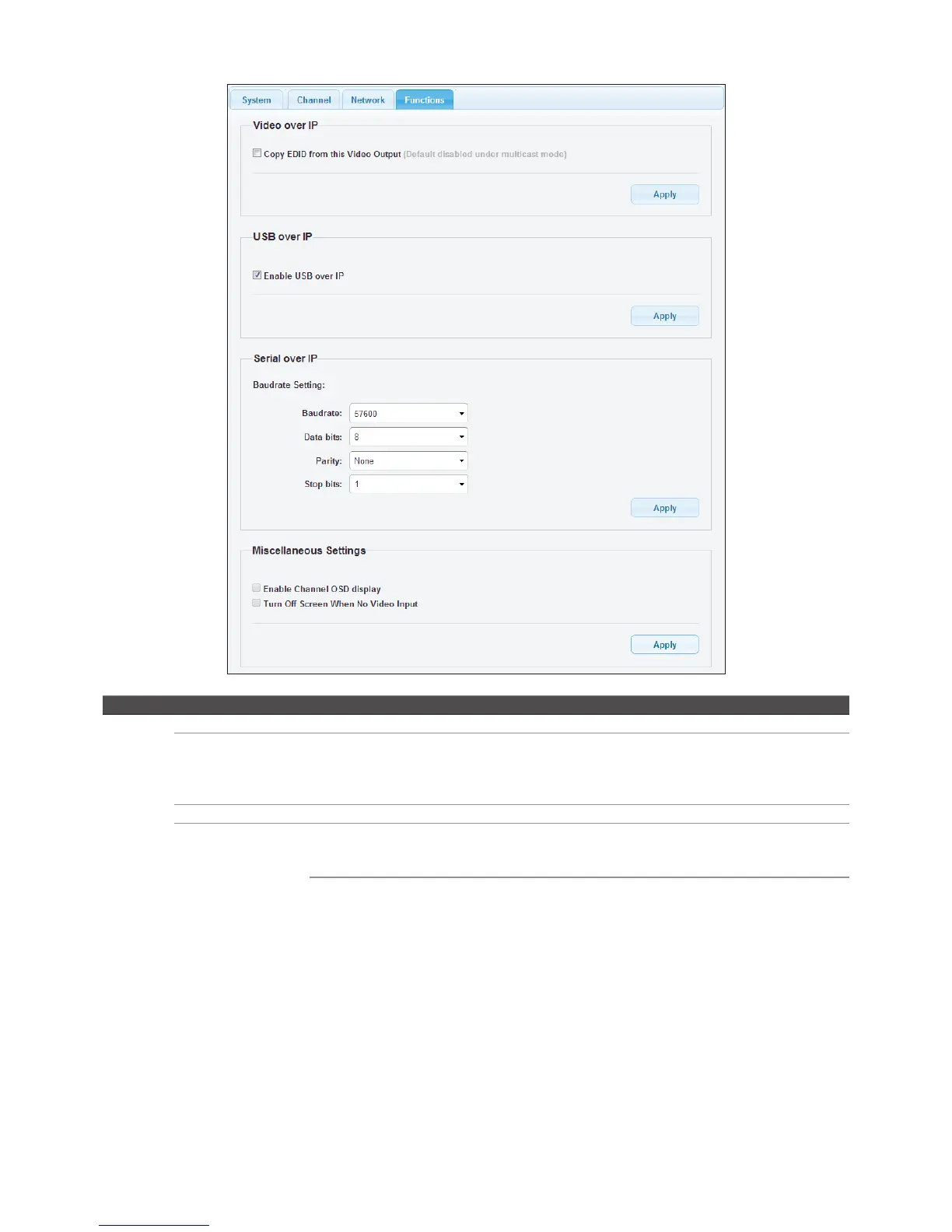
Function Video over IP Enable/disable the copy function from EDID compliant monitors automatically.
USB over IP Enable/disable the sharing of USB peripheral through Ethernet. To enable this
function, tick the option of Enable USB over IP both on the web pages of receiver and
corresponding transmitter, then click Apply. Next, press the DEVICES button to light up
the DEVICE LED on the receiver.
Serial over IP Baudrate setting Setup the baudrate settings.
Miscellaneous
Settings
Enable Channel OSD display Enable the display of channel number after the video
connection has been established. The channel number will
be shown on the upper-left of screen for a few seconds.
Turn Off Screen When No
Video Input
Enable the monitor into standby mode. If there is no video
input from transmitter to receiver, the receiver will trigger
the monitor into standby mode.
Baudrate settings
■
This option allows to set the baudrate of Transmitter, Extender Receiver/VideoWall Receiver manually.
Make sure the settings must match with the RS-232 device you have connected. By default, the system
settings are as following:
Baudrate: 115200 Data bits: 8 Parity: None Stop bits: 1
■
Click the Apply once the baudrate settings have been changed.


 To Next Page