17
HX120
Item Sub-item Option Description
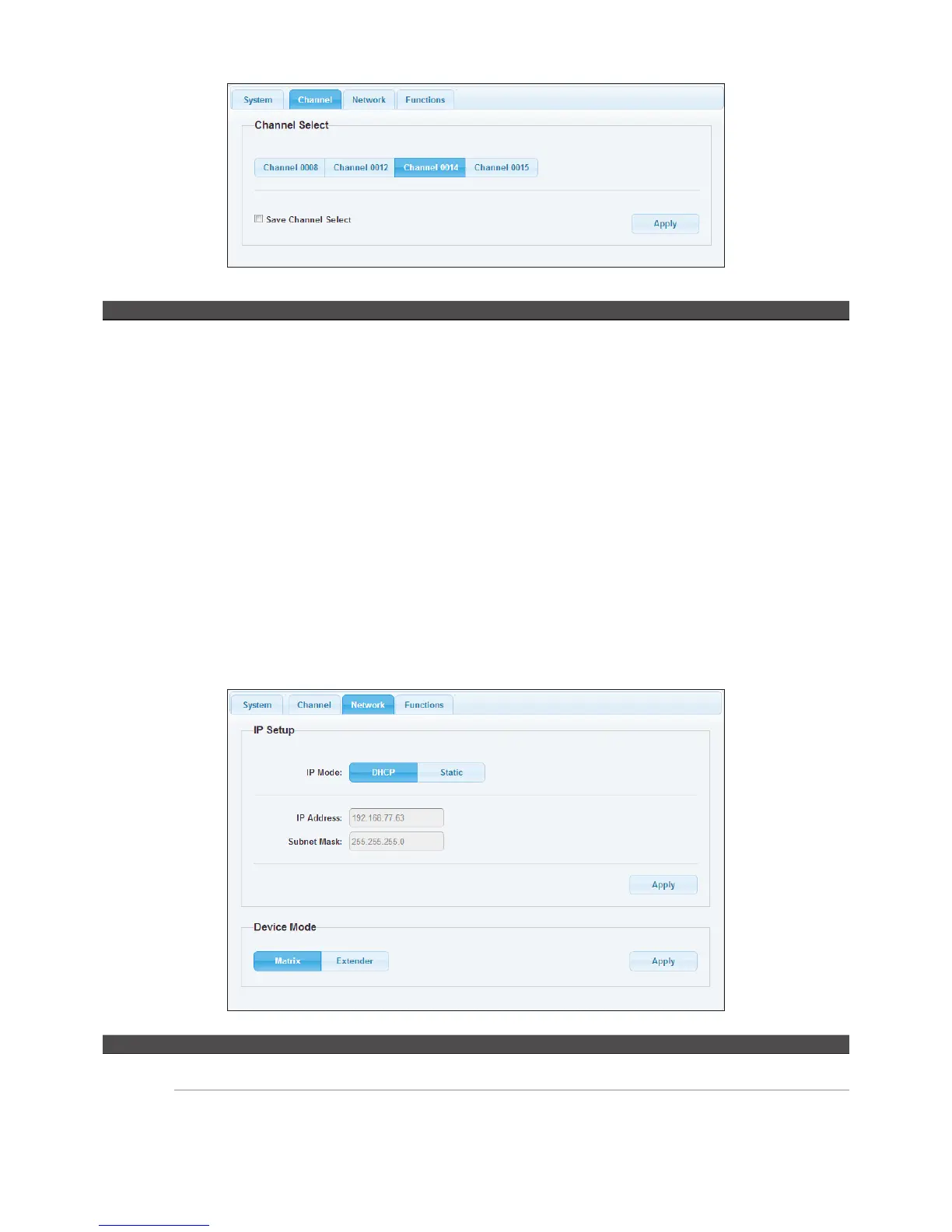
Channel Channel Select Select a desired channel from the Transmitters.
Pairing the Transmitter and Receiver
■
When grouping the network of HDMI AV Matrix Extender/Video Wall using multipoint to multipoint,
the channel selections may be complicated. This option allows user to select the channel more
intuitively. User can click the desired channel on the web oriented user interface directly.
■
Click Apply after selecting the desired channel.
■
The channels may vary, it depends on the number of connected Transmitters.
■
If the option of Save channel select has been ticked, the channel will be saved and based on the
selection of web page, even the settings of DIP switch are different between Transmitter and Receiver.
■
If the option of Save channel select has not been ticked, the channel will be switched to the selection.
Note that this selected channel will not be saved once the power is unplugged. The actual connected
channel is depending on the DIP switch when the power is re-plugged.
■
Reload the channels in the browser once the connection of Transmitter is changed.
Item Sub-item Option Description
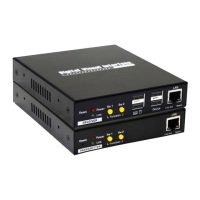
Network IP Setup DHCP/Static Select DHCP to obtain IP address automatically or select
Static to assign an IP manually.
Device Mode Matrix/Extender Select the operation mode depending on the connection
requirements.


 To Next Page