4
Do not obstruct the driver’s view or the operaon of the vehicle
itself.
Do not place it unsecured on the dashboard or in front/above an
airbag.
Do not mount the camera where it will become a distracon if it
becomes loose.
Do not aempt to operate the camera while driving. If you need to
access the DC4 to change sengs, etc., pull o the road in a safe
manner to do so.
Some state laws prohibit drivers from mounng anything on the
windshield, or restrict mounng to specic areas of the windshield.
It is the owner’s responsibility to mount the DC4 in compliance with
local laws.
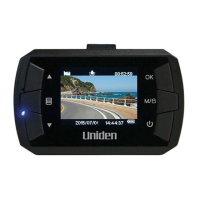
INSTALL THE DC4
Installation Considerations
• Install the device in the area around the rear view mirror.
• Be sure the device is installed where the windshield wipers can clear
the windshield in front of the lens.
• Do not install on colored or heavily nted windshield. The coloring may
aect recording quality.
• Clean the windshield area where you plan to install the bracket. Be
sure it is clear of dust and dirt.
1. Insert microSD card into device.
2. Format microSD card (Menu/File Management/Format Card).
3. Slide the bracket connector into the bracket slot on the camera
unl you hear it click in place.
4. Li the sucon clamp on the bracket. Place the bracket’s sucon


 To Next Page