5
cup on the windshield and press down on the sucon clamp to
secure the bracket.
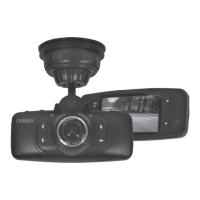
5. Two knobs adjust the camera’s posion. Loosen the top knob on
the side of the bracket to adjust the camera’s vercal posion.
Loosen the boom knob to adjust the camera’s horizontal
posion.
Bracket Suction
Clamp
Vertical
Adjustment
Knob
Horizontal
Adjustment
Knob
Bracket
Connector
6. To remove the bracket from the windshield, release the sucon
cup, hold the camera securely, and li the sucon clamp.
CONNECT TO POWER
1. Connect the car adapter’s miniUSB plug to the DC4’s miniUSB
port.
2. Connect the cigaree lighter adapter plug to the vehicle’s
cigaree lighter port.
3. The device turns on. Red lights indicate the device is recording;
green lights indicate the device is in stand-by mode.
In certain models of cars, the cigaree lighter keeps providing power
even when the engine is o. Be sure to remove the car charger
or disconnect the device when leaving the vehicle to prevent
draining the vehicle baery. Check your vehicle’s owner’s manual to
determine if this applies to your vehicle.




 To Next Page