4
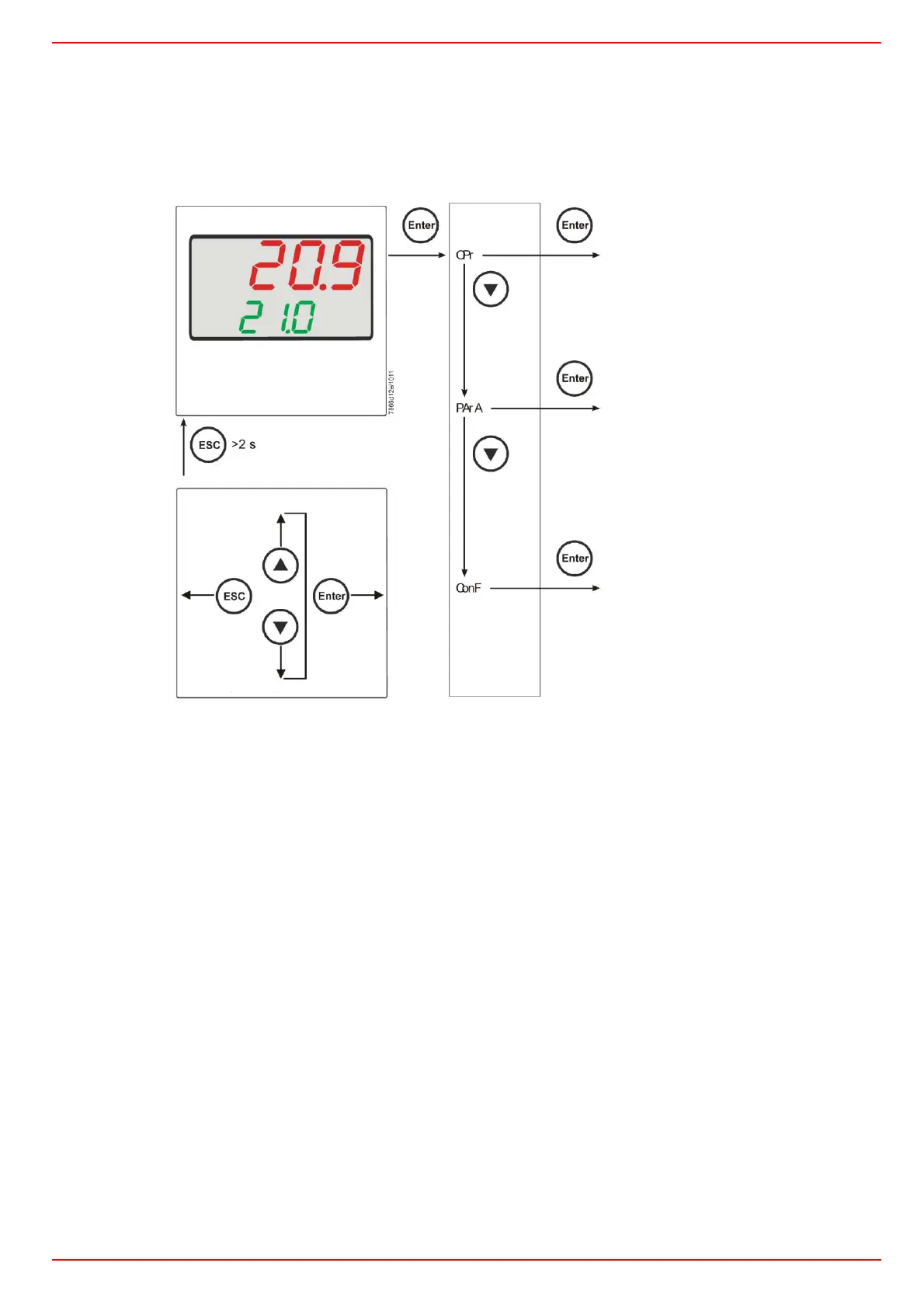
NAVIGATION MENU
RWF55 is preset good for 90% of applications. However, you can set or edit parameters as follow:
Set-point: set or modification:
When the burner is in stand-by, (safety loop open, that is terminals 3-4/T1-T2 on the 7 pole plug open) push the Enter button: on the lower display
(green) Opr appears; push Enter again and in the same display SP1 appears. Push Enter again and the lower display (green SP1) flashes. Using the up
and down arrows change the set-point on the upper display (red).Push Enter to confirm and push ESC more times to get the home position.
Parameter level
Parameter level - PArA
Pb1, dt, rt, db, tt
Heating controllerHYS1 , HYS2 ,
HYS3
Cooling controller
HYS4 , HYS5 , HYS6
q, At1, Ht1, At2, Ht2
Configuration level – ConF
and lower level
Analog inputs InP ..
Controller Cntr
Thermal shock protection rAFC
Alarm function AF
Controllig outputs outP
Binary inputs binF
Display diSP
Interface intF
Basic display
Main
navigation
one level
down
next parameter
previous parameter
one level
back
User Level - Opr
SP1 or SP2 (editable)
dSP readable and editable
through bin1 = 2
InP1 or y (only display)



 To Next Page