Installation
Effective Field of View (FOV) Range
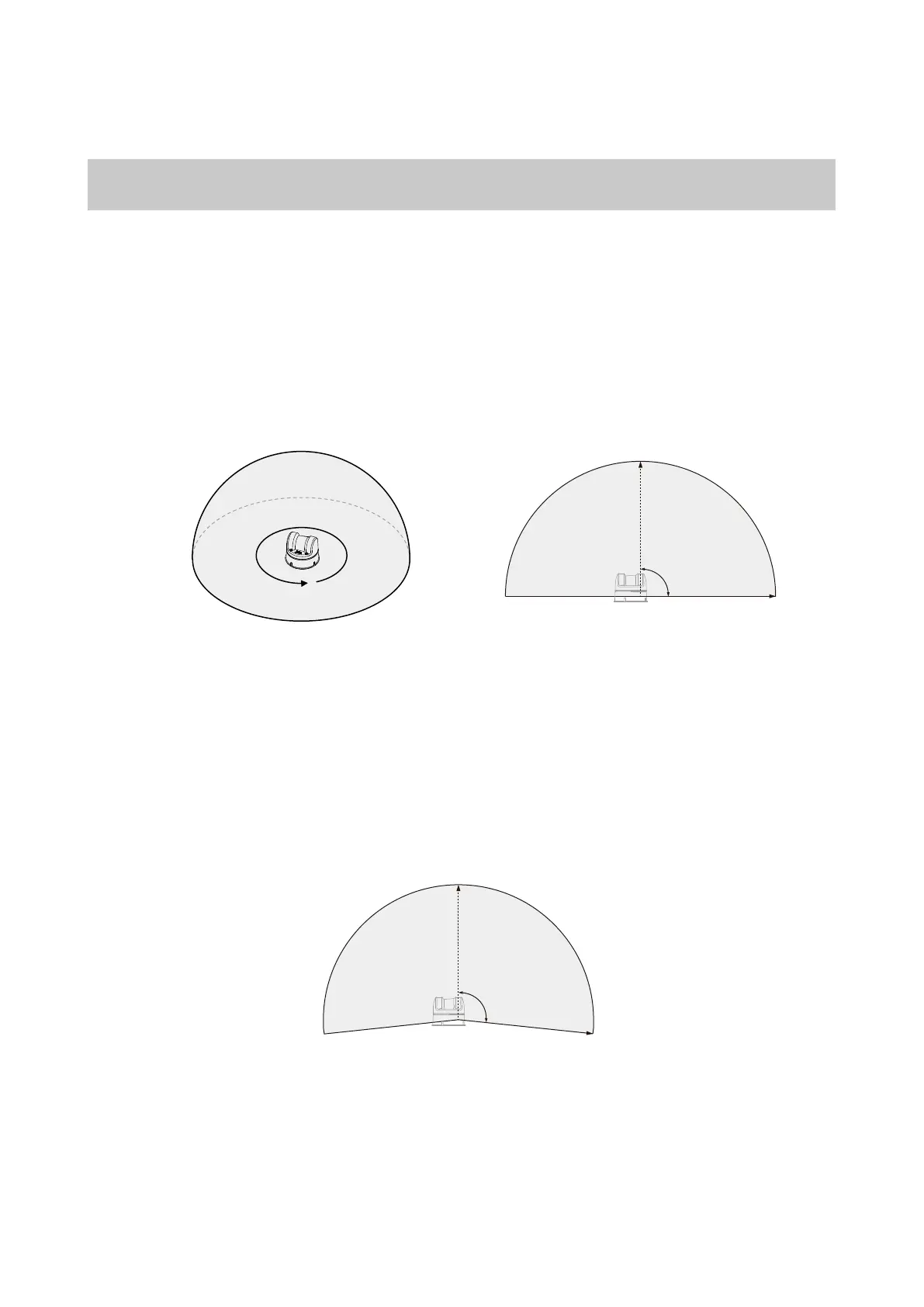
The L2 contains a high - speed motor and a low - speed motor inside. The high - speed motor drives
the reflecting mirror to rotate, achieving a measurement range of 180 ° in the vertical direction, and
then the low - speed rotating motor drives the measurement core part to rotate 360 ° to achieve a
360 * 90 ° hemispherical ultra - wide - angle scan, which can measure the three - dimensional space
above the radar, as shown in the following figure. Please pay attention to the effective range of the
FOV during installation to avoid blocking the FOV area.
L2 supports a negative angle mode, in which the horizontal direction field of view remains
unchanged and the vertical direction field of view expands to 96° in the negative angle mode. In the
negative angle mode, the farthest measurement distance in the range corresponding to the
expanded 6° field of view will be slightly closer.
Please note that the point cloud density of the L2 is different in different FOV regions, and the point
cloud density is larger near the center, as shown in the following figure.
2024 Unitree Robotics. All rights reserved.
6
L2 Effective FOV range
Horizontal direction Vertical direction
Negative Angle Mode Vertical Direction Field of View Figure
360°
90°
96°



 To Next Page